Module 00: Introduction to llama.cpp
This module gives you the map: what llama.cpp is, how it is built inside, what a GGUF file contains, and how to tell before downloading whether a model fits in your computer's memory. You don't need to install anything yet: the two labs use only Python.
What you will learn
- Why running a language model locally makes sense (and when it doesn't).
- How ggml → libllama → tools are stacked, and where Ollama, LM Studio and llama-cpp-python fit.
- What a GGUF file contains and how to read its metadata.
- What "quantizing" a model means and what it costs in quality and memory.
- How to estimate weights + KV cache + overhead with a formula and check it in the logs.
- How to find your way between stable
vX.Y.Zreleases and nightlybNNNNNbuilds.
1. Local inference: why
"Inference" is the phase in which an already trained model produces an answer: it takes a prompt, splits it into tokens (word fragments) and generates one token at a time. Running it locally means the model runs on your hardware instead of on a remote API.
| Reason | What changes in practice |
|---|---|
| Privacy | Documents, code and conversations never leave the machine. No data processing agreement to sign. |
| Cost | Zero cost per token: a laptop generating 10 tokens/s all day costs only electricity. |
| Offline | It works on a plane, on a construction site, on an isolated network, on a Raspberry Pi. |
| Control | You choose the model, the version, the sampling parameters, the output grammar. No surprise deprecations. |
| Latency | The first token arrives in tens of milliseconds, with no network round trip. |
And the limits: an 8-billion-parameter model on a laptop is not GPT-class; on CPU, generation runs from 2 to 15 tokens/s; memory is the constraint you will hit first. The whole course revolves around these three trade-offs: quality, speed, memory.
2. llama.cpp and ggml: history and architecture
llama.cpp was born in March 2023, when Georgi Gerganov rewrote LLaMA inference in pure C/C++, with no dependencies, to run it on a MacBook. In three years it has become the local inference engine: ~129k stars on GitHub, MIT license, one nightly release a day, and the foundation of Ollama, LM Studio, Jan and dozens of mobile apps. The project is maintained by the ggml-org organization.
Inside, it has three layers:
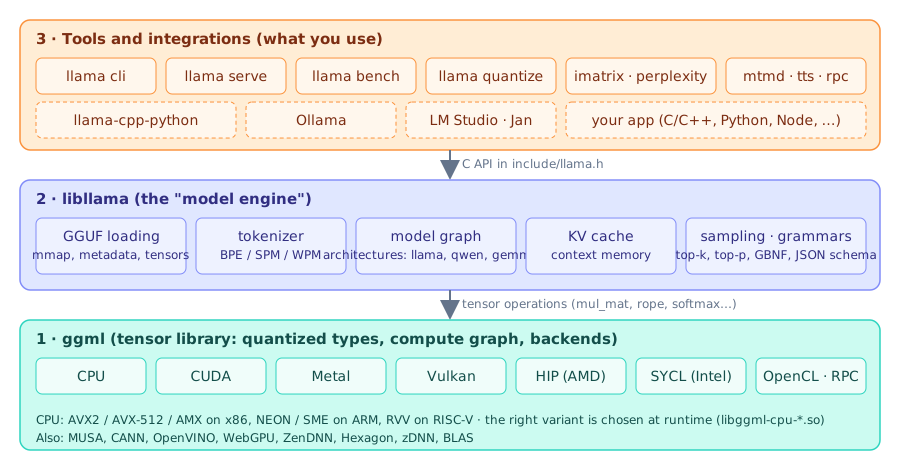
- ggml is the tensor library: it defines the quantized types (
Q4_K,Q8_0, …), builds a compute graph and runs it on a backend: CPU (with AVX2, AVX-512 and NEON variants chosen at runtime), CUDA, Metal, Vulkan, HIP, SYCL, OpenCL and others. It is a separate project (ggml-org/ggml) included in the llama.cpp sources. - libllama (
libllama.so, C API ininclude/llama.h) knows what a language model is: it loads a GGUF, tokenizes, builds the graph for the specific architecture (llama, qwen, gemma, …), manages the KV cache and sampling. - The tools are programs that use libllama: since 2026 there is a single
llamabinary with subcommands (llama cli,llama serve,llama bench,llama quantize, …). The old namesllama-cli,llama-serverstill exist in the tarballs and Docker images: in the course we use the new form.
What the others use
Ollama, LM Studio, Jan, GPT4All and the "local chat" phone apps embed libllama (or ggml) and put
an interface and a model catalog on top of it. llama-cpp-python is a Python binding of the same
library. Learning llama.cpp means understanding what happens underneath all of them.
3. The GGUF format
GGUF (GGML Universal Format) is a single file that contains everything needed to run the model:
weights, tokenizer, chat template, architectural parameters. No separate config.json, no folders of
safetensors to keep in sync.
flowchart TB
    H["Header<br/>magic GGUF · version 3<br/>n_tensors · n_metadata"] --> K["Key → value metadata<br/>general.architecture = qwen35<br/>qwen35.block_count = 25<br/>tokenizer.ggml.tokens = [248 320]<br/>tokenizer.chat_template = …"]
    K --> T["Tensor index<br/>name · shape · type · offset<br/>blk.0.attn_qkv.weight 1024×6144 Q8_0"]
    T --> D["Tensor data<br/>aligned to 32 bytes<br/>(memory-mappable with mmap)"]
Metadata keys have a prefix: general.* (name, license, file type), <architecture>.*
(model dimensions), tokenizer.ggml.* (vocabulary and special tokens), tokenizer.chat_template (the
Jinja template that turns system/user/assistant messages into the text the model expects). Here are
the real values of the course test model, ggml-org/Qwen3.5-0.8B-GGUF, read with gguf-dump:
general.architecture = 'qwen35'
general.name = 'Qwen3.5-0.8B'
general.size_label = '773M'
general.license = 'apache-2.0'
general.file_type = 7                      # (1)!
qwen35.block_count = 25
qwen35.context_length = 262144
qwen35.embedding_length = 1024
qwen35.attention.head_count = 8
qwen35.attention.head_count_kv = 2         # (2)!
qwen35.attention.key_length = 256
qwen35.full_attention_interval = 4         # (3)!
tokenizer.ggml.model = 'gpt2'
tokenizer.ggml.tokens = [248320 elementi]
tokenizer.chat_template = '{%- set image_count = …'
file_type = 7means Q8_0: theftypefield you see in thellama clibanner.- 8 attention heads but only 2 K/V heads: this is Grouped Query Attention (GQA), which shrinks the KV cache 4 times.
- Qwen3.5 is a hybrid model: only 1 block in 4 is classic attention, the others are recurrent layers (SSM) with no KV cache. You will see it count in the memory estimate.
Why the format matters: a GGUF is opened with mmap, meaning the operating system maps the file into memory and loads pages only when they are needed. Loading is almost instant, and two processes that open the same model share the pages. Module 03 explains how to create a GGUF from a Hugging Face model and how to quantize it.
4. Quantization, the concept
A model is trained with 16- or 32-bit weights. Quantizing means rewriting them with fewer bits,
in blocks: for example Q4_0 groups 32 weights, stores one 16-bit scale and each weight in 4 bits
(4 + 16/32 = 4.5 bits per weight). The K families (Q4_K_M, Q5_K_M, Q6_K) use smarter blocks with
two-level scales; the IQ ones go below 3 bits with codebooks.
| Format | Bits/weight (approx.) | 8 B parameters take | Quality (rule of thumb) |
|---|---|---|---|
| F16 / BF16 | 16 | 15 GiB | reference |
| Q8_0 | 8.5 | 8 GiB | indistinguishable from F16 |
| Q6_K | 6.6 | 6.2 GiB | negligible loss |
| Q5_K_M | 5.7 | 5.3 GiB | excellent trade-off |
| Q4_K_M | 4.85 | 4.6 GiB | the de facto standard |
| Q4_0 | 4.5 | 4.2 GiB | slightly worse, but the fastest on ARM |
| Q3_K_M | 3.9 | 3.7 GiB | visible degradation on small models |
| Q2_K / IQ2 | 2–2.6 | 2–2.5 GiB | only for very large models |
Two rules that almost always hold: a larger model at 4 bits beats a smaller model at 8 bits
(an 8B Q4_K_M is better than a 4B Q8_0), and below 4 bits the loss grows fast, the more so the
smaller the model. You will measure all this with llama perplexity in module 03.
5. Estimating memory: weights + KV cache + overhead
The question you will ask most often is "does it fit?". The answer has three terms.
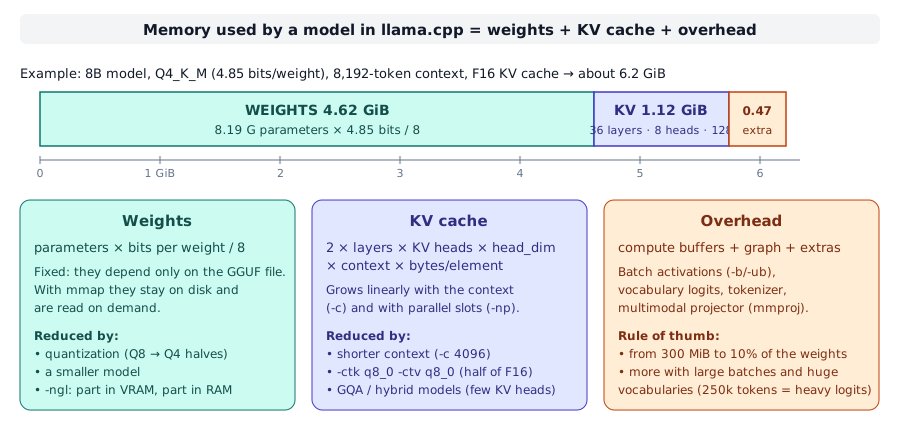
Weights = parameters × bits per weight / 8. This matches the size of the GGUF file (give or take a few MiB of metadata). For 8.19 billion parameters in Q4_K_M: 8.19e9 × 4.85 / 8 ≈ 4.6 GiB.
KV cache: for every token in the context the model keeps the K and V vectors of every attention layer, so it doesn't have to recompute them for each new token. The formula:
where the 2 counts K and V, n_kv_heads is attention.head_count_kv (not head_count!), head_dim is
attention.key_length, ctx is the context you request with -c, and the bytes per element are 2 for F16 (the
default) or about 1 with -ctk q8_0 -ctv q8_0. For Qwen3-8B (36 layers, 8 KV heads, head_dim 128) at 8,192
tokens in F16: 2 × 36 × 8 × 128 × 8,192 × 2 = 1.12 GiB, that is 144 KiB per token. Double the context and
the KV cache doubles; with llama serve -np 4 the total context is split into 4 slots, but if you increase it to
compensate, the cache grows accordingly.
Overhead: compute buffers for the batch, logits over the whole vocabulary, tokenizer, any multimodal projector. From a few hundred MiB up to 10% of the weights: it is the least predictable term.
Check on the test model (llama cli -v log with -c 4096, build 11046):
llama_kv_cache: size =   48.00 MiB (  4096 cells,   6 layers,  1/1 seqs), K (f16):   24.00 MiB, V (f16):   24.00 MiB
llama_memory_recurrent: size =   19.27 MiB (     1 cells,  24 layers,  1 seqs  0 rs_seq), R (f32): 1.27 MiB, S (f32): 18.00 MiB
sched_reserve:        CPU compute buffer size =    46.16 MiB
common_memory_breakdown_print: | memory breakdown [MiB] | total  free  self  model  context  compute |
common_memory_breakdown_print: |   - Host               |                  877 =  763 +     67 +     46 |
The formula gives 2 × 6 × 2 × 256 × 4,096 × 2 = 50,331,648 bytes = 48 MiB: exactly the value in the log.
Note the "6 layers": Qwen3.5 has 25 blocks but only 6 with a KV cache. The memory breakdown line is the total
you care about: 763 MiB of weights + 67 of context (KV + recurrent state) + 46 of compute buffers.
--fit does the math for you
Since 0.4, llama cli and llama serve have --fit on by default: they measure the free memory of the devices and
reduce the context or the GPU layers to fit (common_fit_params: successfully fit params… in the log). You
still need the manual estimate to choose the model before downloading 5 GB.
6. The ecosystem
- Hugging Face is the model warehouse. You find GGUFs with the
library=gguffilter (or "apps = llama.cpp");llama cli -hf utente/repo:QUANTdownloads them into the standard cache~/.cache/huggingface/hub/, shared with the other tools. Reliable repositories:ggml-org(official),unsloth,bartowski. - Ollama packages libllama with a model registry and its own API; LM Studio and Jan are desktop apps; llama-cpp-python exposes the library in Python. They all read GGUF: a file downloaded for llama.cpp works there too.
- llama.app is the official site with the installer and the documentation of the
llama cliandllama servecommands.
7. Versions: vX.Y.Z and bNNNNN
Every commit on master produces a numbered nightly build (b11046, b11095, …) with binaries for all
platforms: these are the ones you see on the GitHub Releases page. Since mid-2026 there are also semantic
releases vX.Y.Z (v0.4.1 of 09/14/2026 points to build b10964): MAJOR changes when the C API changes,
MINOR for new features and models, PATCH for fixes. The installer and the package managers follow the
releases; llama version tells you both:
$ llama version
version: 0.4.1-dev (build 11046, commit 60081bb2b)
built with Clang 22.1.8 for Linux x86_64
The -dev suffix marks a nightly build after the release. The course uses the build listed in
Reference version.
Summary
| Concept | Remember |
|---|---|
| ggml | tensor library + backends (CPU, CUDA, Metal, Vulkan, …) |
| libllama | loads GGUF, tokenizes, runs the graph, manages KV cache and sampling |
llama <comando> |
single 2026 binary; llama-cli/llama-server are the old names |
| GGUF | one file: metadata + tokenizer + chat template + tensors, openable with mmap |
| Quantization | fewer bits per weight; Q4_K_M is the standard, Q8_0 is almost lossless |
| Weights | parameters × bits/weight / 8 |
| KV cache | 2 × layers × kv_heads × head_dim × ctx × bytes/element |
| Overhead | 300 MiB … 10% of the weights |
vX.Y.Z / bNNNNN |
stable release / nightly build |
Common mistakes
Using head_count instead of head_count_kv
With GQA there are 4-8 times more attention heads than KV heads: the estimate would come out 4-8 times too large.
Forgetting that the server context is multiplied by the slots
llama serve -c 8192 -np 4 allocates the KV cache for 8,192 total tokens split into 4 slots of 2,048 (log:
n_ctx_slot = 2048). If you want 8k for each user you must request -c 32768, and the KV cache quadruples.
Looking only at the file size
A 4.6 GiB model does not run in 5 GiB of free memory: at an 8k context you need 6-6.5 GiB. And the operating system, the browser and the terminal need memory too.
Confusing b11046 with the version
llama update takes you to the latest release, not the latest nightly build. If a tutorial cites bNNNNN,
you find that build on the GitHub Releases page (LLAMA_VERSION=bNNNNN for the installer, if it is in the bucket).
Labs in this module
- Lab 00-01: Estimating the memory of a model: you compute
by hand and with
stima_memoria.pythe memory of three models in three quantizations, and compare with the real log. - Lab 00-02: Anatomy of a GGUF file: you read metadata and
tensors with
gguf-dumpand with theGGUFReaderAPI.
Check
- In which of the three layers (ggml, libllama, tools) does the code that runs a matrix multiplication on GPU live?
- Does a GGUF contain the chat template? Where?
- How many bits per weight does
Q4_0have, and why isn't it exactly 4? - A model has 32 layers, 32 attention heads, 8 KV heads, head_dim 128. How much KV cache in F16 for 16,384 tokens?
- Why does Qwen3.5-0.8B have 25 blocks while the log says
6 layersfor the KV cache? - What is the difference between
v0.4.1andb10964? - Between an 8B in Q4_K_M and a 4B in Q8_0, which take about the same memory, which one is usually the better choice?
- What does
--fit ondo, and why do you still need the manual estimate?
Solutions
- In ggml: the backends (CUDA, Metal, Vulkan…) are implementations of ggml. libllama only describes the graph.
- Yes: in the metadata key
tokenizer.chat_template, as a Jinja template. - 4.5: each block of 32 weights at 4 bits carries one F16 scale (16 bits), that is 0.5 extra bits per weight.
- 2 × 32 × 8 × 128 × 16,384 × 2 bytes = 2,147,483,648 bytes = 2 GiB (using the 8 KV heads, not the 32).
- It is a hybrid architecture:
full_attention_interval = 4, so only one block in four has classic attention; the others are recurrent layers with a fixed-size state (llama_memory_recurrent). v0.4.1is a semantic release (stable, followed by the installer and the packages);b10964is the number of the nightly build that release corresponds to. Later builds have version0.4.1-dev.- The 8B in Q4_K_M: for the same memory, the larger model at 4 bits is usually more capable.
- It measures the free memory of the devices and reduces the context or the offloaded layers to avoid running out of memory. You need the estimate before the download, to choose model and quantization, and to size the server.
References
- Repository: https://github.com/ggml-org/llama.cpp · site and docs: https://llama.app
- GGUF specification: https://github.com/ggml-org/ggml/blob/master/docs/gguf.md
- ggml: https://github.com/ggml-org/ggml
- GGUF models on Hugging Face: https://huggingface.co/models?library=gguf&sort=trending
- Release process: https://github.com/ggml-org/llama.cpp/blob/master/docs/release.md
- Course glossary · Recommended models