Module 02: First steps: llama cli¶
llama cli (the old llama-cli, still present in the tarballs and Docker images) is the terminal of
llama.cpp: it downloads a model from Hugging Face, chats with it, and lets you get hands-on with everything the server
of module 04 will later do behind an API. In this module you learn to really use it:
model cache, interactive chat, system prompt, models that "think", sampling parameters,
reading the logs and chat templates.
What you will learn¶
- Download a model with
-hf, understand where the Hugging Face cache is and manage it with-clandllama download. - Use the interactive chat and the
/…commands, give a system prompt with-sys, ask one-shot questions with-st -p. - Turn off or limit the reasoning of thinking models (
-rea off,--reasoning-budget). - What temperature, top-k, top-p, min-p, repeat penalty and seed do, and in what order they apply.
- Size the context (
-c), the answer length (-n) and the threads (-t). - Read the banner and the
[ Prompt: x t/s | Generation: y t/s ]line, and the detailed logs with-v. - The difference between
llama cli(chat with template) andllama completion(raw text). - What a Jinja chat template is and how to control it (
--jinja,--chat-template,/apply-template).
1. The first model: -hf and the Hugging Face cache¶
Prerequisite: llama installed (module 01). On Ubuntu with the installer
binary remember export SSL_CERT_FILE=/etc/ssl/certs/ca-certificates.crt, otherwise -hf fails
with SSL connection failed.
- Downloads the file (785 MiB, the first time) into the Hugging Face cache and enters the chat. It is the test model of the whole course: small, Apache 2.0, "thinking".
- Same thing with a local GGUF file.
The syntax is -hf <user>/<repo>[:QUANT]. Without :QUANT llama.cpp looks for a Q4_K_M file; if there isn't one
it takes the first file in the repository (for Qwen3.5-0.8B-GGUF it is the Q8_0). With -hff nomefile.gguf you choose
a specific file. If the repository also contains a multimodal projector (mmproj-*.gguf), that is downloaded
too (--no-mmproj to avoid it). Gated repositories require HF_TOKEN in the environment (or -hft).
The download ends up in the standard Hugging Face cache, the same one used by the huggingface_hub library
and therefore shared with other tools:
~/.cache/huggingface/hub/models--ggml-org--Qwen3.5-0.8B-GGUF/
├── blobs/37ae482d…                      # the real file, named by its SHA-256
├── refs/main
└── snapshots/8fea6208…/Qwen3.5-0.8B-Q8_0.gguf   # symbolic link to the blob
To see what you have already downloaded:
$ llama cli -cl
number of models in cache: 3
   1. ggml-org/Qwen3.5-0.8B-GGUF:Q8_0
   2. ggml-org/embeddinggemma-300M-GGUF:Q8_0
   3. ggml-org/SmolVLM-256M-Instruct-GGUF:Q8_0
-cl (--cache-list) works with all subcommands (llama serve -cl gives the same list). To download
without starting anything, for example in a provisioning script, there is llama download:
llama download -hf ggml-org/gemma-3-4b-it-qat-GGUF:Q4_K_M
llama download -hf ggml-org/models -hff model.gguf          # specific file
llama download -mu https://example.com/model.gguf -m model.gguf   # any URL, saved where you say
--offline forces the use of the cache without touching the network (useful on isolated machines); the
HF_HOME variable moves the whole cache elsewhere (for example to a bigger disk). To delete a model, just
remove its models--… folder.
Finding models
On Hugging Face filter by library=gguf or, from a model's page, by the llama.cpp app: the
Use this model button directly shows the llama cli -hf … line. Module 03
explains how to read model cards and choose the quantization; the models used in the course are in
Recommended models.
2. The interactive chat¶
After loading, the banner and the > prompt appear:
build      : b11046-60081bb2b
model      : ggml-org/Qwen3.5-0.8B-GGUF
ftype      : Q8_0
modalities : text

available commands:
  /exit or Ctrl+C     stop or exit
  /regen              regenerate the last response
  /clear              clear the chat history
  /read <file>        add a text file
  /glob <pattern>     add text files using globbing pattern

>
The banner tells you four things you will check from now on every time: the build, the model, the
quantization type (ftype, here Q8_0: it is the general.file_type metadata seen in
module 00) and the modalities (text; with a vision model vision appears
and the command list gains /image <file> and /audio <file>, module 07).
Type, press Enter and the answer streams in. Every answer ends with the timing line:
> Spiega in una frase cos'è un token.
Un token è un'unità di valore o un'identità digitale verificata per accedere a un servizio web, una
blockchain, o una risorsa di rete, …

[ Prompt: 4.9 t/s | Generation: 3.4 t/s ]
(Yes, a 0.8 B model understood "token" in the cryptographic sense: that is the price of its size. With a system prompt that says "we are talking about language models" it answers correctly: you will see it in lab 02-03.)
The built-in commands:
| Command | Effect |
|---|---|
/exit or Ctrl+C |
exits (Ctrl+C during an answer just interrupts it) |
/regen |
regenerates the last answer (with a different seed: useful to see sampling at work) |
/clear |
clears the history: the context starts from zero |
/read file.txt |
adds the content of a text file to the next message |
/glob src/*.py |
like /read but for several files |
/image f.png, /audio f.mp3 |
attachments, only with multimodal models |
To write several lines, end each line with \ or start with -mli (--multiline-input).
The history stays in the context (-c): when you fill it, generation stops by default; with
--context-shift the context "slides", discarding the oldest messages.
System prompt and one-shot questions¶
llama cli -hf ggml-org/Qwen3.5-0.8B-GGUF -sys "Rispondi sempre in italiano, in massimo due frasi."
llama cli -hf ggml-org/Qwen3.5-0.8B-GGUF -sysf istruzioni.txt                 # from a file
llama cli -hf ggml-org/Qwen3.5-0.8B-GGUF -st -p "Quanto fa 17 per 3?" -rea off  # (1)!
-st(--single-turn) does a single round and exits; with-pthe question is already given and the command is not interactive: perfect in scripts (llama cli … -st -p "…" > risposta.txt).-o filesaves the output.
-sys is the system role message that the chat template puts at the top of the conversation (§ 7): it is the
place for language, tone, format and "who you are". Not all templates support it (Gemma 3 merges it into the first
user message): llama.cpp does its best, but read the template if the model ignores it.
3. Models that think: -rea and --reasoning-budget¶
Qwen3.5, like DeepSeek R1, gpt-oss and many 2026 models, is a thinking model: before answering
it writes out its reasoning (between <think>…</think> tags), and llama.cpp shows it to you between [Start thinking] and
[End thinking]. With a small model and a low -n the risk is running out of tokens inside the reasoning:
$ llama cli -hf ggml-org/Qwen3.5-0.8B-GGUF -st -p "Quanto fa 17 per 3?" -n 40 -t 3
> Quanto fa 17 per 3?

[Start thinking]

Here's a thinking process that leads to the suggested answer:

1.  **Analyze the Request:**
    *   Question: "Quanto fa 17 per 3?" (

[ Prompt: 5.1 t/s | Generation: 1.6 t/s ]
Forty tokens spent and no answer. There are three levers:
| Flag | Effect |
|---|---|
-rea off (--reasoning off) |
no reasoning: the template closes the <think> block right away (default auto: depends on the template) |
--reasoning-budget N |
at most N thinking tokens, then llama.cpp inserts the closing tag and the model answers (-1 unlimited, 0 = closes immediately) |
--reasoning-effort low\|medium\|high |
for models whose template defines levels (gpt-oss); --reasoning-format decides whether the thinking stays in the text or is separated |
With --reasoning-budget 25, same question:
[Start thinking]

Thinking Process:

1.  **Analyze the Request:**
    *   Question: "Quanto fa
[End thinking]

17 per 3 (o 17/3) non è una semplice divisione di numeri, ma una **quoziente** (o rapporto),
The reasoning was cut at 25 tokens and the model answered (badly, but it answered: the budget cuts
the thinking, it doesn't improve it). In the course we will almost always use -rea off: shorter, more predictable answers.
In the server the per-request equivalent is chat_template_kwargs: {"enable_thinking": false}
(module 04).
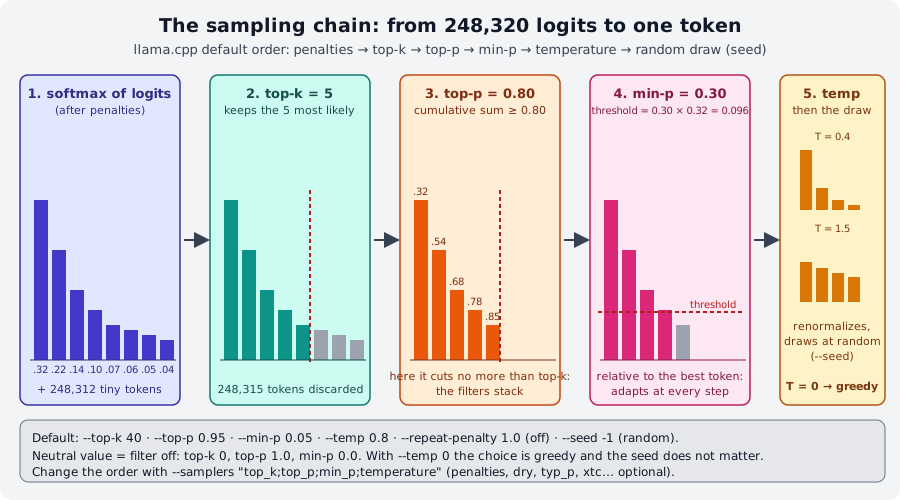
4. Sampling: from 248,320 logits to one token¶
At each step the model produces a logit for every token in the vocabulary (248,320 for Qwen3.5). The
sampler turns them into probabilities, discards most of them with a chain of filters and finally draws
one at random. The llama cli flags control exactly this chain:
| Flag | Default | What it does | When you touch it |
|---|---|---|---|
--temp N |
0.8 | divides the logits by N before the softmax: < 1 sharpens the likely tokens, > 1 flattens; 0 = greedy (always the most likely) | 0-0.3 for data extraction, code, classification; 0.8-1.2 for creative writing |
--top-k N |
40 | keeps only the N most likely tokens (0 = off) | rarely; 1 is equivalent to greedy |
--top-p N |
0.95 | keeps the most likely tokens until their probabilities sum to N (1.0 = off) | lower it (0.7-0.9) for "safer" answers |
--min-p N |
0.05 | discards tokens with probability < N × that of the best token (0 = off) | the most modern filter: 0.05-0.1 works almost always, and replaces top-p |
--repeat-penalty N |
1.0 | penalizes tokens already seen in the last --repeat-last-n (64) tokens (1.0 = off) |
1.05-1.15 if the model loops; too high hurts the grammar |
--presence-penalty, --frequency-penalty |
0 | the "OpenAI" penalties: one-time / proportional to frequency | alternatives to the repeat penalty |
--dry-multiplier N |
0 | DRY: penalizes repeated sequences, not single tokens | against long repetitions in stories |
-s N, --seed N |
-1 | seed of the random generator (-1 = random) | fix it for reproducible experiments |
Some practical rules:
- The filters stack: the strictest one wins. With the defaults, top-k 40 rarely matters because min-p 0.05 has
already cut more. To understand what a parameter does, turn the others off (
--top-k 0 --top-p 1 --min-p 0). - Temperature is the last step in the default order (
--samplersshows the chain:penalties;dry;top_n_sigma;top_k;typ_p;top_p;min_p;xtc;temperature). With--temp 0the seed no longer matters. - Same model, same prompt, same seed, same parameters → same answer (with
-s 42two runs give the same text; with-s 7it changes). This holds on a single machine and build: on different hardware the floating-point numbers can differ, and with them the draw. - Other samplers (
--mirostat,--typical,--xtc-*,--top-nsigma,--dynatemp-*,--adaptive-target) exist for specific cases;--logit-bias TOKEN±Npushes or bans a token,--grammar/--json-schemaconstrain the output (module 06).
Lab 02-02 has you try all this with a repeatable protocol.
5. Context, length, threads¶
| Flag | Default | Notes |
|---|---|---|
-c N, --ctx-size |
0 = the model's | total tokens of prompt + answer + history. The test model has n_ctx_train = 262144: leaving it at 0 means allocating a huge KV cache, so --fit reduces it on its own to the free memory (or you set it). Memory formula in module 00 |
-n N, --predict |
-1 = until the model stops | maximum tokens generated per answer (reasoning included!) |
-t N, --threads |
-1 = automatic | threads for generation; -tb for prompt processing. Rule: physical cores, not logical ones; on a laptop leave one free. Deep dive in module 05 |
-ngl N\|auto\|all |
auto | layers on the GPU, if there is one; --list-devices lists them (module 05) |
-fa on\|off\|auto, -ctk/-ctv q8_0 |
auto, f16 | flash attention and quantized KV cache: less memory at long contexts |
--load-mode mmap\|mlock\|dio |
auto | how to read the file: mlock locks the weights in RAM (no swap). The old --mmap/--mlock no longer exist in 0.4.1 |
6. Reading the logs¶
The final line [ Prompt: 4.9 t/s | Generation: 3.4 t/s ] is your everyday measuring tool:
- Prompt (or prompt processing,
pp): how many prompt tokens (history included, if not already cached) are processed per second. It is a compute-heavy phase: on GPU it flies, on CPU it is limited by the cores. - Generation (
tg): tokens generated per second. On CPU it is limited by memory bandwidth: for every token the model rereads all the weights, so a smaller GGUF generates faster (you will measure it in lab 03-02).
On a 6-vCPU machine with no GPU the Q8_0 model does 3-5 t/s in generation; on a
modern laptop 15-25; with a GPU over 100. If the numbers look low to you, check -t first.
With -v (verbose) you see everything that happens during loading. The lines to recognize (build 11046, -c 4096 -t 3):
system_info: n_threads = 3 (n_threads_batch = 3) / 6 | CPU : SSE3 = 1 | SSSE3 = 1 | AVX = 1 | AVX2 = 1 | F16C = 1 | FMA = 1 | …   # (1)!
print_info: file format = GGUF V3 (latest)
print_info: file type   = Q8_0
print_info: n_ctx_train           = 262144
print_info: model params          = 772.85 M
load_tensors: loading model tensors, this can take a while... (load_mode = none)
llama_context: n_ctx                 = 4096
llama_context: n_ctx_seq (4096) < n_ctx_train (262144) -- the full capacity of the model will not be utilized   # (2)!
llama_kv_cache: size =   48.00 MiB (  4096 cells,   6 layers,  1/1 seqs), K (f16):   24.00 MiB, V (f16):   24.00 MiB
llama_memory_recurrent: size =   19.27 MiB (     1 cells,  24 layers,  1 seqs  0 rs_seq), …
sched_reserve:        CPU compute buffer size =    46.16 MiB
common_memory_breakdown_print: |   - Host  |  877 =   763 +      67 +      46   |    # (3)!
init: chat template, example_format: '<|im_start|>system …
init: chat template, thinking = 0                                                    # (4)!
sampler chain: logits -> ?penalties -> ?dry -> ?top-n-sigma -> top-k -> ?typical -> top-p -> min-p -> ?xtc -> temp-ext -> dist   # (5)!
- Threads used and CPU instructions detected: if
AVX2 = 1is missing on a modern PC, you have the wrong binary. - It is not an error: you asked for less context than the model could handle.
- Total memory in MiB: weights + context (KV cache and recurrent state) + compute buffers. This is the number to compare with free RAM.
thinking = 0confirms that-rea offtook effect.- The sampler chain in its real order;
?marks those inactive with the default values.
--log-file f.log saves everything, --log-jsonl produces one JSON line per message (handy to filter with jq),
-lv N sets the verbosity without going all the way to -v. --no-show-timings removes the timing line.
7. llama completion: raw text, no chat¶
llama cli is a chat: it takes your messages, wraps them with the chat template and shows only the answer.
llama completion (heir of the old -no-cnv mode) is a text completer: it sends the model
exactly the prompt you write and prints what follows, token by token, with no template and no roles:
$ llama completion -hf ggml-org/Qwen3.5-0.8B-GGUF -p "La capitale d'Italia è" -n 20 --temp 0
<think>
</think>
La capitale d'Italia è **Roma**.
Roma è la città più popol
Note two things. The model continued the text (it did not "answer"): the first token after the prompt is <think>
because an instruction-tuned model without a template still tries to open its reasoning block. And
the output stops at 20 tokens (-n), mid-word. This is the right behavior for: base models (not chat),
code completion, tokenizer experiments, perplexity-style work, or when you want to build the template yourself.
At the end llama completion prints the common_perf_print statistics (prompt eval time, eval time,
tokens per second). --ignore-eos -n -1 generates forever (Ctrl+C to stop), -f file.txt reads the
prompt from a file, --verbose-prompt shows the prompt tokens.
In the server the same distinction is between /v1/chat/completions (with template) and /v1/completions or /completion (raw).
8. The chat template¶
A chat model is trained on a precise conversation format. For Qwen3.5 it is ChatML:
<|im_start|>system
Sei un assistente.<|im_end|>
<|im_start|>user
Ciao<|im_end|>
<|im_start|>assistant
<think>
The chat template is the program, written in Jinja, that turns the
messages list (system, user, assistant, tool) into that string. It lives in the GGUF, key
tokenizer.chat_template, and llama.cpp runs it with its own Jinja engine (--jinja, on by default).
Families use different formats: Llama 3 (<|start_header_id|>user<|end_header_id|>), Gemma
(<start_of_turn>user), Mistral ([INST] … [/INST]), Phi (<|user|>), and thinking models add
<think> and the conventions for tools.
flowchart TB
M["messages<br/>system: Sei un assistente.<br/>user: Ciao"] --> T["chat template (Jinja)<br/>tokenizer.chat_template<br/>or --chat-template / --chat-template-file"]
T --> P["prompt<br/><|im_start|>system …<br/><|im_start|>assistant"]
P --> K["tokenizer → token id"]
K --> L["model: generates until<br/><|im_end|> (template EOS)"]
L --> R["parser: separates reasoning,<br/>tool_calls, content"]How to check and change it:
| Tool | Use |
|---|---|
-v |
in the log: init: chat template, example_format: '<|im_start|>system…' shows how an example is rendered |
the server's POST /apply-template |
returns the exact prompt for a list of messages, without generating (module 04) |
--chat-template NOME |
one of the built-in templates (chatml, llama3, gemma, mistral-v7, phi4, deepseek3, gpt-oss, …: the list is in llama cli --help) |
--chat-template-file f.jinja |
your own template, for example a fixed version of the one in the GGUF (it happens with freshly released or hand-converted models) |
--chat-template-kwargs '{"enable_thinking": false}' |
variables passed to the template (this is what -rea off does) |
--no-jinja |
uses the old fixed-template engine: only for compatibility |
What happens with the wrong template? With Qwen3.5 and --chat-template llama2:
The model doesn't recognize [INST] and completes "at random" as if it were code. If a model answers
absurdly, repeats the turns, never stops (the right EOS is missing) or puts strange tags in the text, the first suspect
is the template. Lab 02-03 shows it live.
Summary¶
| What | How |
|---|---|
| Download and chat | llama cli -hf user/repo[:QUANT]; cache in ~/.cache/huggingface/hub/; -cl lists; llama download just downloads |
| System prompt, single question | -sys "…" / -sysf f; -st -p "…" (with -o f it saves) |
| Thinking | -rea off, --reasoning-budget N, --reasoning-effort |
| Sampling | --temp (0 = greedy) · --top-k · --top-p · --min-p · --repeat-penalty · -s seed; order: top-k → top-p → min-p → temp |
| Sizes | -c context (0 = the model's) · -n tokens per answer · -t threads |
| Measurements | [ Prompt: x t/s | Generation: y t/s ]; -v for loading, memory, template, sampler chain |
| Raw text | llama completion -p "…": no template, no roles |
| Template | tokenizer.chat_template in the GGUF; --chat-template, --chat-template-file, /apply-template |
Common mistakes¶
Empty or truncated answer with a thinking model
-n 40 with Qwen3.5 ends inside [Start thinking]. Use -rea off or --reasoning-budget, or raise -n.
In the server it is the same with max_tokens.
The model loops or repeats the same sentence
Try --repeat-penalty 1.1 or --dry-multiplier 0.8; if it repeats whole turns (user: … assistant: …) the
problem is the template, not the sampler.
--temp 0 but the answers change
With --temp 0 sampling is greedy and reproducible on the same machine. If answers change between machines
or between builds, it is floating-point arithmetic (different threads, backends, kernels), not the sampler. In the server
the prompt cache can also introduce tiny differences.
SSL connection failed with -hf
Installer binary on Ubuntu: export SSL_CERT_FILE=/etc/ssl/certs/ca-certificates.crt (put it in ~/.bashrc).
Extremely slow generation
Check system_info: n_threads: if it is higher than the physical cores or equal to all the cores of a laptop, try a lower -t.
Then check that the weights fit in RAM (memory breakdown against free memory): if the system is swapping,
speed collapses by 10-100 times.
Labs in this module¶
- Lab 02-01: The first model: download, chat,
/…commands, system prompt, banner and timings,-v. - Lab 02-02: Sampling experiments: same prompt, fixed seed, one parameter at a time; table of results.
- Lab 02-03: Chat template and system prompt: the
right template and the wrong one,
/apply-template, three system prompts compared.
Check¶
- You type
llama cli -hf unsloth/Qwen3.5-4B-GGUFwithout:QUANT. Which file is downloaded, and where does it end up? - You want an answer of just two sentences from a bash script, with no interaction and no reasoning. Which flags do you use?
- With the defaults (
top-k 40, top-p 0.95, min-p 0.05), which of the three filters usually cuts the most? How do you check? --temp 0and-s 42: does the seed still matter?- What does
Generation: 3.4 t/smeasure, and what limits it on CPU? - Why does
llama completion -p "Ciao"with Qwen3.5 produce<think>as the first token? - A Llama 3 model answers by repeating
user:andassistant:in the text. What is the most likely cause and how do you check it without generating anything? -c 0with a model that hasn_ctx_train = 262144: what happens to memory, and what saves you?
Solutions
- It looks for a
Q4_K_Mfile (there is one:Qwen3.5-4B-Q4_K_M.gguf) plus themmprojif present; it ends up in~/.cache/huggingface/hub/models--unsloth--Qwen3.5-4B-GGUF/snapshots/<hash>/. llama cli -hf … -st -p "domanda" -rea off -sys "Rispondi in due frasi." -n 100(optionally-o file).- min-p 0.05: as soon as the best token goes above 0.5 probability, it discards everything below 0.025, that is
almost always more than 40 candidates. You check it by turning off the other two (
--top-k 0 --top-p 1) and comparing. - No: with temperature 0 the most likely token is always taken, there is no random draw.
- Tokens generated per second. On CPU it is limited by memory bandwidth: for every token all the weights are reread.
- There is no template: the prompt is bare text, and the instruction-tuned model continues the way it was trained to start a turn, that is by opening the reasoning block.
- A wrong or missing chat template (the GGUF has a broken one, or you forced the wrong
--chat-template). With the server:POST /apply-templateshows the rendered prompt; withllama cli -vlook atexample_format. - A KV cache for 262,144 tokens (gigabytes) would be allocated.
--fit on(the default) reduces it to the free memory; still, it is better to set-cto what you actually need.
References¶
- llama.app: Using the CLI and tools/cli/README.md (complete flag reference)
- tools/completion/README.md:
llama completion, prompt from a file, legacy interactive mode - docs/models.md: finding models and
-hf - Hugging Face: GGUF and llama.cpp
- Jinja: template documentation
- Course glossary · Recommended models
Which model now?
You have run the course model. To choose the right one for your machine (Raspberry Pi, laptop, PC, Mac, GPU) go to Module 02b: Choosing the model.