Module 02b: Choosing the model for your machine¶
You have run your first model (module 02) and you are wondering: which model do I download now? This module answers with a simple rule, a table per type of machine and, for each machine, the minimum model that gives real satisfaction: sensible answers in Italian, at a speed that doesn't put you to sleep.
The reader of this course doesn't have a datacenter. You have a home PC, a laptop, a Mac, a Raspberry Pi or a phone; at most 32 GB of RAM and, if you are lucky, a GPU with 8–24 GB. Everything that follows is designed for that world.
What you will learn¶
- Where to get models and how to read a model card on Hugging Face.
- The rule to tell whether a model fits in your memory and how fast it will run.
- Which family, size and quantization to choose based on what you want to do.
- The recommended (and the minimum) model for Raspberry Pi, laptop, PC, Mac, GPU and phone.
1. Where to get models¶
flowchart TB
    HF[("Hugging Face<br/>huggingface.co")] -->|"-hf user/repo:quant"| L[llama cli / serve]
    HF --> O1["ggml-org<br/>official llama.cpp GGUFs"]
    HF --> O2["unsloth, bartowski, lmstudio-community<br/>reliable quantizers"]
    HF --> O3["vendor repo<br/>(Qwen, Google, LiquidAI, Mistral…)"]
    APP["llama.app → Models"] --> HF
    DH[("Docker Hub ai/…")] -->|"-dr model"| L
F[".gguf file on disk"] -->|"-m file.gguf"| L- Hugging Face is the place. Almost all open models are there; llama.cpp downloads them on its own with
-hf <user>/<repo>[:quant]and puts them in the cache (llama cli -clto see it). Filter the search withapps=llama.cppto see only the repositories declared compatible: chat · embedding · vision. - Whom to trust:
ggml-org(the llama.cpp organization: official GGUFs, often withmmprojand draft already included),unsloth(curated quantizations,UD-…variants at higher quality),bartowskiandlmstudio-community(they quantize almost everything the day after release). Vendor repos (Qwen/…,google/…) often contain the original weights in safetensors, not GGUF: you convert them (module 03) or look for a GGUF made by others. - llama.app → Models: the official showcase, with ready-to-copy commands.
- Docker Hub (
-dr gemma3): Docker's "model artifacts", handy if you already use Docker. - Local files (
-m): received from colleagues, converted by you, or downloaded by hand.
A model is code you run
A GGUF contains no programs, but the chat template (Jinja) and the metadata do get interpreted by llama.cpp. Download only from known organizations, check the license, and be wary of repos with few downloads and names "almost identical" to famous ones.
2. How to read a model card¶
The name of a GGUF file tells you almost everything: Qwen3.5-9B-Q4_K_M.gguf.
| Part | Means | What to look at |
|---|---|---|
Qwen3.5 |
family and generation | how recent it is (the 2026 families: Qwen3.5, Gemma 4, gpt-oss, LFM2.5, SmolLM3…) |
9B |
billions of parameters | the size: it decides memory and speed (§3) |
A3B (e.g. 35B-A3B) |
MoE: 35B total, 3B active per token | takes the space of a 35B, runs like a 3B |
it / Instruct / Chat |
trained to follow instructions | to chat you need this; "base" models just complete text |
Q4_K_M |
quantization (bits per weight) | Q4_K_M is the sensible default; §5 |
mmproj-*.gguf in the repo |
multimodal projector | the model sees images (and/or audio); -hf downloads it on its own |
mtp-* / eagle3-* / draft |
draft model for speculative decoding | free extra speed (module 05) |
On the card also check: license (Apache-2.0 and MIT with no strings attached; Gemma and LFM permissive with
conditions; some "research only"), maximum context (4k–256k tokens), languages (almost all
2026 models speak Italian, the tiniest ones do it worse), whether it is a thinking model (it reasons before
answering: slower; -rea off to turn it off), and the date: a model from 18 months ago is already old.
3. The rule: does it fit? how fast does it run?¶
Two numbers are enough to decide, and you can compute them before downloading a single byte.
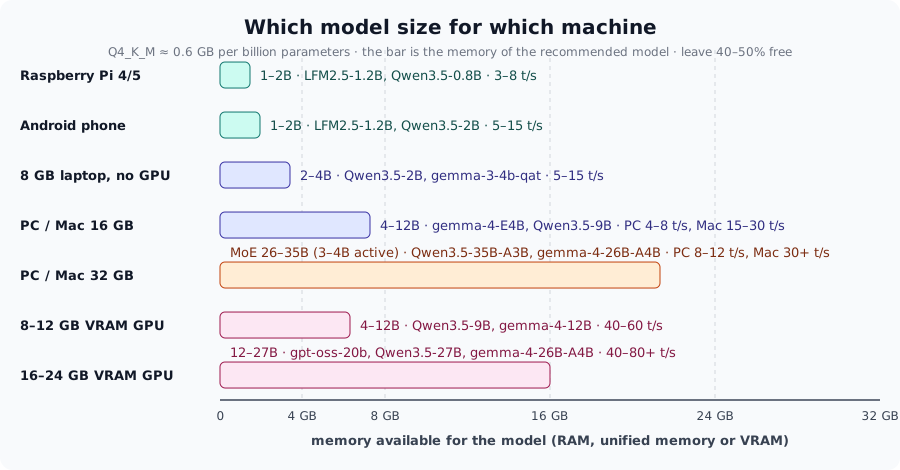
Memory. A model quantized to 4 bits takes about 0.6 GB per billion parameters (Q4_K_M ≈ 4.8 bits/weight), at 8 bits about 1.1 GB. Add to this the KV cache (from 0.2 to 2 GB depending on the context) and the operating system (2–3 GB). Rule of thumb:
GGUF file size × 1.3 ≤ available memory (RAM on CPU and Mac, VRAM on GPU).
Speed. Every generated token requires reading all the weights from memory, so tokens/s ≈ memory bandwidth (GB/s) ÷ model size (GB) (module 05). With typical bandwidths:
| Machine | Bandwidth | 2.5 GB model (4B Q4) | 5.5 GB model (9B Q4) | 16 GB model (27B Q4) |
|---|---|---|---|---|
| Raspberry Pi 5 | ~10 GB/s | ~3 t/s | ~1.5 t/s | doesn't fit |
| DDR4/DDR5 laptop | 30–60 GB/s | 8–15 t/s | 4–8 t/s | 2–3 t/s (with 32 GB) |
| Mac M1/M2/M3 base | ~100 GB/s | 25–35 t/s | 12–18 t/s | 5–6 t/s (with 32 GB) |
| Mac M-Pro / M-Max | 200–400 GB/s | 50+ t/s | 25–50 t/s | 10–20 t/s |
| 8–16 GB GPU (RTX 3060–4070) | 300–500 GB/s | 60–100 t/s | 40–60 t/s | doesn't fit in VRAM |
| 24 GB GPU (RTX 3090/4090) | 900–1000 GB/s | 100+ t/s | 80+ t/s | 40–50 t/s |
Rounded theoretical values: in practice you get 50–80%. On a 6-vCPU virtual machine with no GPU, Qwen3.5-0.8B Q8_0 does 4–5 t/s: that is the worst case you will see.
What 'satisfaction' means
Below 3 tokens/s reading an answer is torture; from 5–8 t/s you follow it well; above 15 t/s the model writes faster than you read. To "be satisfied" you need a model that gives sensible answers (from 2–4B up, for Italian better 4B+) and at least 5 t/s. The tables in §4 are built on these two constraints.
MoE models (A3B, A4B) break the rule in your favor: they take the space of their total size, but for each
token they read only the active experts, so they run like a small model. With 32 GB of RAM they are the
best choice on CPU.
4. The right model for your machine¶
The commands below automatically download the model from the given repository
(SSL_CERT_FILE if you use the installer on Linux, module 01). Legend: recommended = the quality choice
for that machine; minimum = the smallest one worth using, if the recommended one is slow or doesn't fit.
ARM CPU only, low bandwidth: the size is 1–2B, and Q4 pays off even for small models.
| Model | File | Memory | Expected | |
|---|---|---|---|---|
| recommended (Pi 5, 8 GB) | LiquidAI/LFM2.5-1.2B-Instruct-GGUF:Q4_K_M |
697 MiB | ~1.5 GB | 5–8 t/s, decent Italian |
| alternative | ggml-org/gemma-3-1b-it-GGUF:Q4_K_M |
769 MiB | ~1.5 GB | 4–7 t/s |
| minimum (Pi 4, 4 GB) | ggml-org/Qwen3.5-0.8B-GGUF:Q4_0 |
537 MiB | ~1 GB | 3–5 t/s, use -rea off |
| curiosity | LiquidAI/LFM2.5-230M-GGUF:Q4_K_M |
146 MiB | ~0.5 GB | 15+ t/s, but understands little |
The system and the browser eat 3–4 GB: about 4 GB remain for model and context.
| Model | File | Memory | Expected | |
|---|---|---|---|---|
| recommended | unsloth/Qwen3.5-2B-GGUF:Q4_K_M |
1.2 GB | ~2 GB | 10–15 t/s, good Italian, tool calling |
| if you have 5 GB free | ggml-org/gemma-3-4b-it-qat-GGUF:Q4_0 |
2.4 GB (+0.8 mmproj) | ~3.5 GB | 5–8 t/s, sees images |
| minimum | LiquidAI/LFM2.5-1.2B-Instruct-GGUF:Q4_K_M |
697 MiB | ~1.5 GB | 15–20 t/s |
The most common tier. On a Mac (unified memory, Metal) everything runs 2–4 times faster than on a PC without a GPU.
| Model | File | Memory | Expected (PC / Mac) | |
|---|---|---|---|---|
| recommended | ggml-org/gemma-4-E4B-it-GGUF:Q4_0 |
4.4 GB (+0.5 mmproj) | ~6 GB | 5–8 / 20–30 t/s; text, images, audio; MTP draft included |
| more quality | unsloth/Qwen3.5-9B-GGUF:Q4_K_M |
5.4 GB (+0.9 mmproj) | ~7.5 GB | 4–6 / 12–18 t/s; thinking, vision |
| reasoning | ggml-org/gemma-4-12B-it-GGUF:Q4_0 |
6.9 GB | ~9 GB | 3–4 / 10–14 t/s |
| minimum | unsloth/Qwen3.5-4B-GGUF:Q4_K_M |
2.6 GB (+0.6 mmproj) | ~4 GB | 8–12 / 30+ t/s |
This is where MoE models come in: many parameters, few active. On CPU they make the difference between "usable" and "not".
| Model | File | Memory | Expected (PC / Mac) | |
|---|---|---|---|---|
| recommended | unsloth/Qwen3.5-35B-A3B-GGUF:Q4_K_M |
21 GB (+0.9 mmproj) | ~24 GB | 8–12 / 30–40 t/s: 30B quality, 3B speed |
| alternative | ggml-org/gemma-4-26B-A4B-it-GGUF:Q4_0 |
14 GB (+0.8 mmproj) | ~17 GB | 8–12 / 30+ t/s; multimodal, MTP draft |
| reasoning and tools | ggml-org/gpt-oss-20b-GGUF (MXFP4) |
11.5 GB (+0.9 eagle3) | ~14 GB | 8–10 / 30+ t/s; --reasoning-effort low |
| dense, the "smartest" | unsloth/Qwen3.5-27B-GGUF:Q4_K_M |
16 GB | ~19 GB | 2–3 / 6–10 t/s: slow on CPU, great on Mac |
| minimum | unsloth/Qwen3.5-9B-GGUF:Q4_K_M |
5.4 GB | ~7.5 GB | 4–6 / 15 t/s |
What counts is VRAM: the whole model must fit (-ngl all, the default) to get the speeds in the
table; if it overflows, llama.cpp leaves the extra layers on the CPU (--fit is on by default) and the
speed drops toward RAM speed. With MoE models you can keep the experts in RAM and the rest in VRAM (-cmoe).
| VRAM | recommended | File | minimum / notes |
|---|---|---|---|
| 6 GB | unsloth/Qwen3.5-4B-GGUF:Q4_K_M |
2.6 GB | gemma-4-E4B-it:Q4_0 (4.4 GB) with -c 8192; 40–60 t/s |
| 8 GB | unsloth/Qwen3.5-9B-GGUF:Q4_K_M |
5.4 GB | context ≤ 8k; 40–60 t/s. Or gemma-4-E4B with the full context |
| 12 GB | ggml-org/gemma-4-12B-it-GGUF:Q4_0 |
6.9 GB | Qwen3.5-9B with 32k context |
| 16 GB | ggml-org/gpt-oss-20b-GGUF (MXFP4) |
11.5 GB | 80+ t/s; or gemma-4-12B with long context |
| 24 GB | unsloth/Qwen3.5-27B-GGUF:Q4_K_M |
16 GB | 40–50 t/s; gemma-4-26B-A4B:Q4_0 (14 GB) even faster |
| 16–24 GB + 32 GB RAM | unsloth/Qwen3.5-35B-A3B-GGUF:Q4_K_M with -cmoe |
21 GB | experts in RAM, attention in VRAM: 20–30 t/s |
With Termux or an app based on llama.cpp; 8–12 GB of RAM shared with Android, bandwidth ~20–50 GB/s.
| Model | File | Expected | |
|---|---|---|---|
| recommended | LiquidAI/LFM2.5-1.2B-Instruct-GGUF:Q4_K_M |
697 MiB | 8–15 t/s |
| with 12 GB | unsloth/Qwen3.5-2B-GGUF:Q4_K_M |
1.2 GB | 5–10 t/s |
| minimum | ggml-org/gemma-3-270m-it-GGUF:Q8_0 |
278 MiB | 30+ t/s, for rephrasing and classifying |
A 2-minute satisfaction test
Whatever the machine, try this and look at the numbers at the bottom ([ Prompt: … | Generation: … ]):
5. Which quantization¶
| Situation | Choose | Why |
|---|---|---|
| default, almost always | Q4_K_M |
best quality/memory ratio; it is what -hf takes if you specify nothing |
| model ≤ 2B | Q8_0 |
small models suffer from quantization and are light anyway |
| you have memory to spare | Q6_K or Q8_0 |
quality almost identical to F16 |
| you are short on space | Q4_K_S, IQ4_XS, IQ3_M |
you lose a bit; below 3 bits only with imatrix (module 03) |
Q2_K |
avoid | on the course model perplexity goes from 12 to 155 (module 03) |
UD-Q4_K_XL (unsloth) |
excellent alternative to Q4_K_M | sensitive tensors kept at more bits, +5% space |
MXFP4 (gpt-oss, some MoE) |
the native one | the model was trained this way: don't convert it |
Q4_0 from a -qat repo |
ok | quantization-aware training: Q4_0 without the usual loss |
6. Which family, for what¶
| You want to… | Take… | With 8 GB | With 16 GB | With 32 GB / GPU |
|---|---|---|---|---|
| chat, write, summarize in Italian | Qwen3.5, Gemma 4 | Qwen3.5-2B | gemma-4-E4B, Qwen3.5-9B | Qwen3.5-35B-A3B |
| reason (math, logic, plans) | thinking models | Qwen3.5-2B (-rea on) |
Qwen3.5-9B | gpt-oss-20b, Qwen3.5-27B |
| code | Qwen2.5-Coder, Qwen3-Coder | Qwen2.5-Coder-1.5B | Qwen2.5-Coder-3B | Qwen3-Coder-30B-A3B |
| read images, receipts, forms | models with mmproj |
SmolVLM-500M | gemma-3-4b-qat, Qwen3.5-4B | gemma-4-12B, Qwen3.5-9B |
| audio | Gemma 4 E2B/E4B, ultravox | ultravox-1B | gemma-4-E4B | gemma-4-26B-A4B |
| use tools (agents) | Qwen3.5, gpt-oss, functiongemma | functiongemma-270m, Qwen3.5-2B | Qwen3.5-9B | gpt-oss-20b |
| embeddings for search | embedding models (not chat) | embeddinggemma-300M, bge-m3 | same | same |
Repositories, files and exact sizes for every row: Recommended models.
Common mistakes¶
Downloading the biggest model that 'fits'
If it takes 90% of the memory there is no room left for the context: llama.cpp will reduce -c (with --fit) or
go into swap, and you will run at 1 t/s. Aim for 50–60% of the memory.
A base model instead of an instruct one
If the model replies by continuing your sentence instead of answering, you took a base model
(without -it/-Instruct). It is meant for completion and fine-tuning, not for chatting.
A thinking model that never answers
With a low -n or little patience, a thinking model runs out of tokens inside its reasoning. -rea off or
--reasoning-budget 256.
Trusting someone else's t/s
The tables in this module are estimates: the same GPU with different drivers, the same Mac with a browser
open, give different numbers. Measure with llama bench (module 05) and write down your own.
Related labs¶
- Lab 02-01: The first model: use the table in §4 instead of the default model.
- Lab 03-02: The quantization ladder: check §5 on your hardware.
- Lab 05-01: Reproducible benchmarks: measure your real t/s.
Check¶
- A laptop has 16 GB of RAM and no GPU. How many GB of GGUF can you load without suffering?
- Why is
Qwen3.5-35B-A3Bfaster thanQwen3.5-27Beven though it takes more space? - What is the difference between
gemma-4-12B-itand a hypotheticalgemma-4-12Bwithout-it? - You have an 8 GB GPU: a 5.4 GB model "fits". What must you limit so you don't end up on the CPU?
- You want an assistant on a 4 GB Raspberry Pi 4: which model, which quantization, and what speed do you expect?
- When is
Q4_K_MNOT the right choice?
Solutions
- About 6–8 GB (half the RAM): gemma-4-E4B, Qwen3.5-9B Q4_K_M; with a 12B Q4 you are at the limit.
- It is a MoE: 35B total but only 3B active per token, so it reads ~1/10 of the weights from memory for each token.
-it= instruction-tuned: it answers questions and follows the chat template. The base model completes text.- The context (
-c): the KV cache must fit in the remaining 2.6 GB; with 8k tokens it fits, with 32k it doesn't. - Qwen3.5-0.8B
Q4_0(537 MiB) or LFM2.5-1.2BQ4_K_M, 3–5 t/s,-rea off,-c 2048. - Models ≤ 2B (better Q8_0), models with native quantization (MXFP4) or
-qat(Q4_0), or when you have memory for Q6_K/Q8_0.
References¶
- Recommended models for the labs (sizes and licenses of every file)
- llama.app → Models · Hugging Face, llama.cpp filter
- Module 00 §memory and Module 05 §memory bandwidth