Module 10: Deep dives: inside ggml and llama.cpp
In the previous modules you used llama.cpp as a tool. In this one you open it up: you see how ggml represents tensors and computations, how a graph goes from the scheduler to the backends, what really happens between the text you type and the token that appears, how a new architecture is added, how you "steer" a model's behavior with a control vector, and how you contribute to the project without getting your PR closed.
Command names and tools from source
llama-cvector-generator, test-backend-ops and the other tools in this module are not in the installer
binary or in the release tarball: they exist only when you build llama.cpp from source
(cmake -B build && cmake --build build --config Release -j 8, see module 01).
The --control-vector* options, instead, are in llama cli, llama completion and llama serve of any build.
What you will learn
- Reading a ggml program:
ggml_context,ggml_tensor(ne,nb,type,op,src),ggml_cgraph. - Understanding the graph → scheduler → backend → buffer chain and why
-nglis nothing more than "which weights live in which buffer". - Following the full cycle of a token: tokenization, embedding, layers, logits, sampler, detokenization.
- Knowing which files to touch to add an architecture (
convert_hf_to_gguf.py,gguf-py,llama-arch,src/models/). - Generating a control vector with
llama-cvector-generatorand applying it with--control-vector,--control-vector-scaled,--control-vector-layer-range. - Preparing a PR that follows
CONTRIBUTING.md: tests (ctest,test-backend-ops), style, AI usage policy, CI.
1. ggml: tensors, context, graph
ggml is the tensor library all of llama.cpp rests on: pure C/C++ with no
dependencies, cross-platform (x86, ARM, RISC-V, LoongArch, PowerPC, s390x, WebAssembly), SIMD kernels,
CPU/GPU/NPU backends, quantization from 2 to 8 bits plus the MXFP4 and NVFP4 formats, and a design rule that explains many
choices: zero memory allocations during execution. ggml lives in the ggml-org/ggml repository, but
changes to the core are proposed as PRs on llama.cpp (where the library is vendored in ggml/), because there the
CI tests it on all backends.
The context
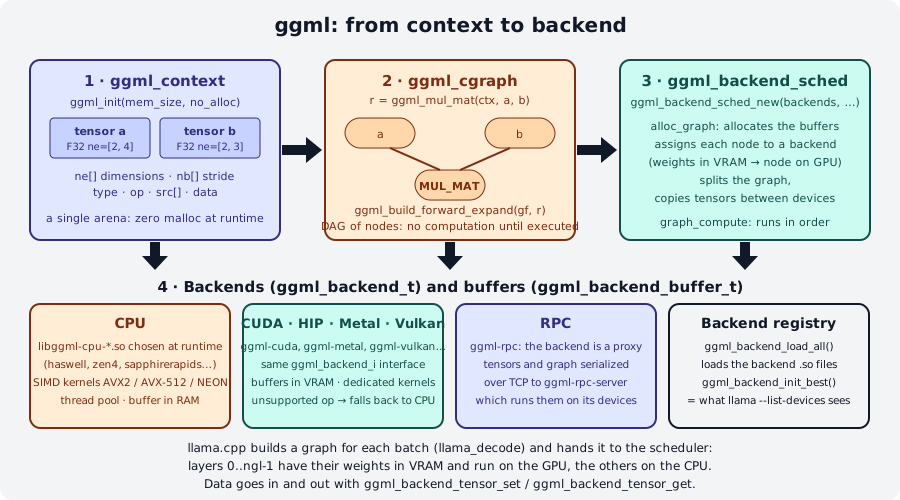
ggml_init(params) creates a context: a fixed-size memory arena (mem_size) in which
tensor objects are created. With no_alloc = false (the "legacy" API, CPU only) each tensor immediately also gets
space for its data; with no_alloc = true the context holds only the metadata and the data goes into a
backend buffer later. That is why you estimate the memory you need before ggml_init:
ggml_tensor_overhead() for each tensor, ggml_graph_overhead() for the graph, plus the data bytes if
no_alloc is false. If the estimate is too low, ggml_new_tensor_* fails with an assertion: that is the price
of the "no malloc at runtime" rule.
The tensor
A ggml_tensor has up to 4 dimensions, ne[0..3] (number of elements) and nb[0..3] (stride in bytes), a
type (F32, F16, BF16, Q8_0, Q4_K, …), an op (the operation that produced it, GGML_OP_NONE for an input
tensor) and src[] (the operands). Two conventions confuse people coming from PyTorch:
ne[0]is the columns,ne[1]the rows,ne[2]the matrices: the order is reversed compared totorch.Size. A[n_embd, n_vocab]tensor in GGUF is the embedding table withn_vocabrows ofn_embdvalues.ggml_mul_mat(ctx, A, B)does not computeA·BbutCsuch thatCᵀ = A·Bᵀ, that isC = B·Aᵀ:AandBmust have the samene[0]and the result hasne[0] = A->ne[1],ne[1] = B->ne[1]. Lab 10-01 shows this with actual numbers.
The compute graph
Calling ggml_mul_mat, ggml_add, ggml_rms_norm, ggml_rope_ext, ggml_soft_max … computes nothing:
it creates a new tensor with op and src set. ggml_new_graph(ctx) creates a ggml_cgraph, and
ggml_build_forward_expand(gf, risultato) fills it by walking the result's dependencies backwards: the
nodes end up in topological order, and ggml_graph_node(gf, -1) is the last one, that is, the result. Only at this
point does something execute the graph: ggml_graph_compute_with_ctx(ctx, gf, n_threads) on the CPU with the legacy API,
or the backend scheduler.
flowchart TB
    A[ggml_init<br/>context] --> B[ggml_new_tensor_2d<br/>a, b]
    B --> C[ggml_mul_mat<br/>MUL_MAT node]
    C --> D[ggml_build_forward_expand<br/>graph]
    D --> E{who executes?}
    E -->|legacy API| F[ggml_graph_compute_with_ctx<br/>CPU, n threads]
    E -->|backend API| G[ggml_backend_sched_alloc_graph<br/>ggml_backend_sched_graph_compute]
2. Backends, scheduler and buffers
A backend (ggml_backend_t) is a device that can execute operations: ggml-cpu, ggml-cuda,
ggml-metal, ggml-vulkan, ggml-hip, ggml-sycl, ggml-rpc, … They all implement the same interface
(ggml_backend_i) and own buffers (ggml_backend_buffer_t): a CPU buffer is RAM, a CUDA buffer is VRAM,
an RPC buffer lives in another machine's memory. Data goes in and out with ggml_backend_tensor_set
and ggml_backend_tensor_get, never with memcpy on tensor->data (which on a GPU is not a valid host
pointer).
Backends are libraries loaded at runtime: ggml_backend_load_all() looks for the libggml-*.so (or .dll,
.dylib) files next to the executable and registers them; ggml_backend_init_best() picks the best one available. This is
exactly what you see with llama cli --list-devices, and it is why the Ubuntu tarball contains a
dozen libggml-cpu-<arch>.so files (sandybridge … zen4, sapphirerapids): the CPU backend picks the variant
built for your CPU's instructions.
The scheduler (ggml_backend_sched_t) receives a list of backends in priority order and a graph, and:
- assigns each node to a backend, based on where the weights are (a
MUL_MATwhose weights are in VRAM runs on the GPU) and on which operations the backend supports (if one is missing, the node goes to the CPU); - splits the graph into consecutive per-backend splits and inserts the required tensor copies between devices;
- allocates the buffers for the intermediate tensors (
ggml_backend_sched_alloc_graph), reusing memory between nodes that do not overlap in time (this is theggml-allocallocator); - executes the splits in order (
ggml_backend_sched_graph_compute).
That is why -ngl N simply means "put the weights of the first N layers in a GPU backend buffer": the
scheduler does the rest, including the CPU↔GPU copies between layers. And it is why -ot "ffn_.*_exps=CPU" works:
it moves certain tensors to a CPU buffer and their nodes follow.
| Object | Type | What it contains | Main APIs |
|---|---|---|---|
| Context | ggml_context |
arena with tensor objects (and data, if no_alloc=false) |
ggml_init, ggml_free, ggml_new_tensor_* |
| Tensor | ggml_tensor |
ne[], nb[], type, op, src[], data, buffer |
ggml_nbytes, ggml_nelements, ggml_set_name |
| Graph | ggml_cgraph |
nodes in topological order | ggml_new_graph, ggml_build_forward_expand, ggml_graph_node |
| Backend | ggml_backend_t |
device + kernels | ggml_backend_load_all, ggml_backend_init_best, ggml_backend_init_by_type, ggml_backend_free |
| Buffer | ggml_backend_buffer_t |
device memory | ggml_backend_tensor_set/get, ggml_backend_alloc_ctx_tensors |
| Scheduler | ggml_backend_sched_t |
node→backend assignment, splits, allocation | ggml_backend_sched_new, _reset, _alloc_graph, _graph_compute, _free |
3. The cycle of a token
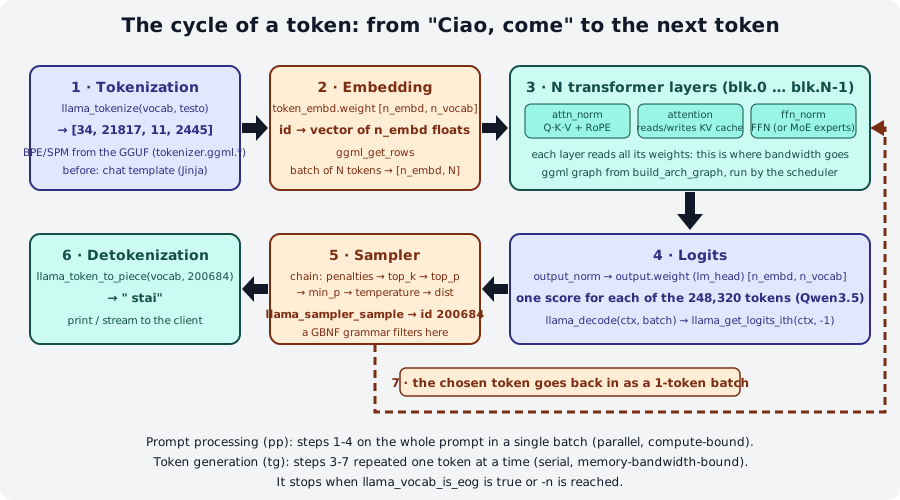
Every time the model "writes" a token, llama.cpp performs seven steps. The ggml graph of step 3 is built
by the model architecture's build_arch_graph and executed by the scheduler; everything else is code in the
libllama library (tokenizer, KV cache, sampler) and in the program that uses it.
-
Tokenization.
llama_tokenize(vocab, testo, …)turns the text into ids using the vocabulary stored in the GGUF (tokenizer.ggml.model,tokenizer.ggml.tokens,tokenizer.ggml.merges,tokenizer.ggml.pre). Even before that, in chat, the Jinja template has wrapped your message in the special tokens. Withllama-tokenize(release tarball) on Qwen3.5-0.8B:Note the space included in the
' come'token: in BPE tokenizers the space belongs to the word that follows it. -
Embedding. Each id selects a row of
token_embd.weight([n_embd, n_vocab], for Qwen3.5-0.8B[1024, 248320]) withggml_get_rows: the batch of N tokens becomes an[n_embd, N]matrix. -
N transformer layers (
blk.0…blk.N-1; heren_layer = 24). In each one: normalization (attn_norm), Q/K/V projections with RoPE on the positions, attention that reads the KV cache of the previous tokens and writes the current token's K and V into it,ffn_norm, feed-forward (or the experts, in MoE models). Each layer reads all of its weights: this is where, during generation, memory bandwidth is consumed (module 05). -
Logits.
output_normand thenoutput.weight(the "lm_head",[n_embd, n_vocab]) produce a score for each of the 248,320 tokens in the vocabulary. From the API's point of view:llama_decode(ctx, batch)runs steps 2-4 andllama_get_logits_ith(ctx, -1)returns the logits of the last token. -
Sampler. The logits pass through a chain of samplers (
llama_sampler_chain). Thellama completionlog prints it exactly:sampler chain: logits -> ?penalties -> ?dry -> ?top-n-sigma -> top-k -> ?typical -> top-p -> min-p -> ?xtc -> temp-ext -> distThe
?marks samplers that are inactive with the default parameters.top-kkeeps the best 40,top-pandmin-pcut the tail,tempscales the logits,distdraws a random token from the distribution. A GBNF grammar (module 06) is a sampler that zeroes out disallowed tokens.llama_sampler_sample(smpl, ctx, -1)returns the id. -
Detokenization.
llama_token_to_piece(vocab, id, …)gives back the piece of text (200684 -> ' stai') that is printed or streamed to the client. -
The token goes back in. The program builds a batch with that single token (
llama_batch_get_one(&id, 1)) and returns to step 3. It stops whenllama_vocab_is_eog(vocab, id)is true (end of answer) or at the-nlimit.
pp and tg seen from the graph
Prompt processing is one llama_decode with all the prompt tokens in a batch: the matrices are
[n_embd, N] with a large N and compute dominates. Token generation repeats steps 3-7 with N = 1: for each
token all the weights are read again and bandwidth dominates. Module 05 starts from here.
4. Adding an architecture: the map
Implementing a new model is outside the scope of this course, but knowing where each piece lives helps you
read errors ("unknown model architecture", "tensor 'blk.0.attn_q.weight' not found") and follow PRs.
The official guide is docs/development/HOWTO-add-model.md; there are four steps.
flowchart TD
    HF[Hugging Face repo<br/>config.json · safetensors · tokenizer] --> C[1 · conversion<br/>convert_hf_to_gguf.py<br/>class registered with ModelBase.register]
    C --> G[GGUF<br/>arch.* metadata + blk.N.* tensors]
    G --> A[2 · llama-arch.h / .cpp<br/>LLM_ARCH_*, tensor names]
    A --> M[3 · src/models/name.cpp<br/>build_arch_graph: the ggml graph]
    M --> T[tests: cli, completion, imatrix,<br/>quantize, server · CPU, CUDA, Metal]
G -.-> MM[4 · optional: multimodal<br/>encoder in libmtmd]- Conversion. In
convert_hf_to_gguf.pyyou add a class decorated with@ModelBase.register("NomeForCausalLM")(and@ModelBase.example("user/model")with a test model, preferably not gated) that extendsTextModelorMmprojModel. Ingguf-py/gguf/constants.pyyou add theMODEL_ARCHenum, the name and the list of tensors; intensor_mapping.pythe mapping between the original names (transformer.h.{bid}.ln_1) and the GGUF ones (blk.{bid}.attn_norm). If needed, you overrideset_gguf_parameters,set_vocab,modify_tensors. The docs insist: choose the architecture name right away, because once GGUFs are published it can no longer be renamed; and apply constant changes to the weights at conversion time (not in the graph), such as the1 +of Gemma's norms. - Architecture in
src/llama-arch.h/.cpp. AnLLM_ARCH_*value, the name inLLM_ARCH_NAMES, any new keys and tensors inLLM_KV_NAMES,LLM_TENSOR_NAMES,LLM_TENSOR_INFOS; the RoPE type inllama_model_rope_type; and everyswitchthat iterates overllm_arch(agrep LLM_ARCH_finds them: forgetting one makestest-llama-archsfail in CI). - The graph. A struct that inherits from
llama_model_baseand implementsbuild_arch_graph, in asrc/models/<nome>.cppfile, added tollama_model_mapping. You start by copying a similar architecture (llama,dbrx,bert) and use the building blocks ofllm_graph_context(build_norm,build_attn,build_ffn,ggml_rope_ext). To compare intermediate tensors with PyTorch there isllama-eval-callback. - Multimodal (optional). An
MmprojModelsubclass in conversion, the encoder intools/mtmd/clip.cpp, the preprocessor inmtmd.cpp; existing encoders (siglip, pixtral, qwen) are reused with a specific projector.
Before the PR you check cli, completion, imatrix, quantize and server on the main backends, and the
first PR is CPU only: kernels for the other backends come in later PRs.
5. Control vectors
A control vector is one vector per layer ([n_embd]) that is added to the hidden state during
inference, shifting the model along a "conceptual" direction (cheerful ↔ sad, formal ↔ casual,
confident ↔ doubtful) without fine-tuning and without touching the weights. You derive the direction like this:
- you write pairs of positive and negative prompts (same format, same number of lines, one per line,
a literal
\nfor line breaks), already in the model's chat template format; llama-cvector-generatorruns each pair through the model, captures the hidden state at the last token of each layer (except the last layer, which is discarded) and computes the positive − negative differences;- on these differences it applies PCA (the default method,
--pca-iter 1000 --pca-batch 100) or a mean (--method mean) to get the dominant direction of each layer; - it writes a GGUF with
general.architecture = controlvector,controlvector.model_hint(the model's architecture, e.g.qwen35) andcontrolvector.layer_count, plus onedirection.<layer>tensor per layer.
sequenceDiagram
    participant P as positivi.txt / negativi.txt
    participant G as llama-cvector-generator
    participant M as GGUF model
    participant V as control_vector.gguf
    P->>G: prompt pairs (same count)
    loop for each pair
        G->>M: llama_decode(positive prompt)
        M-->>G: hidden state per layer (last token)
        G->>M: llama_decode(negative prompt)
        M-->>G: hidden state per layer
    end
    G->>G: differences → PCA (or mean) per layer
    G->>V: direction.1 … direction.N-1
Commands (from source, build/bin/; options read from common/arg.cpp):
llama-cvector-generator -m Qwen3.5-0.8B-Q8_0.gguf \
    --positive-file positivi.txt --negative-file negativi.txt \
    -o allegro.gguf                    # default: control_vector.gguf
llama-cvector-generator -m modello.gguf -ngl 99 --pca-iter 2000 --pca-batch 100   # more iterations, GPU
llama-cvector-generator -m modello.gguf --method mean                              # mean instead of PCA
Applying it, with any build (options from llama cli --help, identical in llama completion and llama serve):
| Option | Meaning |
|---|---|
--control-vector FNAME |
adds a control vector with scale 1; multiple files separated by commas |
--control-vector-scaled FNAME:SCALE,... |
adds it with a custom scale (positive "toward" the positives, negative toward the negatives) |
--control-vector-layer-range START END |
applies only to layers from START to END inclusive |
llama cli -m Qwen3.5-0.8B-Q8_0.gguf --control-vector-scaled allegro.gguf:0.8 --control-vector-layer-range 10 23 -rea off
llama cli -m Qwen3.5-0.8B-Q8_0.gguf --control-vector-scaled allegro.gguf:-0.8 --control-vector-layer-range 10 23 -rea off   # toward "sad"
The official README suggests applying the vector to the layers past the tenth: in the early layers the model is still "reading" and the push only produces incoherent text. You find the right scale by trial and error: too high and the model repeats words or gets stuck, too low and nothing changes. Lab 10-02 guides you.
6. Contributing to the project
llama.cpp receives dozens of PRs a day and CONTRIBUTING.md is strict. In short, for a new contributor:
- Before writing code: search existing issues and PRs (duplicates get closed); a new feature starts from an issue, not a PR; a bug fix must come with a reproduction and a regression test that fails before and passes after; no trivial PRs (typos, formatting); only one open PR at a time; additions to the CLI or the public API face a higher bar.
- AI usage: generated code is allowed but you are 100% responsible for it: it must be declared explicitly,
reviewed by hand (roughly one hour per 200-400 lines), and you must be able to explain every line; using
AI to write issues, PR descriptions, discussions and replies is forbidden. Undeclared use leads to a ban. Details in
AGENTS.md. - Tests: run the full CI locally (
ci/README.md); check that perplexity and performance do not get worse (llama-perplexity,llama-bench); if you touch ggml, runtest-backend-ops(it compares operator results across two different backends, so you need at least two backends) and add cases for new operators. Unit tests run withctestfrom the build folder (cmake -B build -DLLAMA_BUILD_TESTS=ON, thenctest --test-dir build --output-on-failure). - One PR per thing, first version CPU only, and new quantization types require a converted model on Hugging Face, perplexity and KL-divergence comparisons, and performance numbers.
- Style: no external dependencies, simple C++ (
forloops, no templates or "modern" STL), 4 spaces, braces on the same line,void * ptr,int & a,snake_case, uppercase enums with a prefix (LLAMA_VOCAB_TYPE_BPE), names in the form<class>_<action>_<noun>(llama_sampler_chain_remove), opaque types with_t, vertical alignment,clang-formatwhen in doubt. Lowercase file names with dashes. - Afterwards: expect change requests, rebase on
masterif the PR gets old, consider adding yourself toCODEOWNERS. Maintainers squash-merge with the title<module> : <title> (#number)and wait for CI.
flowchart TB
    I[existing issue<br/>or new one] --> B[branch + code<br/>CPU only, repo style]
    B --> T[ctest · test-backend-ops<br/>llama-perplexity · llama-bench<br/>ci/run.sh locally]
    T --> P[PR: one thing only,<br/>AI usage declared]
    P --> R[review<br/>changes requested]
R --> S[squash-merge<br/>green CI]Summary
| Concept / flag | Where | In short |
|---|---|---|
ggml_init, no_alloc |
ggml | fixed arena; true = metadata only, data in backend buffers |
ne[0] = columns, mul_mat = A·Bᵀ |
ggml | dimensions reversed compared to PyTorch |
ggml_build_forward_expand |
ggml | builds the graph; no computation |
ggml_backend_sched_* |
ggml | assigns nodes to backends, splits, allocates, executes |
ggml_backend_tensor_set/get |
ggml | the only correct way to read/write a tensor's data |
llama_tokenize → llama_decode → llama_get_logits_ith → llama_sampler_sample → llama_token_to_piece |
libllama | the cycle of a token |
convert_hf_to_gguf.py, gguf-py/gguf/constants.py, src/llama-arch.*, src/models/*.cpp |
llama.cpp | the four places of a new architecture |
llama-cvector-generator --positive-file --negative-file -o --method --pca-iter --pca-batch |
source | generates the control vector |
--control-vector, --control-vector-scaled F:S, --control-vector-layer-range A B |
cli/completion/serve | applies the control vector |
ctest, test-backend-ops, ci/run.sh |
source | tests before the PR |
Common mistakes
\"Transposed\" result or dimensions that do not add up in ggml_mul_mat
Remember ne[0] = columns and C = B·Aᵀ: the two operands must share ne[0]. If you need a classic A·B,
pass B already transposed (as in lab 10-01) or use ggml_transpose + ggml_cont.
Assertion not enough space in the context's memory pool
The mem_size estimate is too low: add ggml_tensor_overhead() for each tensor (including the
intermediate ones created by the ops!) and ggml_graph_overhead(). With no_alloc=true the data does not count.
memcpy on tensor->data with a GPU backend
With the backend API, data points to device memory: use ggml_backend_tensor_set/get, which perform
the right copy even when the backend is the CPU.
llama-cvector-generator: command not found
The tool is not in the installer or in the tarball: you need a build from source (build/bin/llama-cvector-generator).
The same applies to test-backend-ops and llama-eval-callback.
\"number of positive and negative prompts must be equal\"
The two files must have the same number of non-empty lines, one pair per line. Check for empty lines at the end.
Control vector that produces incoherent text
The scale is too high or it is applied from the low layers. Lower the scale (0.3-0.8) and use --control-vector-layer-range
starting from around layer 10. A vector generated with a different model (another quantization of the same
model is fine, but a different architecture is not) is rejected or gives random results: check model_hint.
Labs in this module
- Lab 10-01 · A ggml graph by hand: two C programs (legacy API and backend API) that multiply two matrices, built with CMake against the ggml sources, on CPU and on GPU.
- Lab 10-02 · Control vector: generating a "cheerful ↔ sad" vector for Qwen3.5-0.8B and applying it with different scales and layer ranges.
Check
- What changes between
no_alloc = falseandno_alloc = trueinggml_init? ggml_mul_mat(ctx, A, B)withAofne = [2, 4]andBofne = [2, 3]: what are the dimensions of the result and what does it compute?- Why does calling
ggml_addnot perform any addition? - In what sense is
-ngl 20"just a matter of buffers"? - In the cycle of a token, where does a GBNF grammar act?
- What are the four places in the code you touch to add a text architecture?
- Why does the
cvector-generatorREADME recommend--control-vector-layer-range 10 31and not0 31? - You fixed a bug with the help of an AI assistant. What must your PR contain to comply with
CONTRIBUTING.md?
Solutions
- With
falseeach tensor immediately gets its data in the context arena (CPU only, legacy API); withtruethe context has only the metadata and the data is allocated in a backend buffer by the scheduler or byggml_backend_alloc_ctx_tensors. ne = [4, 3]: 3 rows of 4 values; it computesC = B·Aᵀ(equivalentlyCᵀ = A·Bᵀ). The operands sharene[0] = 2.- It only creates a new tensor with
op = GGML_OP_ADDandsrc[0], src[1]set; the computation happens when the graph is executed byggml_graph_compute_with_ctxor by the scheduler. - The weights of the first 20 layers are allocated in a GPU backend buffer; the scheduler assigns the nodes that use them to the GPU and inserts the copies between devices. No other special logic.
- In the sampler chain, after the logits and before the draw: it zeroes the probability of the tokens the grammar does not allow in the current state.
convert_hf_to_gguf.py(+gguf-py/gguf/constants.pyandtensor_mapping.py),src/llama-arch.h/.cpp,src/models/<nome>.cppwithbuild_arch_graph,llama_model_mappinginsrc/llama-model.cpp.- In the low layers the model is still processing the form of the text and the push breaks coherence; the vector works better in the high layers, where the hidden state encodes abstract concepts (style, tone).
- A reproducible issue, a regression test that fails before and passes after, an explicit declaration of how AI was used, a PR description written by you (not by the AI), and your ability to explain every line.
References
- ggml: README and examples/simple (
simple-ctx.cpp,simple-backend.cpp) - Introduction to ggml (Hugging Face blog) and GGML Tips & Tricks
- GGUF specification
- docs/development/HOWTO-add-model.md
- tools/cvector-generator/README.md, PR #5970 (control vector support), PR #7514 (generator)
- CONTRIBUTING.md, AGENTS.md, ci/README.md
- include/llama.h and ggml/include/ggml.h: the APIs cited in this module
- Course glossary: tensor, graph, backend, KV cache, sampler