Module 07: Multimodality: vision, audio, voice
So far, models have read and written only text. In this module you open the model up to images, audio and video
with llama.cpp's mtmd subsystem, and you make it speak with llama-tts. The vision examples run on a
regular CPU with a 280 MB model; for audio and speech synthesis you use the same tools with dedicated models.
What you will learn
- What
libmtmdis, why a multimodal model is made of two GGUF files, and what themmprojprojector contains. - Which pre-quantized models
ggml-orgoffers for vision, audio and mixed modalities, and how big they are. - Using images and audio from
llama cli(--image,--audio,/image,/audio) and through the API (image_url,input_audio, base64 data URIs). - Attaching images, PDFs and audio in the web UI.
- Generating voice with
llama-tts(Qwen3-TTS, Pocket TTS). - Estimating memory: how many tokens an image "costs", where the projector goes, how to keep the context in check.
1. The mtmd subsystem and the mmproj projector
llama.cpp added vision in 2023 with LLaVA (llava.cpp, clip.cpp, the llava-cli binary). Each new model family
brought its own binary (qwen2vl-cli, minicpmv-cli, gemma3-cli…), until PR
#12849 introduced libmtmd (multimodal), a single
library that handles images, audio and video with an interface inspired by the Processor class in transformers.
Today it is used by llama cli, llama serve and the development tool llama-mtmd-cli. The official README states that it is
a sub-project "under very heavy development, with breaking changes expected".
The idea is simple: a separate component encodes the image into embeddings, and these embeddings are
inserted into the context of the language model in place of a placeholder. The language model (libllama)
stays untouched; everything specific to the modality lives in a second file.
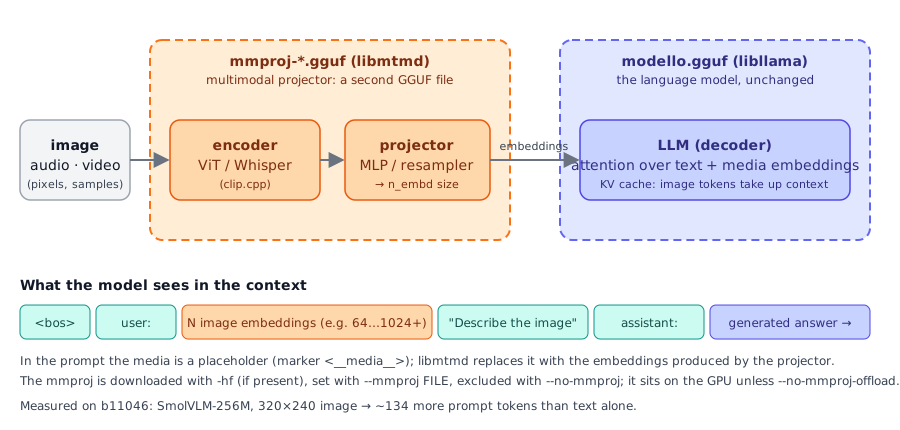
mmproj file contains the encoder and the projector; the language model receives the embeddings as if they were tokens.To run a multimodal model you therefore need two GGUFs:
| File | Contains | Used by |
|---|---|---|
modello.gguf |
the language model (weights, vocabulary, chat template) | libllama |
mmproj-*.gguf |
vision/audio encoder (ViT, Whisper-like) + projector to the LLM's n_embd size |
libmtmd |
The projector is specific to each architecture: the Gemma 3 mmproj does not work with Qwen2-VL. For supported
models (Gemma 3, SmolVLM/SmolVLM2, Pixtral, Qwen 2/2.5 VL, Mistral Small 3.1, InternVL, MiniCPM-V 4.6…) you create it
with convert_hf_to_gguf.py --mmproj; for older models (LLaVA, MobileVLM, MiniCPM-V 2.x, Granite Vision) there are
dedicated guides in docs/multimodal/.
The flags to know
From llama cli --help and llama serve --help (b11046):
| Flag | Effect |
|---|---|
-hf user/repo[:quant] |
downloads the model and, if present, the mmproj too |
-mm, --mmproj FILE |
projector from a local file (-m modello.gguf --mmproj mmproj.gguf) |
-mmu, --mmproj-url URL |
projector from a URL |
--mmproj-auto / --no-mmproj |
use (default) or ignore the projector: with --no-mmproj the model goes back to text only |
--mmproj-offload / --no-mmproj-offload |
projector on the GPU (default) or in RAM |
-mmdev, --mmproj-device DEV |
device for the projector (none = no offload; default: follows --device) |
--image FILE, --audio FILE, --video FILE |
media for a single prompt; multiple files separated by commas |
--image-min-tokens N, --image-max-tokens N |
token limits per image for dynamic-resolution models |
--video-fps N |
frames per second extracted from the video (default 4.0) |
--mtmd-batch-max-tokens N (server) |
image tokens per batch during encoding (default 1024) |
--media-path DIR (server) |
folder from which the API can read local files with file:// |
Single binary and old names
In this course we use llama cli and llama serve. In the release tarballs and in the repo documentation you
still find llama-cli, llama-server, llama-mtmd-cli and llama-tts: they are the same programs. llama-mtmd-cli
and llama-tts are not in the installer binary: you need the release tarball or a build from source.
2. Ready-made models
The official list is in docs/multimodal.md and in the ggml-org
Multimodal GGUFs collection;
almost all of them use the Q4_K_M quant by default. Sizes as of 09/23/2026.
| Modality | -hf repository |
Model + mmproj | Notes |
|---|---|---|---|
| vision | ggml-org/SmolVLM-256M-Instruct-GGUF |
175 MB (Q8_0) + 104 MB | used in this module: runs anywhere, limited quality |
| vision | ggml-org/SmolVLM-500M-Instruct-GGUF |
437 MB (Q8_0) + 109 MB | the next step up for a laptop |
| vision | ggml-org/gemma-3-4b-it-GGUF |
2.5 GB (Q4_K_M) + 851 MB | excellent on 8 GB of RAM; the official README example |
| vision | ggml-org/Qwen2.5-VL-3B-Instruct-GGUF, -7B-, -32B-, -72B- |
from ~2 GB | strong on documents and OCR |
| vision | ggml-org/InternVL3-1B-Instruct-GGUF … -14B- |
from ~1 GB | |
| vision | ggml-org/pixtral-12b-GGUF, Mistral-Small-3.1-24B-Instruct-2503-GGUF, Llama-4-Scout-17B-16E-Instruct-GGUF, moondream2-20250414-GGUF |
large | for those with a GPU |
| audio | ggml-org/Qwen3-ASR-0.6B-GGUF, -1.7B- |
805 MB (Q8_0) + 214 MB | transcription (ASR) |
| audio | ggml-org/ultravox-v0_5-llama-3_2-1b-GGUF, …-3_1-8b- |
808 MB + 1.37 GB | audio understanding |
| audio | ggml-org/Voxtral-Mini-3B-2507-GGUF |
2.5 GB + 716 MB | Mistral |
| text+image+audio | ggml-org/gemma-4-E2B-it-GGUF, ggml-org/gemma-4-E4B-it-GGUF |
E4B: 4.6 GB (Q4_0) + 560 MB | the llama.app example: ~6 GB with 16k of context |
| text+image+audio | ggml-org/Qwen2.5-Omni-3B-GGUF, -7B-, Qwen3-Omni-30B-A3B-… |
from ~2 GB |
To find more: search Hugging Face with pipeline_tag=image-text-to-text and "gguf". Dedicated OCR models
(PaddleOCR-VL, GLM-OCR, DeepSeek-OCR, Dots.OCR, HunyuanOCR) are supported but require specific prompts and input
structure, documented in their respective PRs.
3. Images from llama cli
With -hf the projector comes along by itself. The banner shows the modalities line, which tells you what the model accepts:
build      : b11046-60081bb2b
model      : ggml-org/SmolVLM-256M-Instruct-GGUF:Q8_0
ftype      : Q8_0
modalities : text, vision, video

available commands:
  /image <file>       add an image file
  /video <file>       add a video file
  …
In chat you attach the media first, then you write the question about it:
For a one-shot question without entering chat, use --image with -p (and -st to exit at the end). Output on a
6-vCPU machine without a GPU (a 320×240 test image with a red square and a blue rectangle, generated with ffmpeg in lab 07-01):
llama cli -hf ggml-org/SmolVLM-256M-Instruct-GGUF:Q8_0 --image forme.png -p "Describe this image." -st -n 60 -t 3
Loaded media from 'forme.png'

> Describe this image.
 The image features two rectangular shapes: a red rectangle and a blue rectangle. …

[ Prompt: 5.1 t/s | Generation: 5.6 t/s ]
The same pattern applies to audio: /audio file.mp3 in chat or --audio file.mp3 on the command line, with a model
that lists audio among its modalities. Multiple files: --image a.png,b.png.
llama-mtmd-cli, the development tool
The tarball contains llama-mtmd-cli, the minimal front end of libmtmd:
llama-mtmd-cli -m modello.gguf --mmproj mmproj.gguf --image foto.jpg -p "Describe". Without --image/-p it enters
chat. It is useful for isolating a projector problem from the rest of the chain.
4. Images and audio through the API
llama serve accepts the OpenAI API content parts on the /v1/chat/completions endpoint:
{
  "messages": [{
    "role": "user",
    "content": [
      { "type": "text", "text": "What is in this image?" },
      { "type": "image_url", "image_url": { "url": "https://example.com/photo.jpg" } }
    ]
  }]
}
Rules (from the server README):
image_url.urlcan be a remote URL, base64 (raw or a data URIdata:image/png;base64,…) or a local filefile://path(only with--media-path DIR, paths relative to that folder). Formats: those supported bystb_image(JPEG, PNG, BMP, GIF, TGA…).input_audio:input_audio.data(base64) orinput_audio.url;miniaudioformats (MP3, WAV, FLAC);input_audio.formatis ignored, the type is derived from the file.input_video:dataorurl; requiresffmpeg(--video-ffmpeg-dirif it is not in the PATH).- The native
/completionendpoint accepts{"prompt_string": "… <__media__> …", "multimodal_data": ["<base64>"]}: one<__media__>marker per item. A client must first check in/modelsor/v1/modelsthat the model is multimodal.
Request with a data URI (server started with llama serve -hf ggml-org/SmolVLM-256M-Instruct-GGUF:Q8_0 --port 18105 -c 4096 -t 3):
B64=$(base64 -w0 forme.png)
curl -s http://127.0.0.1:18105/v1/chat/completions -H "Content-Type: application/json" -d @- <<EOF
{"messages":[{"role":"user","content":[
  {"type":"text","text":"Describe this image."},
  {"type":"image_url","image_url":{"url":"data:image/png;base64,$B64"}}]}],
 "max_tokens":60}
EOF
In the response, look at usage: with the image the prompt is 146 tokens, without the image the same question is 12.
The server log confirms that the projector is loaded: srv load_model: loaded multimodal model, '…/mmproj-SmolVLM-256M-Instruct-Q8_0.gguf'.
With the openai Python SDK (seen in module 04) it is identical: client.chat.completions.create(model="…", messages=[…content parts…]).
You encode the local file yourself:
import base64
uri = "data:image/png;base64," + base64.b64encode(open("forme.png", "rb").read()).decode()
5. The web UI: images, PDFs, audio
The llama serve web UI (module 04) adds files from the "media" menu or when you drag them into the conversation:
- images and PDFs for models with vision (JPEG, PNG, GIF, WebP, SVG, PDF);
- audio MP3/WAV for models that accept audio.
The UI knows the model's modalities and prevents you from sending an image to a text-only model. PDF is handy for invoices, receipts and forms: the UI turns it into content the model can read (pages as images for models with vision, extracted text otherwise). Demo videos at llama.app/docs/webui.
6. Audio input
With an audio model (Qwen3-ASR for transcription, Ultravox/Voxtral/Gemma 4 for understanding and answering) the flow is the same
as for images: --audio file.wav, /audio in chat, input_audio through the API. Example from llama.app:
The audio is resampled and encoded by the mmproj encoder (Whisper-type for many models); the token cost
depends on the duration. In lab 07-02 you generate a test WAV file with ffmpeg and try all three paths.
7. Speech synthesis with llama-tts
llama-tts (in the tarball, not in the installer) generates audio through libmtmd: an LLM "backbone" produces acoustic tokens and
an mmproj turns them into a waveform. The tool is model-independent (Qwen3-TTS, Pocket TTS). It used to be the OuteTTS demo with the WavTokenizer vocoder: that flow and the vocoder flag no longer exist.
# Qwen3-TTS: model + mmproj downloaded via -hf, output to out.wav
llama-tts -hf ggml-org/Qwen3-TTS-12Hz-1.7B-Base-GGUF -p "Hello world" --output out.wav

# language and reference voice
llama-tts -hf ggml-org/Qwen3-TTS-12Hz-1.7B-Base-GGUF -p "Buongiorno a tutti" \
    --tts-lang it --tts-speaker-file voce.mp3 --output out.wav

# Pocket TTS (kyutai): local files, the reference voice is required
llama-tts -m pocket-tts.gguf -mm mmproj-pocket-tts.gguf -p "Hello world" \
    --tts-speaker-file speaker.mp3 --output out.wav
| Flag | Meaning |
|---|---|
-o, --output FILE |
WAV file (default output.wav) |
--tts-lang |
ISO 639-1 language for Qwen3-TTS: zh en de it pt es ja ko fr ru (default en); ignored by Pocket TTS |
--tts-speaker-file |
reference audio (wav/mp3) to clone the voice; required with Pocket TTS |
-n N |
limit in audio frames (how many ms a frame lasts depends on the model) |
--temp, --top-k, --top-p, -ngl, -b, -ub |
same as for text |
Qwen3-TTS-1.7B is 1.0 GB (Q4_K_M) + 446 MB of mmproj.
To convert Pocket TTS from HF: convert_hf_to_gguf.py path/languages/english --outfile pocket-tts.gguf and
… --mmproj --outfile mmproj-pocket-tts.gguf (a languages/<language> folder, not the root).
8. Memory and performance
flowchart TB
    A[modello.gguf] -->|LLM weights| M[(RAM / VRAM)]
    B[mmproj.gguf] -->|encoder + projector| M
    C[image] -->|N tokens in the context| K[(KV cache)]
    K --> M
    style M fill:#e0e7ff,stroke:#6366f1,color:#312e81
style K fill:#ffedd5,stroke:#f97316,color:#7c2d12- Weights: LLM +
mmproj(from 100 MB to over 1 GB). With--no-mmproj-offloadthe projector stays in RAM and frees VRAM; it costs encoding time, not generation time. - Context: each image takes tens to thousands of tokens. With SmolVLM-256M a 320×240 image is ~134 tokens; with
dynamic-resolution models (Qwen2.5-VL, Gemma 4) a large photo can exceed 1000 and the docs recommend
-c 8192.--image-max-tokenssets a cap; resizing images before sending them is the most effective lever. - Prompt processing: the encoder runs once per image (on a 6-vCPU CPU: 150 prompt tokens at 3.7 t/s, ~40 s). On a GPU it is almost instant. Images already seen stay in the prompt cache like text tokens.
- Server with multiple slots: each slot has its own context (module 04); with large images raise
-caccordingly.
Summary
| Concept | Remember |
|---|---|
libmtmd |
multimodal library: images, audio, video; used by cli, server, llama-mtmd-cli, llama-tts |
mmproj |
second GGUF: encoder + projector, architecture-specific |
-hf |
also downloads the mmproj; --no-mmproj to exclude it; --mmproj FILE for a local one |
| cli | --image/--audio/--video FILE (multiple files with commas); in chat /image, /audio, /video |
| API | content parts image_url (URL, base64, data URI, file:// with --media-path), input_audio, input_video |
| web UI | image/PDF/audio attachments; blocks media the model does not support |
llama-tts |
-hf or -m … -mm …, -p, --output, --tts-lang, --tts-speaker-file, -n frames |
| memory | LLM weights + mmproj + image tokens in KV; --no-mmproj-offload, --image-max-tokens, -c |
Common mistakes
The model \"does not see\" the image
The banner says modalities : text: the mmproj was not loaded. Typical causes: you used -m without --mmproj,
you passed --no-mmproj, or the HF repository does not contain an mmproj-* file. With a local -m the two files
must belong to the same family and have a compatible quant.
Media after the question
In chat the media must be attached before the text about it (/image, then the question). Through the API the order
of the content parts is the order of the prompt: put the text that refers to the image in the same message.
file:// rejected by the server
Local paths work only with --media-path DIR and are relative to that folder. In production prefer
base64: you do not expose the filesystem.
Context full
A 4000×3000 image on a dynamic-resolution model can fill -c 4096 on its own. Resize, use
--image-max-tokens, raise -c. The server responds with a context error, the cli truncates.
Poor answers from the small model
SmolVLM-256M is a demo model: through the API with temperature 0 it answered "Blue" to the same image it had
described well in chat. For real work use at least a 2-4B (Gemma 3 4B, Qwen2.5-VL 3B).
llama-tts: command not found
It is not in the installer: get it from the release tarball (module 01) or build with LLAMA_BUILD_TOOLS=ON.
Labs in this module
- Lab 07-01: Describing and querying images: SmolVLM-256M from the cli, in chat and through the API with base64; reading a document.
- Lab 07-02: Audio and voice: a test WAV, an audio model, speech synthesis with
llama-tts.
Check
- Why is a multimodal model in llama.cpp made of two GGUF files?
- What happens if you start
llama cli -hf ggml-org/gemma-3-4b-it-GGUF --no-mmproj? - In chat you want to describe
foto.jpg: which two lines do you type, and in what order? - In the OpenAI-compatible API, which three forms can
image_url.urltake? - A client wants to send
file:///tmp/a.pngto the server: which flag is needed and why is it discouraged in production? - With
-np 2 -c 8192, how many tokens does each slot have, and what does that mean for images? - What does
--no-mmproj-offloaddo and when would you use it? - With
llama-tts, what is--tts-speaker-filefor and with which model is it required?
Solutions
- The language model (
libllama) and themmprojprojector (libmtmd, encoder + projector) are kept separate so the multimodal part can evolve without touching the main library. - The model is loaded as text only: the
mmprojis neither downloaded nor used;modalities : text. /image foto.jpgand then the question, e.g.Describe the photo: media first, then text.- Remote URL, base64 (raw or a data URI
data:image/…;base64,), local filefile://(with--media-path). --media-path DIR, with paths relative to DIR; discouraged because it exposes server files to anyone calling the API.- 4096 tokens per slot (the context is split among the slots): a large image can fill it; raise
-cor limit--image-max-tokens. - It keeps the projector in RAM instead of on the GPU: it frees VRAM for the LLM at the cost of slower encoding.
- It provides reference audio to clone the voice; it is required with Pocket TTS, which produces almost nothing without it.
References
tools/mtmd/README.md: https://github.com/ggml-org/llama.cpp/blob/master/tools/mtmd/README.mddocs/multimodal.md(list of models): https://github.com/ggml-org/llama.cpp/blob/master/docs/multimodal.mdtools/tts/README.md: https://github.com/ggml-org/llama.cpp/blob/master/tools/tts/README.md- Server, multimodal and content parts section: https://github.com/ggml-org/llama.cpp/blob/master/tools/server/README.md
- llama.app: CLI, API, Web UI
- HF collection: https://huggingface.co/collections/ggml-org/multimodal-ggufs-68244e01ff1f39e5bebeeedc