Module 04: llama serve: server and API¶
llama serve (the old llama-server, still present in the tarballs and Docker images) turns a
GGUF model into an HTTP service: a web UI to chat from the browser, an OpenAI-compatible API to
point existing SDKs and applications at, an Anthropic-compatible endpoint and a set of native endpoints that
expose what the OpenAI API does not cover (tokenization, slot state, Prometheus metrics, infill).
All of it with several requests in parallel and automatic reuse of the prompt cache.
What you will learn¶
- Start the server, read the startup logs and use the web UI (attachments, branching, JSON schema,
--ui-config). - Call
/v1/chat/completions(also with SSE streaming),/v1/completions,/v1/embeddings,/v1/rerank,/v1/responses,/v1/modelsand the Anthropic endpoint/v1/messages. - Use the native endpoints
/health,/props,/slots,/metrics,/tokenize,/detokenize,/apply-template,/infill,/completion. - Understand slots,
-np, how the-ccontext is split among slots,--kv-unified, prompt cache andcache_n. - Secure the server (
--api-key,--host, what not to expose) and configure it withLLAMA_ARG_*. - Serve several models with router mode, embedding and reranking, and let the model call functions (tool calling).
1. Starting the server¶
export SSL_CERT_FILE=/etc/ssl/certs/ca-certificates.crt   # installer binary on Ubuntu only (see module 01)
llama serve -hf ggml-org/Qwen3.5-0.8B-GGUF               # (1)!
llama serve -m ~/modelli/gemma-3-4b-it-Q4_K_M.gguf -c 8192 -ngl all --port 8081   # (2)!
- Downloads the model (or takes it from the HF cache) and listens on
http://127.0.0.1:8080; web UI on/. - Local file, context 8192, all layers on GPU (
-nglisautoby default), different port.
The log lines that matter, from a startup with -c 2048 -np 2:
srv    load_model: initializing, n_slots = 2, n_ctx_slot = 1024, kv_unified = 'false'
srv  llama_server: model loaded
srv  llama_server: listening on http://127.0.0.1:18103
Until model loaded the /health endpoint answers 503 {"error":{"code":503,"message":"Loading model",…}},
then 200 {"status":"ok"}: this is the check to use in scripts and containers.
| Flag | What it does |
|---|---|
-hf user/repo[:quant], -m file.gguf |
model from Hugging Face (cache ~/.cache/huggingface/hub) or local |
-c N |
total context in tokens (0 = the model's native one); split among the slots |
-np N |
number of slots (parallel requests); -1 = auto (default) |
-ngl N|auto|all, -t N, -fa |
GPU offload, CPU threads, flash attention (as in llama cli) |
--host, --port |
address and port (default 127.0.0.1:8080); --host can also be a .sock socket |
-a, --alias NOME |
model name reported by /v1/models and in responses (default: file path) |
--api-key K1,K2 / --api-key-file |
requires Authorization: Bearer K on all endpoints except /health |
--no-webui |
API only, no interface |
--metrics, --props, --no-slots |
enables /metrics, enables POST /props, disables /slots |
-rea off, --reasoning-format, --chat-template-kwargs |
control of "thinking" in reasoning models |
--embedding, --rerank --pooling rank |
embedding / reranking mode |
--ui-config JSON, --ui-config-file |
default settings of the web UI |
--ssl-key-file, --ssl-cert-file |
native HTTPS (in production prefer a reverse proxy) |
Every flag has an environment variable
llama serve --help prints for every option the corresponding LLAMA_ARG_* name (LLAMA_ARG_MODEL,
LLAMA_ARG_CTX_SIZE, LLAMA_ARG_N_PARALLEL, LLAMA_ARG_PORT, LLAMA_ARG_HOST, LLAMA_ARG_ALIAS,
LLAMA_ARG_ENDPOINT_METRICS…; the API key is LLAMA_API_KEY). If both are present, the flag wins.
Booleans accept 1/0, true/false, on/off. This is the convenient way to configure Docker Compose (module 09).
2. The web UI¶
Open http://127.0.0.1:8080 in the browser. The interface (folder tools/ui, Svelte framework) offers:
- Markdown, tables, highlighted code, KaTeX formulas, and an HTML/JS preview of generated code.
- Reasoning: for "thinking" models the reasoning sits in a collapsible block, separate from the answer.
- Attachments ("media" menu or drag and drop): images and PDFs for vision models (JPEG, PNG, GIF, WebP, SVG, PDF),
MP3/WAV for audio models. The UI knows the model's modalities (it reads them from
/props) and prevents attaching an image to a text-only model. - Branching: edit an earlier message or regenerate an answer and the conversation forks; you can move between branches without losing anything. Search by title/content, import/export in JSON.
- Structured output:
Settings → Developer → Custom JSONaccepts an object with thejson_schemakey (see module 06) and every answer will follow the schema. - Model selector when the server is in router mode (§ 8), with model switching even mid-conversation.
- You change sampling parameters per conversation from the settings panel.
You set the UI defaults at startup:
llama serve -hf ggml-org/Qwen3.5-0.8B-GGUF \
  --ui-config '{"theme": "dark", "pasteLongTextToFileLen": 0, "renderUserContentAsMarkdown": true}'
The available keys are in tools/ui/src/lib/constants/settings-keys.ts in the repository.
3. How a request travels¶
sequenceDiagram
    autonumber
    participant C as Client (curl, SDK, web UI)
    participant S as llama serve (HTTP)
    participant Q as Task queue
    participant SL as Slot k (KV cache)
    participant M as Model + sampler
    C->>S: POST /v1/chat/completions {messages, tools, response_format…}
    S->>S: applies the chat template (Jinja) → prompt
    S->>Q: new task (waits for a free slot)
    Q->>SL: assigns the slot with the most similar prefix (prompt cache)
    SL->>SL: reuses cache_n tokens, tokenizes the rest
    loop continuous batching, one token at a time
        SL->>M: decode (together with the other active slots)
        M->>M: grammar → mask · sampler (top-k, top-p, temp…)
        M-->>SL: token
        SL-->>C: SSE chunk (if stream=true)
    end
    SL-->>S: parsing (reasoning, tool_calls) + timings
    S-->>C: OpenAI JSON {choices, usage, timings}
The chat template turns the messages into the prompt the model expects; you can see it without generating anything
with /apply-template:
curl -s http://127.0.0.1:8080/apply-template -H "Content-Type: application/json" \
  -d '{"messages":[{"role":"system","content":"Sei un assistente."},{"role":"user","content":"Ciao"}]}'
{"prompt":"<|im_start|>system\nSei un assistente.<|im_end|>\n<|im_start|>user\nCiao<|im_end|>\n<|im_start|>assistant\n<think>\n"}
Notice the final <think>: Qwen3.5 reasons by default. To turn it off per request put
"chat_template_kwargs": {"enable_thinking": false} in the body; for the whole server use -rea off.
4. OpenAI-compatible API¶
/v1/chat/completions¶
curl -s http://127.0.0.1:8080/v1/chat/completions -H "Content-Type: application/json" -d '{
  "messages": [{"role": "user", "content": "Qual è la capitale d'\''Italia? Rispondi in una frase."}],
  "max_tokens": 40, "temperature": 0,
  "chat_template_kwargs": {"enable_thinking": false}
}'
Response (b11046, -a qwen-0.8b):
{
  "choices": [{"finish_reason": "stop", "index": 0,
               "message": {"role": "assistant", "content": "Roma è la capitale d'Italia."}}],
  "created": 1790114339, "model": "qwen-0.8b", "system_fingerprint": "b11046-60081bb2b",
  "object": "chat.completion",
  "usage": {"completion_tokens": 9, "prompt_tokens": 27, "total_tokens": 36,
            "prompt_tokens_details": {"cached_tokens": 0}},
  "id": "chatcmpl-jshj5y50FU3IjoA4PjHnsr2rxnKlXLgc",
  "timings": {"cache_n": 0, "prompt_n": 27, "prompt_ms": 2769.0, "prompt_per_second": 9.75,
              "predicted_n": 9, "predicted_ms": 1146.8, "predicted_per_second": 6.98, "…": "…"}
}
Besides the OpenAI fields there are system_fingerprint (build) and timings, specific to llama.cpp:
prompt_per_second and predicted_per_second are the prompt processing and generation speeds, cache_n the
prompt tokens reused from the cache (not reprocessed), prompt_n the ones actually processed. The context
occupied after the answer is cache_n + prompt_n + predicted_n.
In the body you can put any native /completion parameter (§ 5): min_p, repeat_penalty, grammar,
json_schema, n_probs, id_slot, cache_prompt… as well as chat_template_kwargs, reasoning_effort,
reasoning_format, parallel_tool_calls.
Streaming: with "stream": true the response is a Server-Sent Events stream, one data: {…} line per chunk,
closed by data: [DONE]. Example lines (shortened):
data: {"choices":[{"finish_reason":null,"index":0,"delta":{"role":"assistant","content":null}}],"created":1790114342,"id":"chatcmpl-kHR8…","model":"qwen-0.8b","object":"chat.completion.chunk"}

data: {"choices":[{"finish_reason":null,"index":0,"delta":{"content":"Roma"}}],…}

data: {"choices":[{"finish_reason":"stop","index":0,"delta":{}}],…,"timings":{"cache_n":16,"prompt_n":4,…,"predicted_n":20,"predicted_per_second":3.96}}

data: [DONE]
The last chunk carries timings (and usage if you ask for "stream_options": {"include_usage": true}); after every 30 s
of silence the server sends a : ping comment (--sse-ping-interval). "Thinking" models return the
reasoning in message.reasoning_content (or delta.reasoning_content), separate from content.
With the official SDK only base_url changes:
from openai import OpenAI
client = OpenAI(base_url="http://127.0.0.1:8080/v1", api_key="no-key-required")
r = client.chat.completions.create(model="local", messages=[{"role": "user", "content": "Ciao!"}],
                                   extra_body={"chat_template_kwargs": {"enable_thinking": False}})
print(r.choices[0].message.content)
The model field is ignored in single-model mode (the alias applies), required in router mode.
The other /v1/* endpoints¶
| Endpoint | Notes |
|---|---|
POST /v1/completions |
completion of a raw prompt, without chat template; object: "text_completion", field text |
POST /v1/responses |
OpenAI Responses API, translated internally into chat completions (instructions + input, answer in output[]) |
POST /v1/embeddings |
requires a model with pooling and --embedding; otherwise 501 "This server does not support embeddings. Start it with --embeddings" |
POST /v1/rerank (aliases /rerank, /reranking) |
requires a reranker started with --rerank --pooling rank; body query, documents[], top_n |
GET /v1/models |
one item (the alias) with meta (n_ctx_train, n_params, size…); in router mode all models |
POST /v1/chat/completions/input_tokens, /v1/responses/input_tokens |
token count without generating |
Embedding and reranking example (from the official server documentation):
llama serve -hf unsloth/embeddinggemma-300m-GGUF --embedding --port 8080
curl http://127.0.0.1:8080/v1/embeddings -H 'Content-Type: application/json' \
  -d '{"input": ["The cat sat on the mat", "A feline rested on a rug"]}'

llama serve -hf ggml-org/Qwen3-reranker-0.6B-Q8_0-GGUF:Q8_0 --embedding --rerank --pooling rank --port 8080
curl http://127.0.0.1:8080/v1/rerank -H 'Content-Type: application/json' \
  -d '{"query": "What is panda?", "top_n": 3, "documents": ["hi", "it is a bear", "The giant panda is a bear species endemic to China."]}'
# → "results":[{"index":2,"relevance_score":0.1496},{"index":1,"relevance_score":0.0059},{"index":0,"relevance_score":0.0003}]
On Hugging Face you find suitable models with the filters pipeline_tag=sentence-similarity (embedding) and
text-ranking (reranker) plus apps=llama.cpp. Module 08 uses them for a minimal RAG.
Anthropic endpoint: /v1/messages¶
The same server also speaks Anthropic's Messages format (system, required max_tokens, stop_sequences,
streaming, tool use), so SDKs and apps written for Claude can point at a local model. Key in the
x-api-key header (or Bearer). Response with thinking off:
curl -s http://127.0.0.1:8080/v1/messages -H "Content-Type: application/json" -H "x-api-key: nokey" -d '{
  "model": "local", "max_tokens": 30, "system": "Rispondi in italiano, in una frase.",
  "messages": [{"role": "user", "content": "Cos'\''è llama.cpp?"}],
  "chat_template_kwargs": {"enable_thinking": false}}'
{"id":"chatcmpl-n2Wr…","type":"message","role":"assistant",
 "content":[{"type":"text","text":"llama.cpp è un framework … progettato per essere leggero e scalabile."}],
 "model":"qwen-0.8b","stop_reason":"end_turn","stop_sequence":null,
 "usage":{"cache_read_input_tokens":26,"input_tokens":6,"output_tokens":27}}
With thinking on, the first block is {"type":"thinking","thinking":"…"}. POST /v1/messages/count_tokens
returns {"input_tokens": 13} without generating.
5. Native endpoints¶
| Endpoint | What it is for |
|---|---|
GET /health |
200 {"status":"ok"} or 503 while loading; public even with --api-key |
GET /props |
server properties: default_generation_settings (slot n_ctx, default sampler), total_slots, model_path, model_alias, modalities (vision, video, audio), chat_template, chat_template_caps (supports_tools, supports_parallel_tool_calls…), bos_token/eos_token, build_info, is_sleeping. With --props it accepts POST |
GET /slots |
state of every slot (id, n_ctx, is_processing, and the parameters of the running task); ?fail_on_no_slot=1 → 503 if all are busy (useful to a load balancer) |
GET /metrics |
Prometheus metrics, only with --metrics (otherwise 501 not_supported_error) |
POST /tokenize / /detokenize |
text ↔ tokens; "with_pieces": true shows the pieces; add_special for the BOS |
POST /apply-template |
applies the chat template and returns the prompt, without inference |
POST /completion |
native completion with all llama.cpp options: prompt also as a token array, n_predict, n_probs, grammar, json_schema, id_slot, cache_prompt, lora, return_tokens, timings_per_token, t_max_predict_ms; response with content, stop_type (eos/limit/word), tokens_evaluated, tokens_cached, truncated, generation_settings, timings |
POST /infill |
fill-in-the-middle completion for code: input_prefix, input_suffix, input_extra (other files), requires FIM tokens in the model |
POST /embedding, POST /embeddings |
non-OpenAI versions (also --pooling none, one vector per token) |
POST /slots/{id}?action=save|restore|erase |
saves/restores a slot's KV cache to a file (--slot-save-path) |
GET/POST /lora-adapters |
list and scales of LoRA adapters, on the fly |
Examples:
curl -s http://127.0.0.1:8080/tokenize -H "Content-Type: application/json" -d '{"content":"Ciao mondo!","with_pieces":true}'
# {"tokens":[{"id":34,"piece":"C"},{"id":21817,"piece":"iao"},{"id":67348,"piece":" mondo"},{"id":0,"piece":"!"}]}
curl -s http://127.0.0.1:8080/detokenize -H "Content-Type: application/json" -d '{"tokens":[34,21817,67348,0]}'
# {"content":"Ciao mondo!"}
curl -s http://127.0.0.1:8080/completion -H "Content-Type: application/json" \
  -d '{"prompt":"La ricetta della carbonara richiede","n_predict":16,"temperature":0}'
# {"content":" l'uso di un'olio di oliva.…","stop_type":"limit","tokens_evaluated":6,"tokens_cached":21,"truncated":false,"timings":{…}}
curl -s http://127.0.0.1:8080/metrics | grep -E "^llamacpp:(prompt_tokens_total|tokens_predicted_total|requests_processing)"
# llamacpp:prompt_tokens_total 51
# llamacpp:tokens_predicted_total 37
# llamacpp:requests_processing 0
The metrics also include llamacpp:requests_deferred (queued requests without a slot), n_busy_slots_per_decode
and, with speculative decoding, the counters of accepted drafts.
6. Slots, parallelism, context and cache¶
Each slot is an independent sequence with its own portion of KV cache: a request occupies a slot for
its whole duration. With -np N the server has N slots and continuous batching (-cb, on by default) advances
all active sequences together, at every llama_decode: aggregate throughput goes up, while the latency of the
single request rises less than you would expect (on GPU almost not at all, on CPU more because the cores
are already saturated).
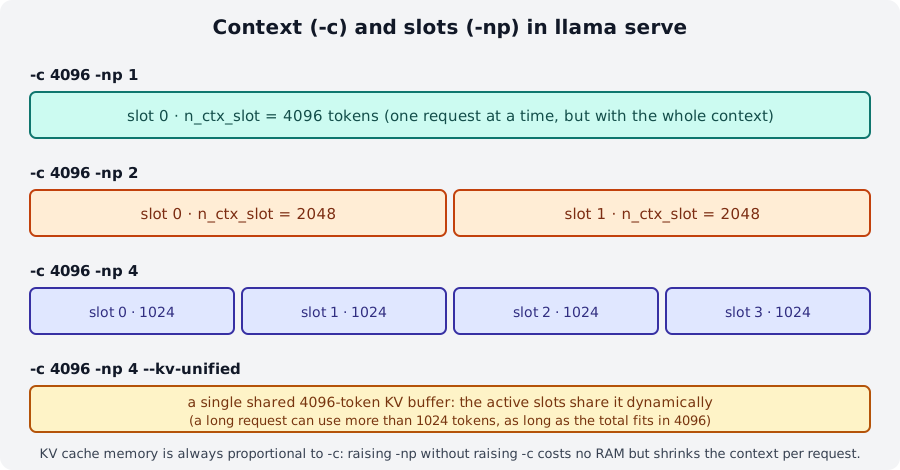
-c context is the total: each slot gets -c / -np. With --kv-unified the slots share a single buffer.The context is split among the slots
-c 4096 -np 2 → n_ctx_slot = 2048; -c 2048 -np 2 → n_ctx_slot = 1024; -c 2048 -np 4 → 512.
A request that exceeds n_ctx_slot is truncated or rejected ("truncated": true, or the error
"the request exceeds the available context size"). If you want 4 requests of 8k tokens you need -c 32768,
and the KV cache costs RAM/VRAM in proportion (module 05). Alternatively --kv-unified (-kvu) uses a single
shared buffer: the active slots share the 4096 tokens dynamically, and a long request can use
more than its "share" as long as the total fits in the context. It is the default when -np is auto;
--kv-unified-per-slot N sizes the buffer as n_parallel × N.
Prompt cache (cache_prompt, on by default): for every new request the server picks the slot whose
previous prompt is most similar to the new one (--slot-prompt-similarity, default 0.10) and reuses the common
prefix already in the KV cache: that is the cache_n in timings. In a chat the common prefix is the whole previous
conversation, so only the last message gets processed. When you repeat an identical request
cache_n goes from 0 to (almost) the whole prompt and prompt_ms collapses. Idle slots are saved to RAM
(--cache-ram, default 8192 MiB) so the cache survives even when the slot serves another user.
--cache-reuse N goes beyond the prefix: when the new prompt contains pieces already seen but shifted (typical
of code completion, where text is inserted mid-file) it reuses chunks of at least N tokens by shifting
the KV cache (KV shifting) instead of recomputing them. Per request: n_cache_reuse. Keep in mind: cache reuse
can make results not bit-for-bit identical between one call and the next (the prompt processing and
generation logits do not match exactly); for deterministic experiments use "cache_prompt": false.
Other slot-related flags: --threads-http N (HTTP threads, automatic by default), -to (timeout, 3600 s),
--context-shift (context shifting for endless generation, off by default),
--sleep-idle-seconds N (unloads the model after N seconds of inactivity and reloads it on the first request).
7. Security: keys, host and what NOT to expose¶
By default the server listens only on 127.0.0.1. To reach it from another machine you need --host 0.0.0.0
(or the interface's IP): from then on anyone on the network can use it. Minimum rules:
--api-key: without a keyGET /v1/modelsanswers401 {"error":{"code":401,"message":"Invalid API Key","type":"authentication_error"}};/healthstays public. Several keys separated by commas, or--api-key-file(one per line,#comments).- On the internet always put a reverse proxy with TLS in front (Caddy, nginx: module 09) with rate
limits;
--ssl-key-file/--ssl-cert-fileexist but do not replace the proxy. - Never expose with
--host 0.0.0.0:--tools/--agent(they give the model file read/write and shell access on the server machine),--mcp-servers-config/--mcp-servers-json,--ui-mcp-proxy,--props(changing properties via POST),--slot-save-path(writes files). The documentation marks them "do not enable in untrusted environments" and, when they are on, restricts CORS tolocalhost. /slotsshows the prompts other users are processing: on a shared server consider--no-slots.- CORS: by default the server reflects any
Originwith credentials; with a web frontend on another domain set--cors-origins https://tuo-frontend, locally--cors-origins localhost. --no-webuiif you only need the API;--api-prefix /llmto mount it under a path;--path DIRserves your own static files in place of the UI.
8. Several models with one server: router mode¶
Started without a model, llama serve becomes a router that launches a child process for every requested
model and forwards requests based on the "model" field (in POSTs) or ?model= (in GETs):
llama serve                              # models from the HF cache (the ones from `llama serve -cl`)
llama serve --models-dir ./modelli       # all the .gguf files in a folder (subfolders for mmproj or shards)
llama serve --models-preset modelli.ini  # preset with per-model options
llama serve --models-max 2 --no-models-autoload -c 8192 -np 2   # (1)!
- At most 2 models loaded together (default 4,
0unlimited); no automatic loading on the first request; generic flags (-c,-np,-ngl…) are inherited by every instance.
curl -s http://127.0.0.1:8080/v1/models | jq '.data[].id'     # available names
curl -s http://127.0.0.1:8080/models | jq '.data[] | {id, status}'   # with status: unloaded/loading/loaded/sleeping
curl -s -X POST http://127.0.0.1:8080/models/load -d '{"model":"ggml-org/Qwen3.5-0.8B-GGUF"}'   # {"success":true}
curl -s -X POST http://127.0.0.1:8080/models/unload -d '{"model":"…"}'
curl -s http://127.0.0.1:8080/v1/chat/completions -H "Content-Type: application/json" \
  -d '{"model":"ggml-org/Qwen3.5-0.8B-GGUF","messages":[{"role":"user","content":"Ciao"}]}'
GET /models?reload=1 rereads the sources; GET /models/sse sends real-time events on status changes;
POST /models downloads a new model and DELETE /models removes it from the cache. An INI preset has a
[*] section with the defaults and one section per model (keys = flag names without dashes, e.g. c = 4096,
n-gpu-layers = 99, chat-template = chatml, load-on-startup = true; for a file not in the cache model = /percorso.gguf
or hf-repo = user/repo:Q4_K_M). Precedence: command-line flags > model section > [*]. The model selector
appears in the web UI.
9. Tool calling¶
With tools in the body (OpenAI format: type: "function", name, description, parameters in JSON Schema) the
server inserts the tool descriptions into the prompt through the chat template, constrains the output to the model's
call format and parses the answer, returning tool_calls instead of text. The model does not
execute anything: you run the function and send the result back with role: "tool".
flowchart TB
    A[Client: messages + tools] --> B[llama serve<br/>template + grammar]
    B --> C{Does the model<br/>call a tool?}
    C -- no --> D[Final answer<br/>finish_reason: stop]
    C -- yes --> E[tool_calls: name + arguments<br/>finish_reason: tool_calls]
    E --> F[The client runs the function]
    F --> G["messages += assistant(tool_calls) + tool(result)"]
    G --> B
Request and response (Qwen3.5-0.8B, native Qwen/Hermes format):
curl -s http://127.0.0.1:8080/v1/chat/completions -H "Content-Type: application/json" -d '{
  "messages": [{"role":"system","content":"Usa gli strumenti quando servono."},
               {"role":"user","content":"Che tempo fa a Bologna?"}],
  "tools": [{"type":"function","function":{"name":"get_weather","description":"Restituisce il meteo attuale di una città",
             "parameters":{"type":"object","properties":{"city":{"type":"string"}},"required":["city"]}}}],
  "temperature": 0, "chat_template_kwargs": {"enable_thinking": false}}'
{"choices":[{"finish_reason":"tool_calls","index":0,
  "message":{"role":"assistant","content":"",
   "tool_calls":[{"type":"function","function":{"name":"get_weather","arguments":"{\"city\":\"Bologna\"}"},
                  "id":"KS6PVNBorsLmJXoEUVZC1q13g2jiYdDi"}]}}], "usage":{"prompt_tokens":297,…}}
Note prompt_tokens: 297 versus 27 for the same question without tools: the tool descriptions cost
tokens on every call. Second round, with the result:
{"messages":[…,
  {"role":"assistant","content":"","tool_calls":[{"id":"KS6P…","type":"function","function":{"name":"get_weather","arguments":"{\"city\":\"Bologna\"}"}}]},
  {"role":"tool","tool_call_id":"KS6P…","content":"{\"city\":\"Bologna\",\"temperatura_c\":24.5,\"condizioni\":\"sereno\"}"}], "tools":[…]}
"finish_reason":"stop", "content":"A Bologna il tempo è sereno con una temperatura di 24,5°C.".
tool_choice:"auto"(default),"none","required", or{"type":"function","function":{"name":"…"}}. With a small model like Qwen3.5-0.8B"required"may not force the call and"none"may make the raw<tool_call>…text appear incontent: how welltool_choiceis respected depends on the model and its template."parallel_tool_calls": trueenables several calls in the same answer (only if the template supports it:chat_template_caps.supports_parallel_tool_callsin/props).- Recognized native formats (docs/function-calling.md): Llama 3.1/3.2/3.3, Functionary v3.1/v3.2, Hermes 2/3 and
Qwen 2.5 (Coder too), Mistral Nemo, Firefunction v2, Command R7B, DeepSeek R1 (with the correct template), plus
recent models (Qwen3, gpt-oss, GLM, Granite…). For the others there is the Generic format (in the log:
Chat format: Generic), more expensive in tokens and less reliable. If the GGUF template is not "tool-aware",--chat-template-filewith the right one (or--chat-template chatml) fixes it; checkchat_template_caps.supports_tools. - Avoid aggressively quantized KV caches (
-ctk q4_0): they greatly degrade the accuracy of the calls. /v1/messagesalso supportstoolsandtool_choice({"type":"auto"},{"type":"any"},{"type":"tool","name":"…"}).
Summary¶
| Concept | Where |
|---|---|
| Startup, port, alias, key | llama serve -hf … --port --host -a --api-key, LLAMA_ARG_* variables |
| Ready? | GET /health → 200/503 |
| OpenAI chat | POST /v1/chat/completions (+stream, tools, response_format, chat_template_kwargs) |
| Speed and cache | timings.prompt_per_second, predicted_per_second, cache_n; --cache-reuse |
| Parallelism | -np N → N slots, context -c/N each; --kv-unified; /slots; --metrics |
| Alternative formats | /v1/messages (Anthropic), /v1/responses, native /completion |
| Embedding / rerank | --embedding + /v1/embeddings; --rerank --pooling rank + /v1/rerank |
| Several models | llama serve without a model, --models-dir, --models-preset, --models-max, /models/load |
Common mistakes¶
The per-request context is smaller than expected
You set -np 4 and long answers get truncated: each slot has -c/4. Raise -c, reduce -np,
or use --kv-unified. The real value is in the log (n_ctx_slot) and in /props → default_generation_settings.n_ctx.
The model 'thinks' and uses up all the tokens
With thinking models (Qwen3.5, DeepSeek R1…) a small max_tokens ends up in the reasoning and content stays
empty (finish_reason: length). Turn thinking off (chat_template_kwargs.enable_thinking=false, -rea off,
--reasoning-budget N) or raise max_tokens.
/v1/embeddings answers 501
You need to start with --embedding and an embedding model (with pooling). The same goes for /v1/rerank with --rerank --pooling rank
and /metrics with --metrics.
The model field is ignored… until it is not
With a single model you can write model: "gpt-4" and it works. In router mode the name must match an
id from /v1/models, otherwise you get an error. Use -a to give stable names.
Server reachable by everyone
--host 0.0.0.0 without --api-key or a proxy exposes the model (and, with --tools, the filesystem) to the network.
SSL error with -hf on the installer binary (Ubuntu)
E get_repo_commit: error: HTTPLIB failed: SSL connection failed → export SSL_CERT_FILE=/etc/ssl/certs/ca-certificates.crt.
Labs in this module¶
- Lab 04-01: Server and web UI: startup, UI, curl on the endpoints.
- Lab 04-02: OpenAI-compatible clients: the
openaiSDK in Python andfetchin Node, streaming included. - Lab 04-03: Load and parallelism: measure latency and throughput with
-np 1/2/4. - Lab 04-04: Tool calling: a weather agent with a fake function and then a real one.
Check¶
- You start with
-c 8192 -np 4: how many context tokens does each request get? And with--kv-unified? - What does
timings.cache_nindicate, and why is it high in the second request of a chat? - Which endpoint do you use in a startup script to know whether the model is loaded, and what code does it return meanwhile?
- How do you turn off Qwen3.5's "thinking" for a single request without restarting the server?
- Which flags must never be combined with
--host 0.0.0.0on an untrusted network? - What changes in the request body when the server is in router mode?
- In tool calling, who runs the
get_weatherfunction? With whichroledo you send the result back? - How do you get Prometheus metrics, and what is the name of the counter of generated tokens?
Solutions
- 2048 tokens per slot (
n_ctx_slot = 8192/4). With--kv-unifiedthe slots share a single 8192 buffer: a request can use more if the other slots are free. - It is the number of prompt tokens reused from the KV cache without reprocessing them. In a chat the new prompt starts with the whole previous conversation, already in the cache: only the last message is processed.
GET /health:503with"Loading model"while loading,200 {"status":"ok"}when ready.- In the body:
"chat_template_kwargs": {"enable_thinking": false}(for the whole server:-rea off). --tools/--agent,--mcp-servers-*,--ui-mcp-proxy,--props; and in any case never without--api-keyor a proxy.- The
"model"field becomes required and must match an id from/v1/models(in GETs:?model=). - The client (your code). The result goes back in a
{"role":"tool","tool_call_id":…,"content":…}message after theassistantmessage that contains thetool_calls. - Start with
--metricsand readGET /metrics; the counter isllamacpp:tokens_predicted_total.
References¶
- llama.app: Running a server, API server, Web UI
- tools/server/README.md: complete reference of flags and endpoints
- docs/function-calling.md: tool calling and supported formats
- tools/ui/README.md and the web UI discussion
- OpenAI Chat Completions API, Anthropic Messages API