Module 03: Models, GGUF and quantization¶
In module 00 you saw what a GGUF is and what quantizing means;
in module 02 you downloaded a ready-made GGUF. Here you close the loop: how to
choose a model on Hugging Face by reading its model card, what really sets Q4_K_M apart from Q4_0 and
IQ4_XS, and how to produce a GGUF from the original weights: conversion, importance matrix,
quantization, quality measurement with perplexity and KL-divergence, splitting into shards, and LoRA adapters.
What you will learn¶
- Search for GGUFs on Hugging Face (filters
library=gguf,apps=llama.cpp) and read a model card: quantizations, sizes, license, imatrix. - The structure of a GGUF file in detail: header, metadata, tensor index, aligned data.
- The quantization families: legacy (
Q4_0,Q8_0), K-quants (Q2_K…Q6_K, S/M/L variants),IQ*, ternary,F16/BF16. - The pipeline
safetensors → convert_hf_to_gguf.py → GGUF F16 → llama-imatrix → llama quantize → GGUF Q4. - Measure the loss:
llama perplexityand--kl-divergence. llama-gguf-splitfor models that exceed Hugging Face's size limits;--loraandllama-export-lora.
1. Finding and reading a model on Hugging Face¶
Hugging Face is the warehouse: tens of thousands of GGUF repositories. Useful searches:
| Search | URL |
|---|---|
| All GGUFs, most popular first | huggingface.co/models?library=gguf&sort=trending |
| Compatible with llama.cpp (from the Apps filter) | huggingface.co/models?apps=llama.cpp&sort=trending |
| From one organization | huggingface.co/ggml-org (official), unsloth, bartowski, LiquidAI |
| By task | pipeline_tag=text-generation, sentence-similarity (embedding), text-ranking (reranker) |
On a model card, read in this order:
- The base model (
base_modelin the metadata): who trained it, how many parameters, native context, license. The GGUF inherits the license of the original model even if the GGUF repo's card does not repeat it. - The file list (Files and versions): one file per quantization (
Nome-Q4_K_M.gguf,…-Q8_0.gguf), anymmproj-*.gguf(multimodal projector),mtp-*oreagle3-*(drafts for speculative decoding), folders with shards-00001-of-00003.gguf. The sizes are right there: they are the "weights" in the memory formula. - How the quantizations were made: with or without imatrix (§ 6), from which starting precision, with
which llama.cpp build. The
bartowskiandunslothcards include size tables and recommendations ("UD-Q4_K_XL" is an unsloth recipe that keeps sensitive tensors at more bits). - The Use this model → llama.cpp button generates the line
llama cli -hf …:QUANT(orllama serve).
A serious card states the build used and the imatrix calibration file; an empty card with a single
Q4_K_M and no explanation is a signal to look elsewhere. When in doubt, the ggml-org repository with the
same name is the safe choice.
2. Inside the file: the GGUF structure¶
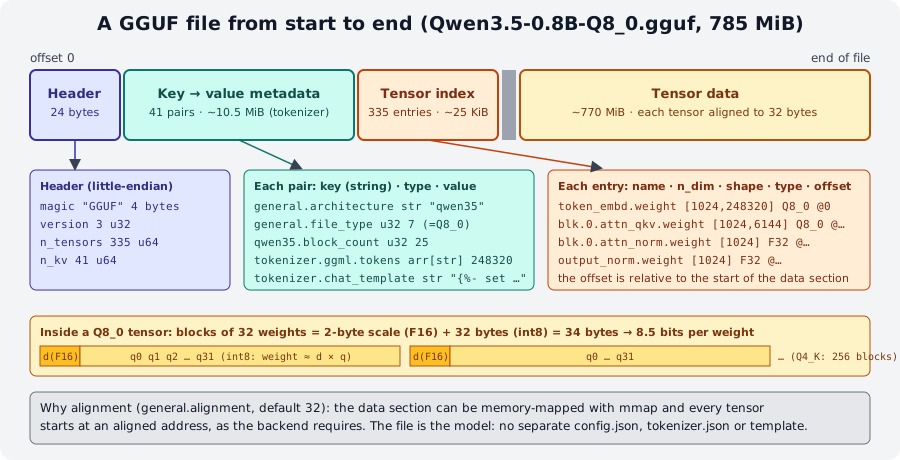
GGUFReader: 41 metadata pairs, 335 tensors, data starting at offset 10,962,464 (alignment 32).Four sections, always in the same order:
- Header:
GGUF(4 bytes), version (3), number of tensors, number of key-value pairs. - Metadata: typed
key → valuepairs (u32,f32,str,arr…). The heaviest are the tokenizer arrays (tokenizer.ggml.tokens, 248,320 strings) and the chat template: in the test model they take about 10.5 MiB; the rest of the file is weights. - Tensor index: for each tensor, name (
blk.0.attn_qkv.weight), dimensions, type (F32,Q8_0,Q4_K…) and offset from the start of the data section. The same file mixes different types: the norms stayF32, the embedding and output can have more bits than the inner blocks. - Data: the tensors one after another, each aligned to
general.alignment(32 bytes), so the file can be memory-mapped and every tensor is directly usable by the backend.
The type of a quantized tensor is a block structure: Q8_0 = 32 int8 weights + one F16 scale
(34 bytes per 32 weights = 8.5 bits/weight); Q4_0 = 32 4-bit weights + F16 scale (18 bytes = 4.5 bpw). The K
families use super-blocks of 256 weights with scales and minimums that are themselves quantized (6 bits): this is why
Q4_K reaches 4.5 bpw with better quality than Q4_0. The tools to read all of this (gguf-dump,
GGUFReader) are in lab 00-02.
3. The quantization families¶
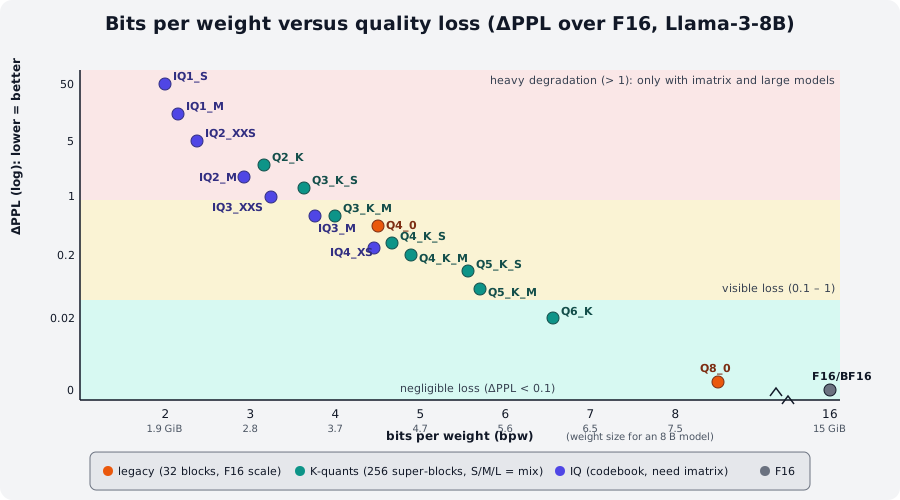
llama quantize --help and tools/perplexity/README.md; the IQ types use imatrix). Below 4 bits the curve shoots up.| Family | Types | Bits/weight | How it works | When |
|---|---|---|---|---|
| Float | F32, F16, BF16 |
32 / 16 | no quantization; BF16 is the most common training format, F16 the historical llama.cpp one |
starting point for quantizing; inference only on large GPUs |
| Legacy | Q4_0, Q4_1, Q5_0, Q5_1, Q8_0 |
4.5 / 5 / 5.5 / 6 / 8.5 | blocks of 32, F16 scale (_1: also a minimum) |
Q8_0: almost lossless, the "practical reference"; Q4_0: the fastest on ARM CPUs and with repacking, and the format of Google's QAT models |
| K-quants | Q2_K, Q3_K_S/M/L, Q4_K_S/M, Q5_K_S/M, Q6_K |
3.2 → 6.6 | super-blocks of 256, 6-bit scales; S/M/L = mix: how many "sensitive" tensors (attention V, ffn_down, embedding, output) are kept at more bits |
Q4_K_M is the standard; Q5_K_M/Q6_K if you have memory; Q3_K_M to fit a large model |
| I-quants | IQ1_S/M, IQ2_XXS/XS/S/M, IQ3_XXS/XS/S/M, IQ4_XS/NL |
1.6 → 4.7 | codebook: weights are indices into a table of optimal vectors; designed to be used with the imatrix (without it, quality collapses); a bit slower on CPU | IQ4_XS ≈ a smaller Q4_K_S; IQ2/IQ3 for models ≥ 30 B that would not fit otherwise |
| Ternary | TQ1_0, TQ2_0 |
1.7 / 2.1 | weights in {-1, 0, +1}: only for models trained as ternary (BitNet, Maple 20B-A1B) | useless on normal models |
| MXFP4 | MXFP4_MOE |
~4.25 | FP4 microscaling in blocks of 32: gpt-oss's native format for the MoE experts | models distributed this way |
How to read a name: Q4_K_M = 4 bits, K family, Medium mix. The final letter is not the size of the
model but how many tensors stay at higher precision: the llama quantize log shows it line by line
(test model, Q8_0 → Q4_K_M):
[   2/ 335] token_embd.weight      - [  1024, 248320], type = q8_0, converting to q6_K .. size = 257.66 MiB -> 198.93 MiB
[   5/ 335] blk.0.attn_qkv.weight  - [  1024,   6144], type = q8_0, converting to q6_K .. size =   6.38 MiB ->   4.92 MiB
[   6/ 335] blk.0.ffn_down.weight  - [  3584,   1024], type = q8_0, converting to q6_K .. size =   3.72 MiB ->   2.87 MiB
[   7/ 335] blk.0.ffn_gate.weight  - [  1024,   3584], type = q8_0, converting to q4_K .. size =   3.72 MiB ->   1.97 MiB
[   4/ 335] blk.0.attn_norm.weight - [  1024], type = f32, size = 0.004 MiB
llama_model_quantize_impl: model size  =   784.52 MiB (8.52 BPW)
llama_model_quantize_impl: quant size  =   506.34 MiB (5.50 BPW)
Embedding, attn_qkv and ffn_down at q6_K, the rest at q4_K, the norms untouched: the result is 5.50 bpw on average, not 4.5.
On a 0.8 B model the 248,320-row embedding is 40 % of the file, which is why the reduction is "only"
35 %; on an 8 B the same Q4_K_M reaches 4.89 bpw (4.58 GiB).
Sizes for an 8 B model according to llama quantize --help (Llama-3-8B, +ppl = perplexity increase
over F16):
| Type | Size | +ppl | Type | Size | +ppl |
|---|---|---|---|---|---|
Q2_K |
2.96 GB | +3.52 | Q4_K_M |
4.58 GB | +0.18 |
Q3_K_S |
3.41 GB | +1.63 | Q5_K_S |
5.21 GB | +0.10 |
Q3_K_M |
3.74 GB | +0.66 | Q5_K_M |
5.33 GB | +0.06 |
Q3_K_L |
4.03 GB | +0.56 | Q6_K |
6.14 GB | +0.02 |
Q4_0 |
4.34 GB | +0.47 | Q8_0 |
7.96 GB | +0.003 |
Q4_K_S |
4.37 GB | +0.27 | F16 |
14.0 GB | 0 |
IQ4_XS |
4.25 bpw | (with imatrix ≈ Q4_K_S) |
IQ2_M |
2.7 bpw | (imatrix only) |
Rules of thumb
- Above 4 bits (
Q4_K_Mand up) the loss is small and often not measurable in real use;Q8_0is indistinguishable fromF16and serves as the reference to measure the others. - Below 4 bits the loss grows fast, and the smaller the model, the faster:
Q2_Kon a 0.8 B is unusable (you will measure it: perplexity ×13), on a 70 B it is acceptable. - A larger model at fewer bits almost always beats a smaller one at more bits, for the same memory.
Q4_0is not simply "worse": on ARM CPUs (Apple, Snapdragon, Raspberry Pi) and with x86 repacking it is the fastest format, and QAT models (quantization-aware training, e.g.gemma-3-*-qat) are trained specifically to lose nothing inQ4_0.
4. The pipeline: from Hugging Face to a quantized GGUF¶
flowchart TB
    HF["Hugging Face repo<br/>config.json · tokenizer.json<br/>model-*.safetensors (BF16)"]
    C["convert_hf_to_gguf.py<br/>--outtype f16 | bf16 | q8_0<br/>(source or Docker :full)"]
    G16["GGUF F16/BF16<br/>2 bytes/weight"]
    IM["llama-imatrix<br/>-f calibrazione.txt<br/>→ imatrix.gguf"]
    Q["llama quantize<br/>[--imatrix imatrix.gguf]<br/>type Q4_K_M"]
    G4["GGUF Q4_K_M<br/>~0.6 bytes/weight"]
    P["llama perplexity<br/>--kl-divergence"]
    HF --> C --> G16 --> Q --> G4
    G16 --> IM --> Q
    G16 -. reference .-> P
    G4 --> P
Three programs, three moments: convert (Python, once), calibrate (optional but recommended below 4 bits), quantize (C++, a few minutes, repeatable for every type). Then you measure.
4.1 Converting: convert_hf_to_gguf.py¶
The script lives only in the llama.cpp source (and in the full Docker image): it is not in the llama binary or in the
tarballs. It needs Python with torch, transformers, gguf, safetensors:
git clone https://github.com/ggml-org/llama.cpp && cd llama.cpp
python3 -m venv .venv && source .venv/bin/activate
python3 -m pip install -r requirements.txt          # (1)!
python3 convert_hf_to_gguf.py --outtype f16 --outfile modello-f16.gguf ./cartella-del-modello-hf   # (2)!
python3 convert_hf_to_gguf.py --outtype bf16 --outfile gemma-4-E2B-it-bf16.gguf --remote google/gemma-4-E2B-it  # (3)!
python3 convert_hf_to_gguf.py --mmproj --outtype q8_0 --outfile mmproj-gemma-4-E2B-it-Q8_0.gguf --remote google/gemma-4-E2B-it  # (4)!
- Installs torch (CPU) and everything else: ~2 GB. With
uv:uv pip install -r requirements.txt --index-strategy unsafe-best-match. The documentation warns that the requirements pin transformers 4 but the newest models (Gemma 4) want transformers 5:pip install -U transformersis safe. - The folder is the clone of the HF repo (
hf download org/modello --local-dir cartella).--outtype:f16,bf16,f32,q8_0,tq1_0,tq2_0,auto(= the original precision, usually bf16, the recommended choice). --remotereads the safetensors directly from Hugging Face without downloading them all (gated models needHF_TOKEN).--mmprojproduces the multimodal projector (vision/audio encoder + projection), to keep atq8_0orbf16: it is small and its quality affects everything.
The script recognizes the architecture from config.json (architectures: ["Qwen3ForCausalLM"], …): if the model is
new and not supported, the error is Model … is not supported and the fix is to update the source (new
architectures are added almost every week). The output file already contains tokenizer, chat template and
metadata: it is a complete GGUF, runnable with llama cli -m, just large. New in 0.4.1 according to the release
notes: the --fuse-qkv option, which fuses the three attention tensors Q, K, V into a single attn_qkv.weight
(as in the test model: blk.0.attn_qkv.weight [1024, 6144]), for more efficient matrix multiplications.
Without installing anything: the Hugging Face space GGUF-my-repo converts and quantizes in the browser (it follows master
every 6 hours) and publishes the result in a repo of yours; the ghcr.io/ggml-org/llama.cpp:full image contains the
scripts (docker run -v ./modelli:/models ghcr.io/ggml-org/llama.cpp:full --all-in-one /models/ 7B is the example
from the documentation, module 01).
4.2 Quantizing: llama quantize¶
llama quantize [opzioni] modello-f16.gguf [modello-Q4_K_M.gguf] TIPO [nthreads]
llama quantize modello-f16.gguf modello-Q4_K_M.gguf Q4_K_M 8
llama quantize --imatrix imatrix.gguf modello-f16.gguf modello-IQ3_M.gguf IQ3_M
llama quantize --dry-run modello-f16.gguf Q4_K_M         # only the final size, in one second
You write the type in upper or lower case (q4_k_m), or as a number (15). The output file is optional
(default ggml-model-TIPO.gguf). Options you will use:
| Option | Effect |
|---|---|
--imatrix f.gguf |
uses the importance matrix (§ 4.3); --include-weights/--exclude-weights nome to limit it to some tensors |
--pure |
no mix: all tensors at the given type (useful for clean experiments) |
--leave-output-tensor |
does not quantize output.weight: larger file, slightly better quality |
--output-tensor-type T, --token-embedding-type T |
explicit type for output and embedding (q8_0, q6_k…) |
--tensor-type NOME=T |
rules for single tensors, also with regex ("\.(\d*[13579])\.attn_k=q5_k"): this is how the UD-* recipes are made |
--allow-requantize |
allows starting from an already quantized file (Q4_K_M → Q2_K): worse quality, avoid it when you have the F16 |
--keep-split |
keeps the shards of the input file |
--prune-layers 20,21,22, --override-kv |
surgery: removes layers, changes metadata (advanced) |
--max-buffer-size MiB |
limits RAM per tensor (default 8192): to quantize large models on small machines |
On the test model (785 MiB Q8_0, 3 threads) each quantization took 20-60 s and about 1.5 GB of peak
RAM: quantization does not run the model, it walks through the tensors one by one. Starting from an already
quantized file is refused by default (llama_model_quantize: failed to quantize: requantizing from type
q8_0 is disabled); with --allow-requantize it works, and starting from Q8_0 (almost lossless) is an acceptable
shortcut for the labs. To publish a model you always start from F16/BF16.
4.3 The importance matrix: llama-imatrix¶
Block quantization treats all weights the same way. But not all of them matter the same: some
multiply large activations, others stay almost inert. The imatrix (importance matrix) runs the
F16 model on a calibration text and records, for every column of every tensor, the sum of the squares
of the activations; llama quantize --imatrix uses it to choose scales and codes that minimize the error
where it hurts. The effect is modest above 4 bits and decisive below (you will see it in lab 03-03: Q2_K without
imatrix perplexity 155, with imatrix 34).
llama-imatrix is not in the llama binary: it is in the release tarball (or in the built source).
~/llama-lab/rel/llama-b11046/llama-imatrix -m modello-f16.gguf -f calibrazione.txt -o imatrix.gguf -c 512 -ngl 99
compute_imatrix: tokenizing the input ..
compute_imatrix: computing over 4 chunks, n_ctx=128, batch_size=2048, n_seq=16
[1]14.9594,[2]10.8089,[3]11.4033,[4]12.8878,
Final estimate: PPL = 12.8878 +/- 1.90874
(test model and a 430-word Italian text, -c 128: 1.1 MB of imatrix in 20 s on CPU). Useful
flags: -o (default imatrix.gguf; with the .dat extension the old binary format), --chunks N to stop
early, --in-file a.gguf --in-file b.gguf -o c.gguf to merge matrices from different corpora, --parse-special if
the text contains special tokens, --show-statistics (with -m) for a per-tensor table (Σ(Act²),
% Active, entropy, cosine similarity with the previous layer). The calibration text matters: it must
resemble real use (language, domain, code if needed); public quantizers use mixed corpora of
a few hundred KB (bartowski's calibration_datav3.txt, Wikitext). With a larger -c and more text the
matrix is better, but the documentation notes that beyond a certain point (10 k → 10 M tokens) the gains are minimal.
5. Measuring quality: perplexity and KL-divergence¶
Perplexity (PPL) measures how "surprised" the model is by a text: the exp of the mean log-loss
per token; lower is better. It is not comparable across models with different tokenizers or across different texts; it is
instead perfect for comparing quantizations of the same model on the same text. The contributors' convention
is Wikitext-2 (scripts/get-wikitext-2.sh), split into chunks of -c tokens.
Results on the test model, 384-word Italian text, -c 128 (4 chunks):
| File | MiB | bpw | PPL | Mean KLD | Same top p |
|---|---|---|---|---|---|
Q8_0 (reference) |
784.5 | 8.52 | 11.50 ± 1.81 | 0 | 100 % |
Q4_K_M |
506.3 | 5.50 | 12.50 ± 1.97 | 0.074 | 85.3 % |
Q4_0 |
478.8 | 5.20 | 14.66 ± 2.34 | – | – |
Q2_K |
399.4 | 4.34 | 154.9 ± 30.4 | 2.36 | – |
Q2_K + imatrix |
399.4 | 4.34 | 34.09 ± 6.08 | 0.83 | – |
(The bpw values are high because the 248,320-row embedding stays at 6-8 bits and is almost half the file.)
KL-divergence is finer: it compares, token by token, the whole probability distribution of the quantized model with that of the reference, not just the loss on the correct token. Two passes:
llama perplexity -m Q8_0.gguf   -f testo.txt -c 128 --kl-divergence-base base.kld              # saves the logits (125 MB for 512 tokens × 248 320 vocab!)
llama perplexity -m Q4_K_M.gguf -f testo.txt -c 128 --kl-divergence-base base.kld --kl-divergence
Mean PPL(Q)                   :  12.503109 ±   1.964999
Mean PPL(base)                :  11.497455 ±   1.807024
Mean PPL(Q)/PPL(base)         :   1.087468 ±   0.026184
Mean    KLD:   0.074038 ±   0.005346
Mean    Δp: -2.055 ± 0.481 %
RMS Δp    :  7.886 ± 0.816 %
Same top p: 85.317 ± 2.234 %
How to read it: KLD 0 = identical distributions (for an 8 B, Q8_0 ≈ 0.001, Q4_K_M ≈ 0.03, Q2_K ≈ 0.4);
Δp is the change in probability of the correct token (negative = worse; if the percentiles are symmetric the
quantization only adds noise); Same top p is the percentage of tokens where the two models would choose
the same token at temperature 0: the 85 % of Q4_K_M on a 0.8 B tells you that one answer in seven starts to
diverge already at the first token. The logits file is huge (11 GiB for Llama 2 on Wikitext): use it on short texts.
6. Large files: llama-gguf-split¶
Hugging Face limits single files to 50 GB: large models are published as shards
modello-00001-of-00004.gguf. llama.cpp loads them when you pass only the first one (-m …-00001-of-00004.gguf, or
-hf with the right quant) and finds the others in the same folder. To produce or merge them there is
llama-gguf-split (tarball, not the llama binary):
~/llama-lab/rel/llama-b11046/llama-gguf-split --split --split-max-size 200M Qwen3.5-0.8B-Q4_0.gguf q4split
~/llama-lab/rel/llama-b11046/llama-gguf-split --split --split-max-tensors 128 modello.gguf out    # by number of tensors (default)
~/llama-lab/rel/llama-b11046/llama-gguf-split --merge q4split-00001-of-00004.gguf riunito.gguf
On the test model the 513 MB Q4_0 becomes 4 files (11 + 209 + 199 + 94 MB: the first holds metadata and
tokenizer) and the merge rebuilds a file of identical size (335 tensors). llama quantize
--keep-split keeps the shards while quantizing.
7. LoRA adapters¶
A LoRA is a "lightweight" fine-tuning: instead of retraining the weights, you train two small matrices (A, B)
for some tensors and at runtime add B·A × scale. llama.cpp uses them in two ways:
llama cli -m base-Q4_K_M.gguf --lora adattatore.gguf                    # at runtime, on the quantized model
llama cli -m base.gguf --lora-scaled a.gguf:0.5,b.gguf:0.5               # several adapters with weights
llama serve -m base.gguf --lora a.gguf --lora b.gguf                     # in the server: GET/POST /lora-adapters to enable and weight them on the fly
~/llama-lab/rel/llama-b11046/llama-export-lora -m base-f16.gguf --lora adattatore.gguf -o fuso-f16.gguf   # merges and produces a new GGUF
The adapter must be in GGUF format: convert_lora_to_gguf.py (source) converts it from PEFT
(adapter_config.json + adapter_model.safetensors), or use the GGUF-my-LoRA space. Applying it at runtime
costs some speed and works on a quantized base too; run export-lora on the F16 base and then
quantize the result, for the best quality. Options and details in
tools/export-lora/README.md.
Summary¶
| What | How |
|---|---|
| Find | huggingface.co/models?library=gguf / apps=llama.cpp; card: base model, license, files, imatrix, build |
| Structure | header → metadata (tokenizer, template) → tensor index (type per tensor) → data aligned to 32 |
| Choose the type | Q4_K_M standard · Q5_K_M/Q6_K if you have memory · Q8_0 reference · IQ* + imatrix for large models · Q4_0 on ARM and QAT |
| Convert | source: pip install -r requirements.txt; convert_hf_to_gguf.py --outtype f16\|bf16\|q8_0 [--remote] [--mmproj] [--fuse-qkv] |
| Quantize | llama quantize [--imatrix i.gguf] [--pure] in.gguf out.gguf TIPO [thread]; --dry-run for the size |
| Calibrate | llama-imatrix -m f16.gguf -f testo.txt -o imatrix.gguf (tarball) |
| Measure | llama perplexity -m x.gguf -f testo.txt -c 512; --kl-divergence-base base.kld then --kl-divergence |
| Shards | llama-gguf-split --split --split-max-size 2G / --merge; loading the first shard is enough |
| LoRA | --lora, --lora-scaled f:0.5; llama-export-lora to merge; convert_lora_to_gguf.py |
Common mistakes¶
Quantizing from an already quantized file
Q4_K_M → Q2_K accumulates the error twice, and in fact llama quantize refuses (requantizing from type … is
disabled) until you add --allow-requantize. If you only have a quantized GGUF and need a different type,
download the F16/BF16 (or reconvert from HF). In lab 03-02 we start from Q8_0 with --allow-requantize only because
it is almost lossless.
IQ2/IQ3 (or Q2_K) without imatrix
Perplexity from 155 to 34 on the test model: below 4 bits the imatrix is not an optimization, it is a requirement. And check that the calibration text includes your language and your domain.
Comparing perplexity of different models
Different tokenizers = different tokens = numbers you cannot compare. PPL is for comparing quantizations
of the same model on the same text with the same -c.
Model … is not supported during conversion
The source is older than the model: git pull (and pip install -U transformers if the card asks for it).
If the architecture is truly new, look for an open issue/PR in the repository.
Passing all shards to -m
You pass only the first one (-00001-of-N): the others are found automatically. And do not rename them: the
name contains the index.
llama imatrix: command not found
imatrix, gguf-split, export-lora, tokenize are not in the installer's binary: take them from the release
tarball (module 01) or build them.
Labs in this module¶
- Lab 03-01: From Hugging Face to GGUF: convert a
135 M parameter model to GGUF F16 with
convert_hf_to_gguf.py, check it and quantize it. - Lab 03-02: The quantization scale: three
quantizations of the test model, measured in size, speed (
llama bench) and perplexity. - Lab 03-03: Quantization with imatrix: compute an imatrix on an
Italian text and compare
Q2_Kwith and without it, using perplexity and KL-divergence.
Check¶
- An HF card offers
Q4_K_S,Q4_K_M,IQ4_XSandQ4_0of an 8 B. Which one do you choose for an M-series MacBook, and which for an x86 PC with 8 GB to dedicate to the model? - Why does
Q4_K_Mon the test model reach 5.50 bpw and not ~4.9? - What does the imatrix record, and in which phase is it used?
- You want to produce
IQ3_Mof a model for which you only have theQ4_K_M. What should you do, and what should you not do? - What is the difference between what perplexity measures and what KL-divergence measures?
Same top p: 85 %forQ4_K_M: what does it mean in practice for an application attemperature 0?- You have
modello-00001-of-00003.gguf…-00003-of-00003.gguf: which command uses them and which one merges them? - Which tools in this module are not in the installer's
llamabinary?
Solutions
- On Apple Silicon
Q4_0(optimized ARM kernels, excellent speed) orQ4_K_Mif quality matters more; on x86 with 8 GBQ4_K_M(4.6 GiB + KV cache) orIQ4_XSif you need room for more context. - It is a mix: embedding (40 % of the file for a 248 k vocabulary),
attn_qkvandffn_downstay atq6_K; the norms atF32. On an 8 B the embedding weighs little and the mix drops to 4.9 bpw. - For every tensor, the sum of the squares of the activations that pass through it on a calibration text.
llama quantize --imatrixuses it to weight the quantization error column by column. - Download (or reconvert) the F16/BF16, compute an imatrix, quantize to
IQ3_M --imatrix. Do not use--allow-requantizefrom theQ4_K_M: you would add up two errors. - PPL looks only at the probability of the correct token (one number per text); KLD compares the whole distribution over the entire vocabulary, token by token, against the reference: it also catches changes that do not touch the correct token.
- In 15 % of the steps the quantized model would choose a different token from the reference: answers diverge early even if the average quality is similar.
llama cli -m modello-00001-of-00003.gguf(it finds the others by itself);llama-gguf-split --merge modello-00001-of-00003.gguf unito.gguf.llama-imatrix,llama-gguf-split,llama-export-lora(tarball/source) andconvert_hf_to_gguf.py,convert_lora_to_gguf.py(source or Dockerfullonly).
References¶
- tools/quantize/README.md: full pipeline, options, tables for Llama-3.1-8B
- tools/imatrix/README.md and PR #4861, which introduced the imatrix
- tools/perplexity/README.md: PPL, KLD and the Llama 3 8B scoreboard
- tools/gguf-split/README.md · tools/export-lora/README.md
- docs/models.md: GGUF-my-repo, GGUF-my-LoRA, GGUF-editor
- GGUF specification · k-quants (PR #1684)
- Hugging Face: GGUF models · Recommended models