Module 08: Integrating llama.cpp into applications
So far you have used llama.cpp "from the outside": cli, server, curl. This module brings it inside your application. There are
two paths, the HTTP server and the embedded library, plus a set of ready-made bridges: Python bindings, frameworks such as
LangChain and LlamaIndex, bindings for Node, Swift, .NET, Go, Rust, and packages for iOS and Android. You finish with the most
requested use case, RAG, built only with /v1/embeddings and /v1/chat/completions.
What you will learn
- Choosing between
llama serveandlibllamabased on the product you need to build. - Using the OpenAI SDK (see module 04) and
llama-cpp-python, both in-process and as a server. - Connecting LangChain and LlamaIndex to a local server.
- Reading
include/llama.hand writing a correct C++ generator in 100 lines: model, context, batch, sampler, vocabulary. - Finding your way among bindings for other languages and the mobile options (XCFramework, Android).
- Building a minimal RAG: chunks, embeddings, cosine similarity, top-k, prompt with citations.
1. HTTP server or embedded library?
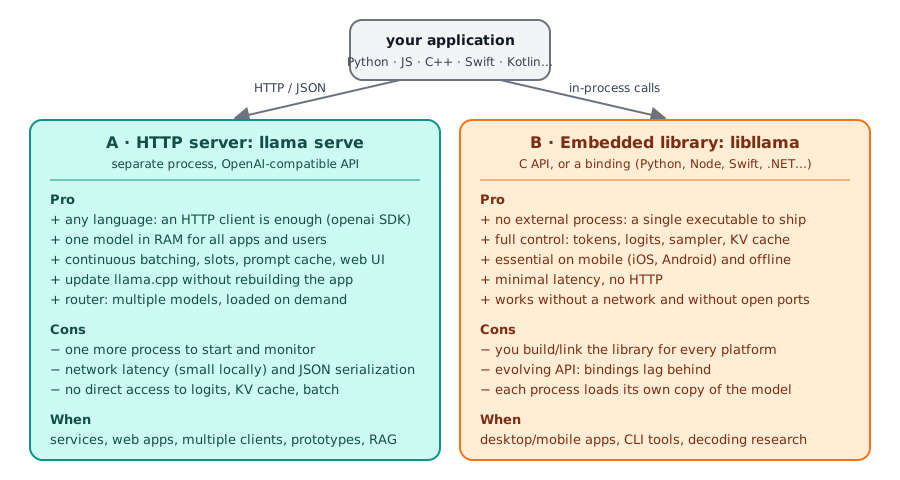
Rule of thumb: start with the server. A llama serve process takes advantage of continuous batching, slots and prompt cache
(module 04), updates with llama update without touching the app, and works from any language with an HTTP client.
Switch to the library when an external process is not acceptable (a mobile or desktop app shipped to end users,
environments without network ports) or when you need things the API does not expose: raw logits, batch control,
KV cache manipulation, custom samplers.
2. Python
OpenAI SDK against the server
This is the path already covered in lab 04-02:
openai.OpenAI(base_url="http://localhost:8080/v1", api_key="no-key-required") and then chat.completions.create,
embeddings.create, streaming. It works for any framework that speaks OpenAI.
llama-cpp-python: the in-process library
llama-cpp-python is the Python binding of libllama (ctypes) with
a high-level API. It ships its own copy of llama.cpp, which pip builds: the version can be
older than your llama (brand-new models may fail to load).
pip install llama-cpp-python                                         # builds llama.cpp (needs cmake + a compiler)
pip install llama-cpp-python --extra-index-url https://abetlen.github.io/llama-cpp-python/whl/cpu   # prebuilt CPU wheel
CMAKE_ARGS="-DGGML_CUDA=on"   pip install llama-cpp-python           # backend: CUDA
CMAKE_ARGS="-DGGML_METAL=on"  pip install llama-cpp-python           # Metal (macOS)
CMAKE_ARGS="-DGGML_VULKAN=on" pip install llama-cpp-python           # Vulkan
CMAKE_ARGS="-DGGML_HIP=on"    pip install llama-cpp-python           # ROCm
CMAKE_ARGS accepts all of llama.cpp's build options (module 01); alternatively pip install -C cmake.args="…".
Prebuilt wheels also exist for CUDA (whl/cu121…cu132), Metal, Vulkan and ROCm. To rebuild:
--upgrade --force-reinstall --no-cache-dir.
from llama_cpp import Llama

llm = Llama(
    model_path="./Qwen3.5-0.8B-Q8_0.gguf",
    n_ctx=4096,          # context (default 512!)
    n_gpu_layers=-1,     # -1 = all layers on the GPU; 0 = CPU
    verbose=False,
)

# raw completion, response in OpenAI format (dict)
out = llm("Q: Name the planets in the solar system? A: ", max_tokens=32, stop=["Q:", "\n"])
print(out["choices"][0]["text"])

# chat: uses the chat template included in the GGUF (or chat_format="chatml", "llama-2", "gemma"...)
r = llm.create_chat_completion(messages=[
    {"role": "system", "content": "Rispondi in italiano, in una frase."},
    {"role": "user", "content": "Cos'è un file GGUF?"},
])
print(r["choices"][0]["message"]["content"])
Other useful functions: Llama.from_pretrained(repo_id="…", filename="*Q8_0.gguf") downloads from Hugging Face
(requires huggingface-hub); response_format={"type": "json_object"} or json_schema for constrained JSON
(module 06); embedding=True + llm.embed(...) for embeddings; for vision a chat handler
(MTMDChatHandler for GGUFs with mmproj and an embedded chat template, or dedicated ones such as Gemma4ChatHandler)
with a raised n_ctx to make room for the image. The package also includes an OpenAI-compatible server:
pip install 'llama-cpp-python[server]' and python3 -m llama_cpp.server --model modello.gguf (port 8000, docs at
/docs), but for serving prefer llama serve: it is more up to date and faster with many clients.
3. Frameworks: LangChain, LlamaIndex
The most robust approach is always the same: point the framework at the server as if it were OpenAI.
For embeddings, both frameworks have an "OpenAI embeddings" class to point at /v1/embeddings
(OpenAIEmbeddings(base_url=…) in LangChain, OpenAIEmbedding(api_base=…) in LlamaIndex) with a server started with
--embedding. The model field is required by the frameworks, but the server ignores it unless it is in router mode.
4. The libllama C API
Everything goes through a single header, include/llama.h
(1646 lines in the current build), which includes ggml.h. Objects are opaque and a program's life is always
this sequence:
sequenceDiagram
    participant P as program
    participant L as libllama
    P->>L: llama_backend_init() · ggml_backend_load_all()
    P->>L: llama_model_load_from_file(path, llama_model_params)
    L-->>P: llama_model* (weights, mmap)
    P->>L: llama_model_get_vocab(model) · llama_tokenize(vocab, text…)
    P->>L: llama_init_from_model(model, llama_context_params)
    L-->>P: llama_context* (KV cache, threads, batch)
    P->>L: llama_sampler_chain_init + llama_sampler_chain_add(top_k, top_p, temp, dist)
    loop for each token
        P->>L: llama_decode(ctx, llama_batch_get_one(tokens, n))
        P->>L: llama_sampler_sample(smpl, ctx, -1)
        L-->>P: llama_token
        P->>L: llama_vocab_is_eog? · llama_token_to_piece(vocab, tok, buf…)
    end
    P->>L: llama_sampler_free · llama_free(ctx) · llama_model_free(model) · llama_backend_free()
The functions, with their real signatures
| Phase | Function (b11046) | Notes |
|---|---|---|
| init | void llama_backend_init(void); ggml_backend_load_all() |
the second loads the dynamic backends (libggml-cpu-*.so, CUDA…) by looking next to the executable |
| model | llama_model * llama_model_load_from_file(const char * path, llama_model_params) |
llama_model_default_params(); fields: n_gpu_layers, load_mode, main_gpu, tensor_split, progress_callback |
| vocabulary | const llama_vocab * llama_model_get_vocab(const llama_model *) |
then llama_vocab_n_tokens, llama_vocab_bos/eos, llama_vocab_is_eog |
| tokenize | int32_t llama_tokenize(vocab, text, text_len, tokens, n_tokens_max, add_special, parse_special) |
with a NULL buffer it returns -N (how many tokens are needed) |
| context | llama_context * llama_init_from_model(model, llama_context_params) |
n_ctx (0 = from the model), n_batch, n_ubatch, n_threads, n_threads_batch, type_k/type_v, embeddings, pooling_type, flash_attn_type |
| batch | llama_batch llama_batch_get_one(llama_token * tokens, int32_t n) |
a single sequence (seq 0), automatic positions; for multiple sequences llama_batch_init(n_tokens, embd, n_seq_max) + llama_batch_free |
| decode | int32_t llama_decode(ctx, batch) |
0 ok; 1 = no room in the KV cache; 2 = aborted; -1 invalid batch; < -1 fatal error. llama_encode for encoder-decoder models |
| sampler | llama_sampler_chain_init(params), llama_sampler_chain_add(chain, s), llama_sampler_init_top_k(k), _top_p(p, min_keep), _min_p, _temp(t), _dist(seed), _greedy() |
the chain takes ownership of the added samplers: do not free them individually |
| sample | llama_token llama_sampler_sample(smpl, ctx, idx) |
idx = -1 = logits of the last token in the batch |
| text | int32_t llama_token_to_piece(vocab, token, buf, length, lstrip, special) |
does not add the \0 terminator; llama_detokenize for a whole sequence |
| chat | llama_model_chat_template(model, name), llama_chat_apply_template(tmpl, msgs, n, add_ass, buf, len) |
it is not a Jinja engine: it supports only a list of known templates. The cli/server use the Jinja engine in libcommon |
| embedding | cparams.embeddings = true, llama_get_embeddings_seq(ctx, seq_id) |
with the model's pooling_type |
| memory | llama_get_memory(ctx), llama_memory_clear(mem, data), llama_memory_seq_rm/cp/… |
the KV cache is called "memory" in the API |
| statistics | llama_perf_context_print(ctx), llama_perf_sampler_print(smpl) |
they go through the logger (llama_log_set) at INFO level |
Names you find in old tutorials that are now DEPRECATED in the header: llama_load_model_from_file →
llama_model_load_from_file, llama_free_model → llama_model_free, llama_new_context_with_model →
llama_init_from_model, llama_token_eos/bos/is_eog → llama_vocab_*, llama_n_vocab → llama_vocab_n_tokens,
llama_n_ctx_train → llama_model_n_ctx_train.
The minimal program
Lab 08-01 contains main.cpp, derived from the repository's examples/simple/simple.cpp,
built against the .so files of the b11046 tarball. This is its core:
llama_backend_init();
ggml_backend_load_all();

llama_model_params mparams = llama_model_default_params();
mparams.n_gpu_layers = 0;
llama_model * model = llama_model_load_from_file("modello.gguf", mparams);
const llama_vocab * vocab = llama_model_get_vocab(model);

const int n_prompt = -llama_tokenize(vocab, prompt.c_str(), prompt.size(), nullptr, 0, true, true);
std::vector<llama_token> tok(n_prompt);
llama_tokenize(vocab, prompt.c_str(), prompt.size(), tok.data(), tok.size(), true, true);

llama_context_params cparams = llama_context_default_params();
cparams.n_ctx = n_prompt + n_predict;  cparams.n_batch = n_prompt;
llama_context * ctx = llama_init_from_model(model, cparams);

llama_sampler * smpl = llama_sampler_chain_init(llama_sampler_chain_default_params());
llama_sampler_chain_add(smpl, llama_sampler_init_top_k(40));
llama_sampler_chain_add(smpl, llama_sampler_init_top_p(0.95f, 1));
llama_sampler_chain_add(smpl, llama_sampler_init_temp(0.8f));
llama_sampler_chain_add(smpl, llama_sampler_init_dist(LLAMA_DEFAULT_SEED));

llama_batch batch = llama_batch_get_one(tok.data(), tok.size());
llama_token nuovo;
for (int n_pos = 0; n_pos + batch.n_tokens < n_prompt + n_predict; ) {
    if (llama_decode(ctx, batch) != 0) break;
    n_pos += batch.n_tokens;
    nuovo = llama_sampler_sample(smpl, ctx, -1);
    if (llama_vocab_is_eog(vocab, nuovo)) break;
    char buf[256];
    int n = llama_token_to_piece(vocab, nuovo, buf, sizeof(buf), 0, true);
    fwrite(buf, 1, n, stdout);
    batch = llama_batch_get_one(&nuovo, 1);
}
llama_sampler_free(smpl); llama_free(ctx); llama_model_free(model); llama_backend_free();
Output on a 6-vCPU machine without a GPU with Qwen3.5-0.8B-Q8_0.gguf (3 threads): Il linguaggio C è uno dei linguaggi di programmazione più
popolari nel mondo… at 5.7 tokens/s, with llama_perf_context_print reporting prompt eval time, eval time and
graphs reused = 22. Note that this is a raw completion: without a chat template the model continues the sentence, it does not
"answer". For a chat you must format the messages with the GGUF's template (through libcommon/Jinja, or by hand).
Building and linking
Three ways, in order of robustness:
add_subdirectory(llama.cpp)in yourCMakeLists.txt: you build the library together with your project, with the same backend options (-DGGML_CUDA=ON…); disable tools and examples withLLAMA_BUILD_TOOLS/EXAMPLES/TESTS=OFF.find_package(llama): aftercmake --install build --prefix …of llama.cpp (orbrew/conda), thellama-config.cmakefile imports thellamatarget with includes and libraries.- Headers + tarball
.sofiles:g++ -std=c++17 -I include main.cpp -L tarball -lllama -lggml -lggml-base. It works (it is the method used in lab 08-01), but the headers must come from the same build as the libraries: the parameter structs change between versions and a mismatch is a silent crash.
In case 3 (and with -DGGML_BACKEND_DL=ON) the backends are separate .so files that ggml_backend_load_all() looks for in the
executable's folder: if the model "does not load" with no backends are loaded, copy or link the libggml-*.so files next to the binary,
or use ggml_backend_load_all_from_path(dir).
5. Other languages and mobile
| Language | Binding | Notes |
|---|---|---|
| Python | llama-cpp-python | section 2 |
| Node.js | node-llama-cpp | prebuilt binaries, CLI npx node-llama-cpp chat |
| React Native | llama.rn | iOS and Android |
| .NET | LLamaSharp | backends as NuGet packages (CPU, CUDA, Vulkan) |
| Go | go-llama.cpp | cgo |
| Rust | llama-cpp-rs | crate llama-cpp-2 |
The full list (Java, Ruby, Swift, Scala, Dart, PHP, Zig…) is in the repository README, Bindings section.
Every binding chases llama.h: check which build it is aligned with before choosing a new model.
iOS / macOS / visionOS / tvOS: every release publishes llama-bNNNNN-xcframework.zip, a prebuilt library you use
in Swift Package Manager without building anything (docs/xcframework.md):
// Package.swift
.binaryTarget(
    name: "LlamaFramework",
    url: "https://github.com/ggml-org/llama.cpp/releases/download/b5046/llama-b5046-xcframework.zip",
    checksum: "c19be78b5f00d8d29a25da41042cb7afa094cbf6280a225abe614b03b20029ab"
)
Replace the build and checksum with those of the release you choose (the checksum is the SHA-256 of the zip:
swift package compute-checksum llama-bNNNNN-xcframework.zip). The example app is examples/llama.swiftui.
Android (docs/android.md): you import the examples/llama.android example into Android Studio (Gradle sync and build);
the JNI binding detects the CPU instructions (up to SME2 on Arm) and loads the compatible kernels. Alternatively,
you cross-compile the CLI with the NDK:
cmake -DCMAKE_TOOLCHAIN_FILE=$ANDROID_NDK/build/cmake/android.toolchain.cmake \
      -DANDROID_ABI=arm64-v8a -DANDROID_PLATFORM=android-28 \
      -DGGML_NATIVE=OFF -DGGML_OPENMP=OFF -DGGML_LLAMAFILE=OFF -DLLAMA_OPENSSL=OFF -B build-android
cmake --build build-android --config Release -j8
and run it through adb with LD_LIBRARY_PATH=lib ./bin/llama-simple -m modello.gguf -c 4096 -p "…". On Termux,
pkg install cmake clang git and the normal build are enough (module 01).
6. Embeddings, vector search, RAG
An embedding is a vector of numbers that represents the meaning of a text: similar texts have nearby vectors.
The server produces them with a dedicated model started with --embedding (options --pooling {none,mean,cls,last,rank}
if the GGUF does not declare it, --embd-normalize default 2 = Euclidean norm):
llama serve -hf ggml-org/embeddinggemma-300M-GGUF:Q8_0 --embedding --port 8080 -c 2048
curl -s http://127.0.0.1:8080/v1/embeddings -H "Content-Type: application/json" \
     -d '{"input":["ciao mondo","hello world"]}'
embeddinggemma-300M-Q8_0.gguf (334 MB) responds with already-normalized 768-dimensional vectors
(usage.prompt_tokens: 9 for the two sentences). With unit-norm vectors, cosine similarity is a dot product.
For reranking there is /v1/rerank with a reranker model and --rerank (e.g. ggml-org/Qwen3-reranker-0.6B-Q8_0-GGUF).
flowchart TB
    D[.txt documents] --> C[chunks<br/>~500 characters]
    C -->|/v1/embeddings| E[768-d vectors]
    E --> I[(index<br/>numpy matrix)]
    Q[question] -->|/v1/embeddings| QE[question vector]
    QE --> S[cosine: index · q]
    I --> S
    S --> K[top-k fragments]
    K --> P[prompt:<br/>numbered fragments + question]
    P -->|/v1/chat/completions| R[answer with citations]
    style I fill:#e0e7ff,stroke:#6366f1,color:#312e81
    style R fill:#ccfbf1,stroke:#0d9488,color:#134e4a
Lab 08-02 implements exactly this flow in
rag_minimo.py (numpy + requests, 130 lines) and runs it with a single server in router mode: an INI preset
tells the router to start the embedding model with embedding = true and the chat model with reasoning = off, and with
--models-max 1 the two models take turns in memory. Result:
RISPOSTA:
Q4_K_M usa circa 4,8 bit per peso.

FONTI:
  [1] quantizzazione.txt (sim 0.600): La quantizzazione riduce la precisione dei pesi…
From a "minimal" RAG to a real one: a vector database (sqlite-vec, Chroma, Qdrant, pgvector) instead of the numpy matrix, overlapping chunks, reranking of the top-k, and evaluation of answer quality.
Summary
| Choice / tool | When |
|---|---|
llama serve + OpenAI SDK |
default: services, web apps, multiple clients, RAG |
llama-cpp-python |
Python scripts and apps without an external process; watch the bundled llama.cpp version |
| LangChain / LlamaIndex | ChatOpenAI(base_url=…), OpenAILike(api_base=…); LlamaCpp for in-process |
C API (llama.h) |
full control: model → vocab → context → batch → decode → sampler → piece |
add_subdirectory / find_package(llama) |
the two CMake ways to link libllama |
| Bindings | node-llama-cpp, llama.rn, LLamaSharp, go-llama.cpp, llama-cpp-rs… |
| Mobile | XCFramework (SwiftPM binaryTarget), examples/llama.android, NDK cross-compile |
| RAG | --embedding + /v1/embeddings (768-d with EmbeddingGemma), cosine, top-k, prompt with citations; /v1/rerank |
Common mistakes
no backends are loaded
You linked against libraries with dynamic backends and ggml_backend_load_all() cannot find them: the libggml-cpu-*.so
(or libggml-cuda.so) files must be in the executable's folder, or use ggml_backend_load_all_from_path().
The GGML_BACKEND_PATH variable takes the path of a single .so file, not a folder.
Header and library from different builds
llama_context_params and llama_model_params change between versions. Compiling with the master header against the
.so of an old release makes parameters get read at the wrong offsets: crashes or absurd behavior. Download the
headers from the build's tag (https://raw.githubusercontent.com/ggml-org/llama.cpp/bNNNNN/include/llama.h).
The router does not load the embedding model
In router mode, /v1/embeddings on EmbeddingGemma fails with failed to load (instance exited with status 1) if
the instance is not started with --embedding. You need the INI preset with embedding = true (lab 08-02) or a dedicated server.
Default n_ctx in llama-cpp-python
Llama(model_path=…) uses n_ctx=512 if you do not set it: long chats and images do not fit. Always pass n_ctx.
llama_chat_apply_template is not Jinja
It supports only the templates known in llama_chat_builtin_templates. For the Jinja templates of recent models use libcommon
(common_chat_templates_*) as the cli and server do, or format by hand.
Double free of the sampler
llama_sampler_chain_add transfers ownership: free only the chain with llama_sampler_free(chain).
Labs in this module
- Lab 08-01: A C++ program with libllama:
main.cpp+CMakeLists.txt, three ways to build, sample output. - Lab 08-02: Minimal RAG:
rag_minimo.pywith/v1/embeddings, numpy and citations; router with presets.
Check
- List two cases where the embedded library is mandatory and two where the server is the better choice.
- Why is
llama_tokenizecalled twice in the minimal program? - What does
llama_decodereturn when the KV cache is full, and how would you handle it? - What is the difference between
llama_batch_get_oneandllama_batch_init? - Why must you not call
llama_sampler_freeon samplers added to a chain? - Which environment variable do you use to build
llama-cpp-pythonwith CUDA? And how do you avoid building altogether? - What do you need to use llama.cpp in an iOS app without building from source?
- In the minimal RAG, why does cosine similarity reduce to a dot product?
Solutions
- Library: mobile apps (iOS/Android), desktop software shipped without external processes, access to logits/KV cache. Server: web backends with multiple clients, updates independent of the app, RAG and tools in different languages.
- The first call, with a NULL buffer, returns
-N, that is, how many tokens are needed; the second fills a vector of that size. - It returns
1("could not find a KV slot"): reduce the batch, raisen_ctxor free space withllama_memory_seq_rm. get_onebuilds a batch for a single sequence (seq 0) with automatic positions, without allocating;initallocates a batch you fill by hand (token, pos, seq_id, logits) for multiple sequences, to be freed withllama_batch_free.- The chain takes ownership of them and frees them when you free the chain: a double free corrupts memory.
CMAKE_ARGS="-DGGML_CUDA=on" pip install llama-cpp-python; to skip building, a prebuilt wheel with--extra-index-url https://abetlen.github.io/llama-cpp-python/whl/cu121(orwhl/cpu).- The release XCFramework (
llama-bNNNNN-xcframework.zip) as abinaryTargetin Swift Package Manager, with URL and checksum. - The server normalizes the vectors (Euclidean norm,
--embd-normalize 2): with norms equal to 1, cos(a,b) = a·b.
References
include/llama.h: https://github.com/ggml-org/llama.cpp/blob/master/include/llama.hexamples/simple/simple.cpp: https://github.com/ggml-org/llama.cpp/blob/master/examples/simple/simple.cppdocs/xcframework.md,docs/android.md: https://github.com/ggml-org/llama.cpp/tree/master/docs- llama-cpp-python: https://github.com/abetlen/llama-cpp-python · docs https://llama-cpp-python.readthedocs.io
- LangChain OpenAI: https://python.langchain.com/docs/integrations/chat/openai/ · LlamaCpp: https://python.langchain.com/docs/integrations/llms/llamacpp/
- LlamaIndex OpenAILike: https://docs.llamaindex.ai/en/stable/api_reference/llms/openai_like/
- Server README (embeddings, rerank, router and presets): https://github.com/ggml-org/llama.cpp/blob/master/tools/server/README.md