Module 06: Structured output: GBNF grammars and JSON Schema¶
A language model produces free text. When that text has to be read by a program (a JSON to
decode, a command to run, a "yes/no" to compare), free text is a problem: one ```json too
many, a missing comma, a "2" instead of 2, and the parser fails. llama.cpp solves the problem
at the root, in sampling: at every token a formal grammar decides which tokens are allowed and
sets the probability of all the others to zero. The model physically cannot leave the format. In this
module you learn to write those grammars (GBNF), to generate them from a JSON Schema, to use them via the CLI and via the
API (response_format) and, above all, to understand what they guarantee and what they do not.
What you will learn¶
- How constrained sampling works and why it is more reliable than "please answer in JSON".
- GBNF syntax: rules, terminals, alternations, repetitions, character ranges, special tokens.
- How llama.cpp converts a JSON Schema into a grammar, and which parts of the schema it ignores.
- How to use it:
--grammar,--grammar-file,-j/--json-schemain the CLI;grammar,json_schemaandresponse_formatin the server;Custom JSONin the web UI. - The limits: sampling cost, slow grammars, "made-up" values in a perfect shape, and when tool calling is a better fit than a grammar.
1. Why constrain the output¶
Try asking Qwen3.5-0.8B to extract data "in JSON" without constraints (temperature 0, thinking off):
curl -s http://127.0.0.1:8080/v1/chat/completions -H "Content-Type: application/json" -d '{
  "messages": [{"role":"system","content":"Estrai i dati in JSON con i campi nome, eta (intero), citta."},
               {"role":"user","content":"Mi chiamo Giulia Ferri, ho trentaquattro anni e vivo a Ferrara."}],
  "temperature": 0, "max_tokens": 80, "chat_template_kwargs": {"enable_thinking": false}}'
Response content: ```json\n[\n {\n "nome": "Giulia Ferri",\n "eta": 24,\n "citta": "Ferrara"\n }\n]\n```.
Three problems in one line: the Markdown block around it, an array instead of an object, and eta: 24 instead
of 34. With response_format and a schema (§ 4) the same request returns exactly
{"nome": "Giulia Ferri", "eta": 24, "citta": "Ferrara"}: the fence is gone, the array is gone, but 24
stays 24. Keep this in mind for the whole module: the grammar controls the shape, not the truth.
The mechanism lives in the sampler. At each step the model produces a logit for each of the ~150k tokens in the
vocabulary; before top-k, top-p and temperature choose, the grammar looks at the state it is in
(what has already been generated) and sets to -∞ every token that cannot continue a valid string. The rest is
normal sampling, renormalized over the surviving tokens.
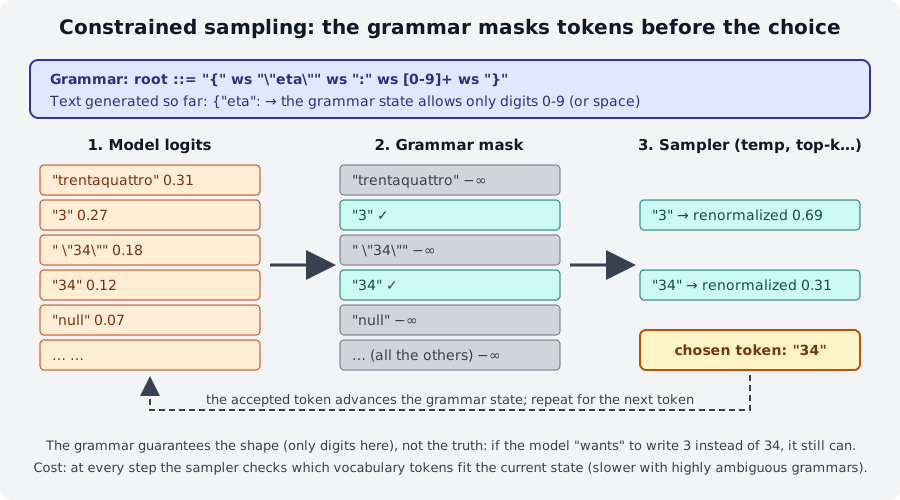
{"eta": the grammar allows only digits: "trentaquattro" and "null" are zeroed out, but between "3" and "34" the model still chooses.Constrained sampling is the basis of three features you have already met or will meet: tool calling in module 04 (the server generates a grammar for the model's call format), the JSON schema in the web UI and, in module 08, reliable extraction for RAG.
2. GBNF syntax¶
GBNF (GGML BNF) is a BNF notation with a few additions borrowed from regular expressions. A grammar is a
list of rules name ::= sequence; the root rule is the starting point and describes the whole output.
| Construct | Example | Meaning |
|---|---|---|
| Rule | root ::= "sì" \| "no" |
the name (lowercase, with hyphens: check-mate) stands for what is on the right |
| Terminal | "1. ", "O-O" |
literal characters (Unicode; escapes \n, \", \xXX, \uXXXX, \UXXXXXXXX) |
| Range | [1-9], [NBKQR], [ぁ-ゟ] |
one character among those listed |
| Negation | [^\n]+ |
any character except those listed |
| Sequence | "1. " move " " move "\n" |
order matters |
| Alternation | pawn \| nonpawn \| castle |
one of the options |
| Group | ("accendi" \| "spegni") " " stanza |
groups items to apply alternations or repetitions |
| Repetitions | x* (0+), x+ (1+), x? (0-1), x{3}, x{2,}, x{0,5} |
as in regex |
| Token | <think>, <[151667]>, !</think> |
a vocabulary token (by text or by id); ! = any other |
| Comment | # text |
up to the end of the line |
Rules can break across lines only inside parentheses or right after a |: a rule broken elsewhere gives
error parsing grammar: expecting ::= at … (you run into it while writing domotica-json.gbnf in lab 06-01).
Three example grammars¶
root ::= (
    "1. " move " " move "\n"                    # first numbered move
    ([1-9] [0-9]? ". " move " " move "\n")+     # the following ones, with a 1-2 digit number
)
move ::= (pawn | nonpawn | castle) [+#]?         # [+#]? = optional check or mate
pawn ::= ([a-h] "x")? [a-h] [1-8] ("=" [QRBN])?
nonpawn ::= [NBKQR] [a-h]? [1-8]? "x"? [a-h] [1-8]
castle ::= "O-O" ("-O")?
root   ::= object
value  ::= object | array | string | number | ("true" | "false" | "null") ws
object ::= "{" ws ( string ":" ws value ("," ws string ":" ws value)* )? "}" ws
array  ::= "[" ws ( value ("," ws value)* )? "]" ws
string ::= "\"" ( [^"\\\x7F\x00-\x1F] | "\\" (["\\bfnrt] | "u" [0-9a-fA-F]{4}) )* "\"" ws
number ::= ("-"? ([0-9] | [1-9] [0-9]{0,15})) ("." [0-9]+)? ([eE] [-+]? [0-9] [1-9]{0,15})? ws
ws     ::= | " " | "\n" [ \t]{0,20}
Note ws ::= | " " | …: the first alternative is empty (no whitespace). And note {0,15} / {0,20} instead
of *: bounding repetitions keeps the grammar fast (§ 5).
Token grammars are for "thinking" models: root ::= <think> thinking </think> .* with
thinking ::= !</think>* accepts a reasoning block and then free text; it works only if <think> is
a single token in the vocabulary, otherwise the grammar does not compile.
Using it from the CLI¶
llama cli -hf ggml-org/Qwen3.5-0.8B-GGUF -st -rea off --temp 0 -n 20 \
  --grammar 'root ::= ("sì" | "no")' -p "Bologna è in Italia? Rispondi sì o no."
# → sì

llama cli -hf ggml-org/Qwen3.5-0.8B-GGUF -st -rea off --temp 0 -n 40 --grammar-file json.gbnf \
  -sys "Estrai citta e gradi in JSON." -p "A Trento oggi ci sono 17 gradi."
The second example shows two things: the JSON is syntactically perfect but the model chose the
field names (city, not citta: the generic JSON grammar does not know them), and -n 40 cut
the output before the final }. The constraint does not stop max_tokens from truncating: always size the
token budget and check finish_reason. For a command format of your own, with a closed vocabulary, see lab 06-01.
3. From JSON Schema to grammar¶
Writing a grammar by hand for a JSON with ten fields is tedious and fragile. llama.cpp contains a converter
(common/json-schema-to-grammar, rewritten in 0.4.1 as common_schema) that turns a subset of
JSON Schema into GBNF, on every request. For the schema
{"type": "array", "minItems": 10, "maxItems": 100,
 "items": {"type": "object", "additionalProperties": false, "required": ["name", "age"],
           "properties": {"name": {"type": "string", "minLength": 1, "maxLength": 100},
                          "age":  {"type": "integer", "minimum": 0, "maximum": 150}}}}
the generated grammar (from the official README) is:
char ::= [^"\\\x7F\x00-\x1F] | [\\] (["\\bfnrt] | "u" [0-9a-fA-F]{4})
item ::= "{" space item-name-kv "," space item-age-kv "}" space
item-age ::= ([0-9] | ([1-8] [0-9] | [9] [0-9]) | "1" ([0-4] [0-9] | [5] "0")) space
item-age-kv ::= "\"age\"" space ":" space item-age
item-name ::= "\"" char{1,100} "\"" space
item-name-kv ::= "\"name\"" space ":" space item-name
root ::= "[" space item ("," space item){9,99} "]" space
space ::= | " " | "\n" [ \t]{0,20}
Read it with the table in § 2: each property becomes a name-kv rule with the literal key (the model
cannot invent keys), required properties appear in schema order, an integer's minimum/maximum
become an alternation of digits (item-age: from 0 to 150), minLength/maxLength become char{1,100},
minItems/maxItems become {9,99} repetitions after the first item.
flowchart TB
    A["JSON Schema<br/>(response_format / json_schema / -j)"] --> B["converter<br/>common_schema"]
    B --> C["GBNF grammar"]
    C --> D["sampler: mask<br/>at every token"]
    E["prompt<br/>(the schema is NOT included)"] --> M["model"]
    M --> D
    D --> F["output valid<br/>against the schema"]
The schema is not shown to the model
The schema only constrains sampling, it is not injected into the prompt. The model "discovers" the structure
token by token, while the grammar closes off paths. If you want it to understand what to write in each
field (what locali means, that prezzo_euro is an integer without separators), describe it yourself in the prompt.
Tool calling is different: there the parameter schema ends up in the prompt through the chat template.
What the converter supports and what it does not (grammars/ README, current build):
| Supported | Not supported or limited |
|---|---|
type (object, array, string, integer, number, boolean, null), enum, const |
additionalProperties is false by default (contrary to the spec: faster, fewer hallucinations); true can produce keys with unescaped newlines |
properties, required, items, minItems/maxItems |
prefixItems broken; uniqueItems, contains/minContains never |
minLength/maxLength, pattern (must start with ^ and end with $) |
no patternProperties; format without uri and email (date, time, date-time, uuid yes) |
minimum, maximum, exclusiveMinimum/Maximum only for integer |
for number the bounds are ignored |
anyOf, oneOf, allOf, local $ref, $defs |
you cannot mix properties with anyOf/oneOf in the same type; nested $ref broken; no remote $ref (only the Python/JS versions) |
not, if/then/else, dependentSchemas, $anchor |
Unsupported features are silently ignored: the schema is accepted, the grammar simply does not
enforce them. If you need them, validate the result in the client (a jsonschema.validate in Python) on top of the grammar.
4. In the API and in the CLI¶
| Where | How |
|---|---|
llama cli / llama completion |
--grammar 'root ::= …', --grammar-file f.gbnf, -j '{"type":"object"}', -jf schema.json |
POST /completion (native) |
grammar field (GBNF string) or json_schema (object) |
POST /v1/chat/completions |
response_format (below) or the same grammar / json_schema as /completion |
| Web UI | Settings → Developer → Custom JSON → {"json_schema": {…}} (lab 04-01) |
| Tool calling | automatic: the server generates the grammar from the model's format and the tools' parameters |
response_format accepts the two OpenAI forms, plus a variant:
{"type": "json_object"}                                         // any JSON (generic json grammar)
{"type": "json_object", "schema": {…}}                          // llama.cpp variant: json_object + schema
{"type": "json_schema", "schema": {…}}                          // form from the llama.app docs
{"type": "json_schema", "json_schema": {"name": "x", "schema": {…}}}   // OpenAI form (the one the SDK produces)
Request with a schema (same prompt as § 1):
curl -s http://127.0.0.1:8080/v1/chat/completions -H "Content-Type: application/json" -d '{
  "messages": [{"role":"system","content":"Estrai i dati in JSON con i campi nome, eta (intero), citta."},
               {"role":"user","content":"Mi chiamo Giulia Ferri, ho trentaquattro anni e vivo a Ferrara."}],
  "temperature": 0, "max_tokens": 80, "chat_template_kwargs": {"enable_thinking": false},
  "response_format": {"type": "json_schema", "schema": {"type": "object",
     "properties": {"nome": {"type": "string"}, "eta": {"type": "integer", "minimum": 0, "maximum": 120},
                    "citta": {"type": "string"}}, "required": ["nome", "eta", "citta"]}}}'
{"choices":[{"finish_reason":"stop","message":{"role":"assistant","content":"{\n  \"nome\": \"Giulia Ferri\",\n  \"eta\": 24,\n  \"citta\": \"Ferrara\"\n}"}}],
 "usage":{"prompt_tokens":53,"completion_tokens":34}, "timings":{"predicted_per_second":8.5,"…":"…"}}
With {"type": "json_object"} and the question «Dammi nome, eta e citta di un personaggio inventato, in JSON» (give me the name, age and city of a made-up character) the model
answered {"nome": "Elio", "citta": "Milano"}: valid JSON, but without eta. json_object only guarantees
"a JSON": for required fields you need the schema.
With the Python SDK (lab 06-02 uses the standard library, but the principle is the same):
r = client.chat.completions.create(model="local", messages=msgs,
    response_format={"type": "json_schema", "json_schema": {"name": "persona", "schema": SCHEMA}},
    extra_body={"chat_template_kwargs": {"enable_thinking": False}})
dati = json.loads(r.choices[0].message.content)
On the CLI, -j and -jf are documented for llama cli, but on build b11046 they fail with
Error: Failed to initialize samplers: std::exception with any schema, even {"type":"object"},
both with the installer binary and with llama-cli from the tarball. llama completion -j … works instead
(answer: {"citta": "Trento", "gradi": 17}), and in chat you still have --grammar-file with a JSON grammar.
If you want the schema in an interactive session, use the server.
A malformed grammar is a request error, not a generation error:
{"error":{"code":400,"message":"Failed to initialize samplers: failed to parse grammar","type":"invalid_request_error"}}
5. Limits and costs¶
Shape is not truth. In lab 06-02, with a strict schema, three real estate listings out of three produce valid
JSON: but a "trilocale" (three-room flat) becomes locali: 2, a villa becomes tipo: "appartamento" and ascensore: true shows up
where the text does not mention it. The grammar closed off the syntactic paths; inside the field, the model chooses among
the allowed values with its own (limited) competence. An enum with four values forces it to pick one even when
none is right: always provide a way out ("altro", null) and check the values downstream.
The model can be forced into a dead end. A grammar that starts with { forbids the model from
starting with Ecco il JSON: (good) but also with the <think> block of "thinking" models, which then reason
"inside" the JSON or produce worse results. In this module's examples thinking is off
(enable_thinking: false, -rea off); if you need reasoning, use a token grammar that allows it
(§ 2) and check the behavior with your model: each family uses different reasoning tokens.
Cost. At every token the sampler has to determine which of the ~150k vocabulary tokens are compatible with the grammar state; with ambiguous grammars (many possible paths open at once) the set of states explodes. The golden rules from the official README:
- Bounded repetitions:
x{0,N}and notx? x? x? …norx*on whitespace (thewsinjson.gbnfuses[ \t]{0,20}; lab 06-01 uses[ \n]{0,4}). - As few open alternations as possible;
additionalProperties: false(the default) keeps the grammar small. - With thinking off and temperature 0, on a three-field schema the constraint does not slow generation down measurably: on a 6 vCPU machine without a GPU, 8.5 t/s with the schema and 4.9 without, a difference that falls within the variability of CPU measurements, not the sampler cost. It becomes a cost with schemas of dozens of nested fields and long strings.
Diagnostics. The server rejects grammars that do not compile with a 400; unsupported schema features
instead pass without warning. To see what was really generated you can convert the schema with the
examples/json_schema_to_grammar.py script from the sources (it prints the GBNF) and test the grammar with
tests/test-gbnf-validator built from source (it is not in the release tarballs).
Grammar or tool calling?¶
| You want… | Use |
|---|---|
| output in a format of your own, not JSON (commands, CSV, moves, "yes/no") | GBNF grammar |
| a JSON that follows a schema, with no program logic in between | response_format / json_schema |
| the model to decide whether and which function to call, with valid arguments, and then continue with the result | tool calling (module 04): the parameter schema ends up in the prompt, the call format is the model's native one |
| the model to answer in text or in JSON, depending on the case | tool calling (tool_choice: auto): a JSON grammar would always force JSON |
| guarantees on the content (correct numbers, right categories) | neither: downstream validation, larger models, examples in the prompt |
Summary¶
| Concept | Where |
|---|---|
| GBNF grammar | rules name ::= …, root required; terminals, [a-z], \|, (), * + ? {m,n}, <token> |
| In the CLI | --grammar, --grammar-file; -j/-jf (on b11046 only in llama completion) |
| In the server | grammar, json_schema (native); response_format: json_object \| json_schema (OpenAI) |
| Schema → grammar | subset of JSON Schema; additionalProperties: false by default; schema not in the prompt |
| Limits | shape yes, truth no; features silently ignored; unbounded repetitions are slow; thinking vs { |
| Alternative | tool calling when the choice of action belongs to the model |
Common mistakes¶
expecting ::= at …
You broke a rule across several lines outside parentheses. Put the right-hand side inside ( … ) or break
the line right after a |.
The JSON is valid but the fields have different names
You used json_object or a generic JSON grammar: the model picks the keys. Pass a schema with
properties + required, and describe the fields in the prompt (the model does not see the schema).
Output cut off halfway
finish_reason: length. The grammar cannot close the brackets for the model if the tokens run out.
Raise max_tokens and limit maxLength/maxItems in the schema.
With the grammar the 'thinking' model produces garbage or gets stuck
The grammar forbids <think> as the first token. Turn thinking off or write a token grammar that allows it.
minimum/maximum ignored
They apply only to integer. For number (and for all the features in the "not supported" table) validate in the client.
llama cli -j → Failed to initialize samplers
A bug in build b11046: use llama completion -j, --grammar-file, or the server with json_schema.
Labs in this module¶
- Lab 06-01: Writing a grammar: a GBNF grammar for home automation
commands, in text form and in JSON form, tested with
llama cli --grammar-fileand via the API. - Lab 06-02: Extracting data to JSON:
response_formatwith a schema on real estate listings, comparison with/without the constraint, and hunting for errors in the values.
Review questions¶
- Where exactly does a GBNF grammar act in the generation process? What does it do to disallowed tokens?
- Write a GBNF rule that accepts a time
HH:MMwith hours 00-23 and minutes 00-59. - Why is
ws ::= [ \t\n]*discouraged and what should you use instead? - Does the model receive the JSON schema passed in
response_format? And a tool'sparameters? - What is the default of
additionalPropertiesin llama.cpp and why does it differ from the spec? - Can a schema with
"type": "number", "minimum": 0produce-3.5? Why? - You extract
etafrom «ho trentaquattro anni» ("I am thirty-four") with anintegerschema: is the result guaranteed to be 34? - You need the model to choose between searching the database and answering right away: grammar or tool calling?
Solutions
- In the sampler, before top-k/top-p/temperature: at each step it masks (logit
-∞) the tokens that cannot continue a valid string from the current state; the chosen token advances the state. root ::= ([01] [0-9] | "2" [0-3]) ":" [0-5] [0-9]- Unbounded repetitions over "open" alternatives multiply the states to evaluate at every token. A
bounded repetition is better:
ws ::= [ \t\n]{0,20}(or the forms injson.gbnf:| " " | "\n" [ \t]{0,20}). - No:
response_format/json_schemaonly constrain sampling, the prompt does not change. Yes for tools: the chat template inserts the name, description and parameter schema into the prompt. false: a smaller, faster grammar, fewer hallucinated keys. The JSON Schema spec saystrue.- Yes:
minimum/maximumare applied only tointeger; fornumberthey are silently ignored. - No. The grammar guarantees that it is an integer (within the range, if given); the model chooses the value and can get it wrong (in the example in § 1: 24). You need downstream validation or a better model.
- Tool calling with
tool_choice: auto: the model can answer in text or emit atool_callwith already valid arguments. A JSON grammar would always force it into JSON.
References¶
- grammars/README.md: GBNF guide, JSON Schema conversion, limits
- grammars/: examples
json.gbnf,json_arr.gbnf,chess.gbnf,list.gbnf,arithmetic.gbnf,c.gbnf - tools/server/README.md:
grammar,json_schema,response_formatfields - llama.app: API server:
response_formatexample - tests/test-json-schema-to-grammar.cpp: the most up-to-date list of supported schema features
- Issue 4218: grammar performance
- JSON Schema: spec reference